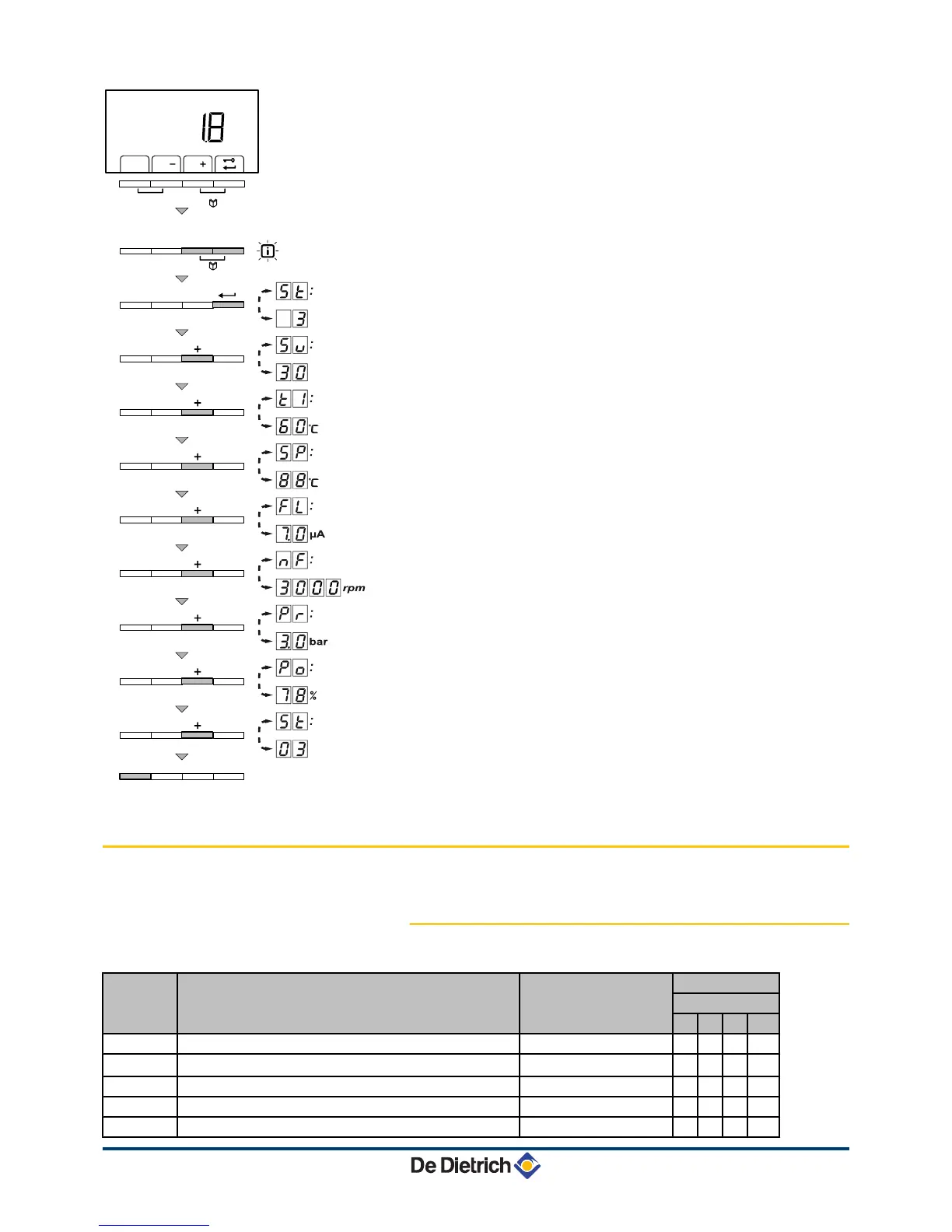
The current values can be read as follows:
1. Press the two
f
keys simultaneously. The symbol
Q
flashes.
2. Confirm using key
S
.
5t
is displayed, alternating with the
current status
3
(for example).
3. Press the [+] key.
5v
is displayed, alternating with the current
sub-status
30
(for example).
4. Press the [+] key.
t1
is displayed, alternating with the current
flow temperature
60
°C (for example).
5. Press the [+] key successively to scroll down the various
parameters.
t"
,
t3
,
t4
,
t5
.
6. Press the [+] key.
5p
is displayed, alternating with the internal
set point
88
°C (for example).
7. Press the [+] key.
fl
is displayed, alternating with the current
ionisation current
70
µA (for example).
8. Press the [+] key.
Mf
is displayed, alternating with the current
fan rotation speed
3000
rpm (for example).
9. Press the [+] key.
pr
is displayed, alternating with the current
water pressure
#0
bar (for example). If no water pressure sensor
is connected, [-.-] appears on the display.
10.Press the [+] key.
p;
is displayed, alternating with the current
modulation percentage
78
% (for example).
11.Press the [+] key. The readout cycle starts again with
5t
.
12.Press 2 times on key
j
to return to the current operating mode.
5.3 Changing the settings
5.3.1. Description of the parameters
Parameter
Description Adjustment range Factory setting
MCA
45 65 90 115
p1
Maximum outlet temperature 20 to 90 °C 80 80 80 80
p2
Domestic hot water temperature: T
SET
40 to 65 °C 60 60 60 60
p3
Heating / DHW mode Do not modify 1 1 1 1
p4
Mode ECO Do not modify 2 2 2 2
p5
Anticipation resistance Do not modify 0 0 0 0




 To Next Page