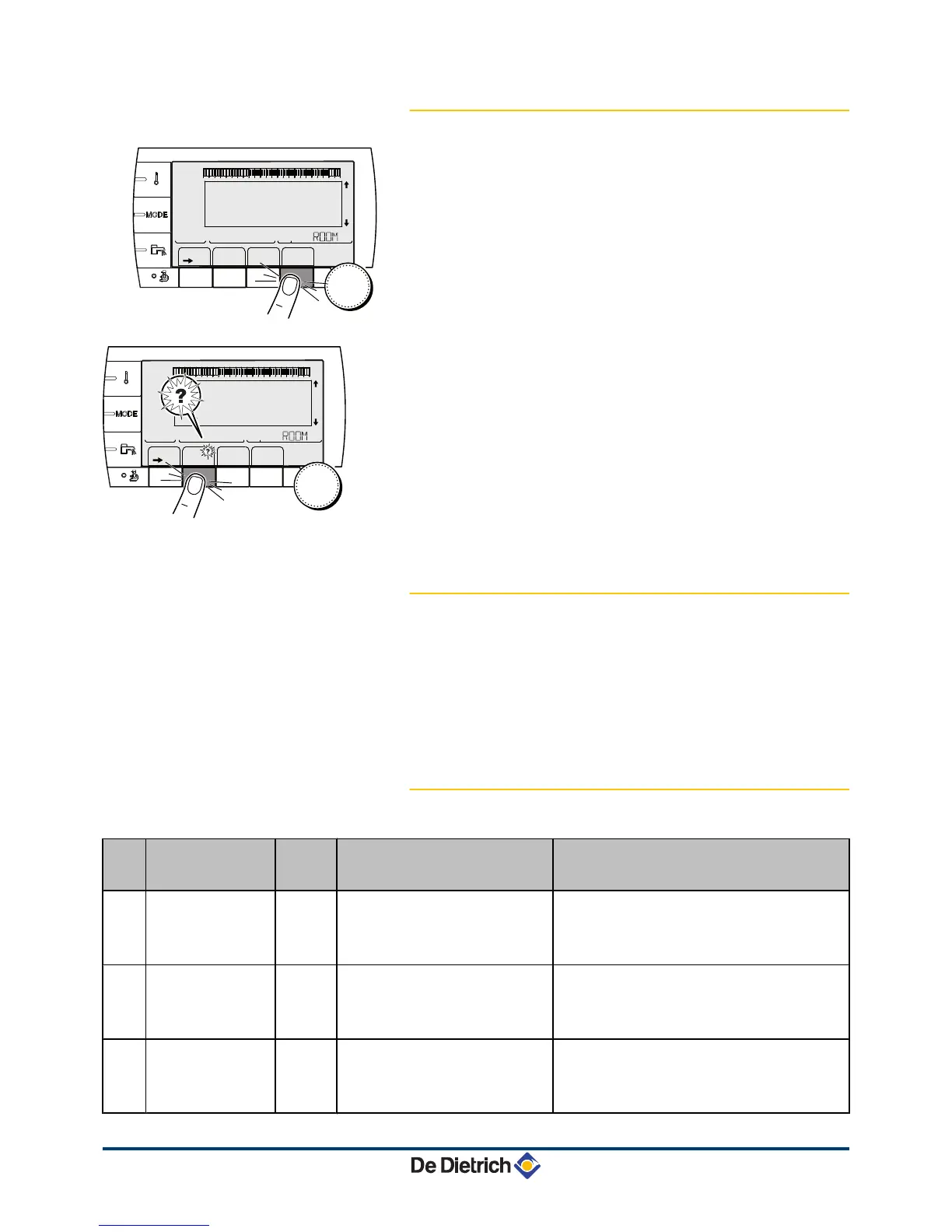
7.3.1. Control panel DIEMATIC iSystem
1. Make a note of the code displayed.
The code is important for the correct and rapid diagnosis of the
type of failure and for any technical assistance that may be
needed.
2. Press the
t
key. If the code is displayed again, switch off the boiler
and then switch it back on.
3. Press the ? key. Follow the instructions displayed to solve the
problem.
4. Consult the meaning of the codes in the table below:
7.3.2. Control panel IniControl
1. Make a note of the code displayed.
The code is important for the correct and rapid diagnosis of the
type of failure and for any technical assistance that may be
needed.
2. Press the
t
key. If the code is displayed again, switch off the boiler
and then switch it back on.
7.3.3. List of errors
Code
Faults Cause
of the
error
Description Checking / solution
L00 PSU FAIL
PCU PSU PCB not connected Bad connection
PSU PCB faulty
4 Contact the professional who takes care of
maintenance of the appliance
L01 PSU PARAM FAIL
PCU The safety parameters are incorrect Bad connection
PSU PCB faulty
4 Contact the professional who takes care of
maintenance of the appliance
L02 DEF.OUTLET S.
PCU The boiler flow sensor has short-
circuited
Bad connection
Sensor fault
4 Contact the professional who takes care of
maintenance of the appliance




 To Next Page