Parameter Description Adjustment range Factory setting
MCA
45 65 90 115
p6
Display screen Do not modify 2 2 2 2
p7
Post-circulation of the boiler pump connected to the PCU 1 to 98 minutes
99 minutes = continuous
3 3 3 3
p8
Brightness of display lighting Do not modify 1 1 1 1
5.3.2. Modification of the user-level parameters
Parameters p1 to p8 can be modified by the user in order to meet
central heating and DHW comfort needs.
CAUTION
Modification of the factory settings may be detrimental to
the functioning of the boiler.
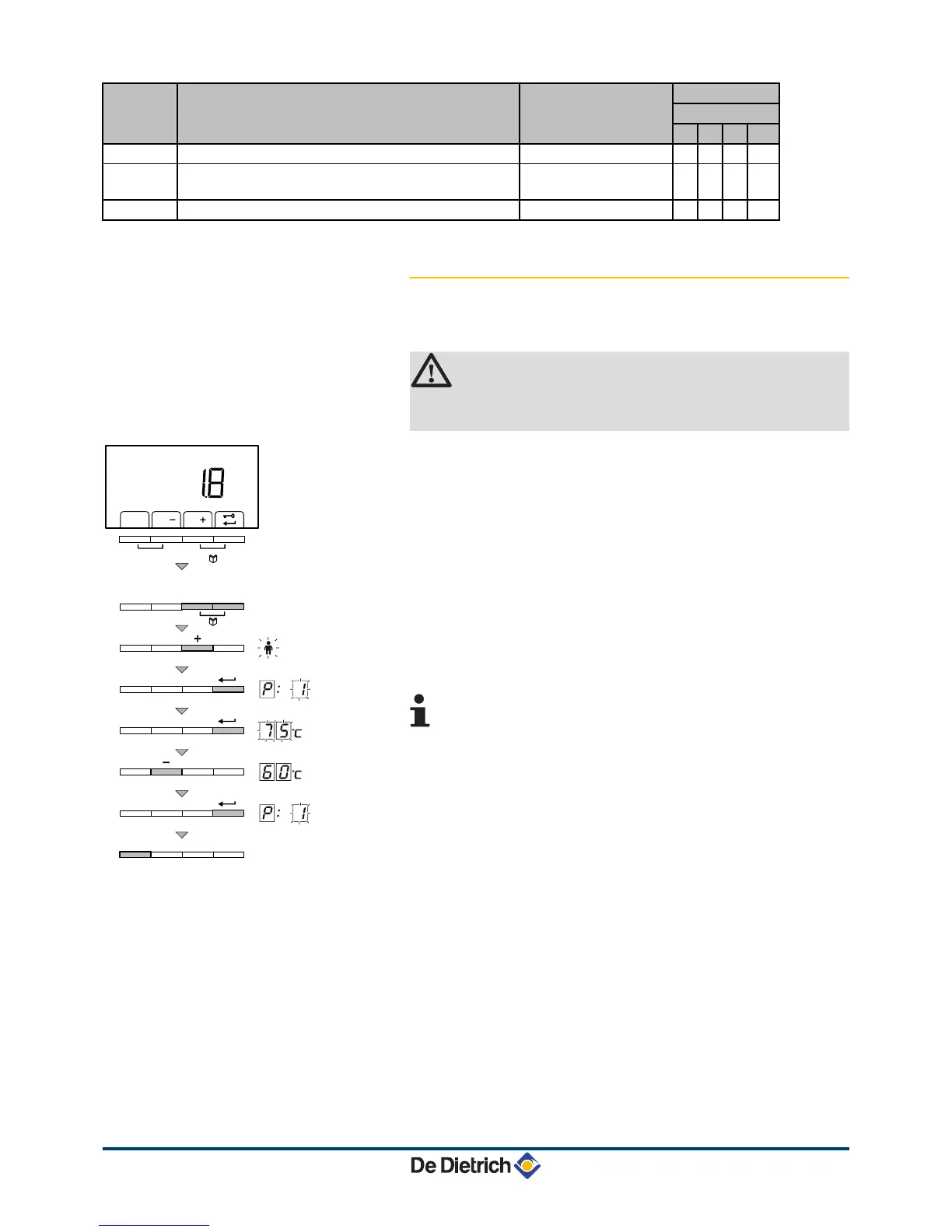
1. Press the two keys
f
simultaneously and then key [+] until the
symbol
W
flashes on the menu bar.
2. Select the users menu using the key
S
.
p[1
is displayed with
1
flashing.
3. Press the
S
key a second time. The value 80°C appears and
flashes (for example).
4. Change the value by pressing the [-] or [+] key. In this example
using key [-] to
60
°C.
5. Confirm the value with the
S
key.
p[1
is displayed with
1
flashing.
6. Press 2 times on key
j
to return to the current operating mode.
4
The parameters
p2
to
p8
are changed in the
same way as
p1
. After step 2, use the [+] key to
move to the required parameter.
4 The parameters
p1
(the maximum heating water
temperature) and
p2
(the maximum drinking water
temperature) can also be modified using the quick
selection menu.




 To Next Page