EasyManua.ls Logo

Definox Sorio - Color Change RGB LED Upper Valve & Lower Valve Pulse (Version 3 EV)

Definox Sorio
50 pages
Print Icon
To Next Page IconTo Next Page
To Previous Page IconTo Previous Page
Loading...
MAINTENANCE NOTICE
NM-275 index 09 Page 28/50 September 2021
8.4.2 Color change RGB LED upper valve & lower valve pulse (version 3EV)
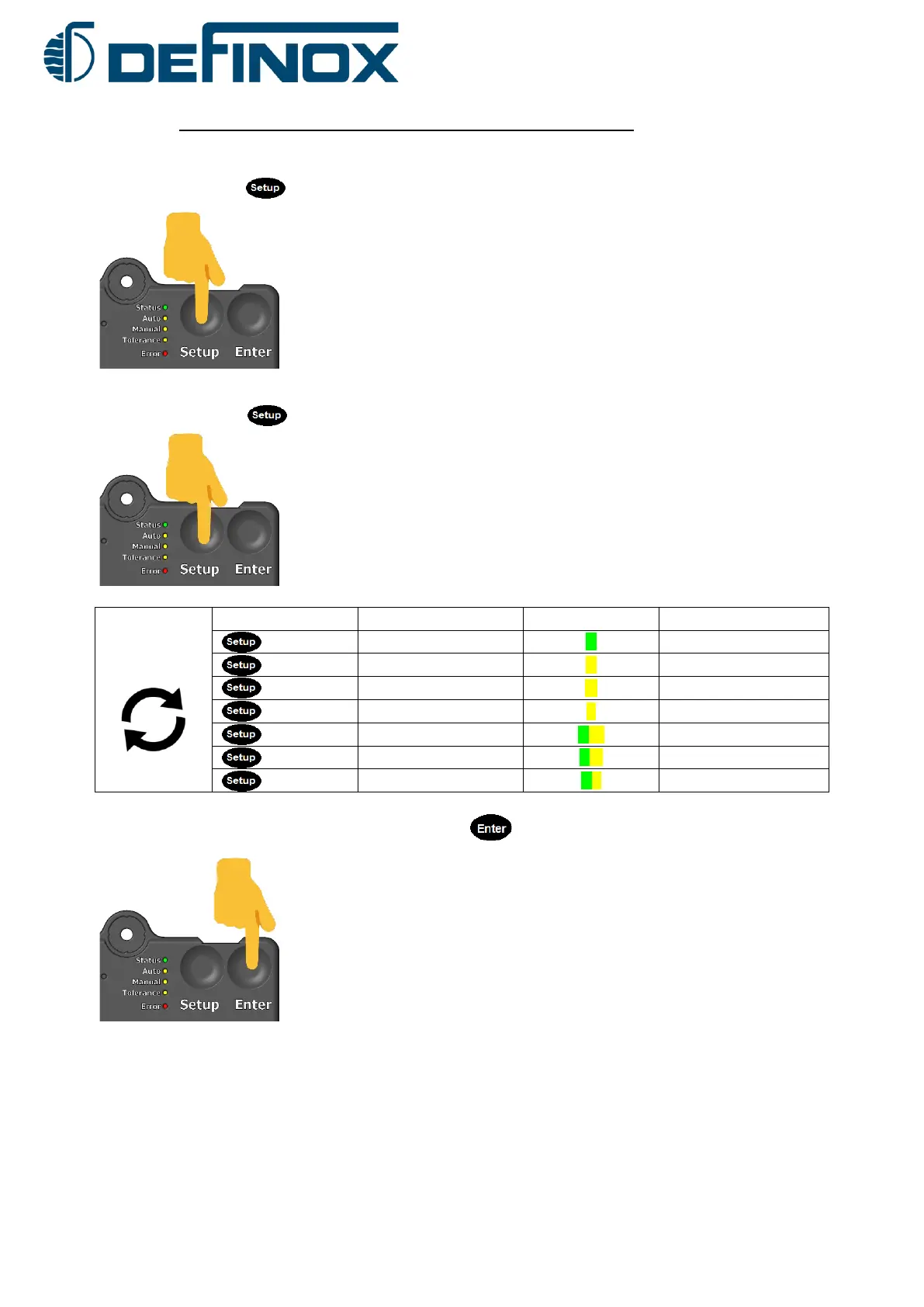
1) Press the button for at least 5 seconds to enter the colour change mode.
The RGB LED colour of the lower valve pulse flashes. (Default flashing cyan)
2) Press the button several times until the desired lower valve pulse colour is found
Choose the
colour for idle
Button
Effect
Led column
RGB Led
Change to off
S
Unlit
Change to white
A
White flashing
Change to green
M
Green flashing
Change to blue
T
Blue flashing
Change to yellow
S A
Yellow flashing
Change to Cyan
SM
Cyan flashing
Change to Violet
ST
Flashing violet
3) Confirm the lower valve pulse colour by pressing
(The RGB colour chosen for lower valve pulse is displayed for 2 seconds)
5 sec.
x clicks

Related product manuals