The Rooster™ Sensor100 is a next-generation air velocity and temperature sensor, and a monitoring and alarm system for critical HVAC and process control applications where airflow needs to be viewed, monitored, alarmed, and even communicated to building and laboratory systems. It is designed to meet the demand for high-performance air velocity and temperature sensing applications and features an intuitive, glove-friendly, color touchscreen interface, and best-in-class air velocity sensing. This product is designed with a probe style sensor to reach into ducted flows in building, process, datacenter, and HVAC applications. An instrumentation class sensor is used to eliminate trouble alarms and provide best accuracy across wide temperature ranges. The Rooster™ Sensor100 comes calibrated with NIST certificate, from 0.15 – 20.0 m/s (30 – 4000 fpm). Different calibration ranges can be ordered, for more information, contact Degree Controls, Inc.
The Rooster™ Sensor100 boasts a bright, backlit display and contains many simple-to-use features and configuration capabilities, built into an intuitive user interface that requires little to no training to learn. Password-protected access tiers ensure greater safety in a range of environments by limiting access to critical functions and system settings for specific, authorized users. The Rooster™ Sensor100 is the first airflow sensor with USB-based plug and play firmware upgrades, to keep your product current and operating to the latest standards.
Function Description:
The Rooster™ Sensor100 functions as an airflow sensing device that measures air velocity and temperature. It provides real-time data on these parameters and can trigger alarms based on predefined thresholds. The device is designed for critical HVAC and process control applications, ensuring that airflow is maintained within specified limits. It can be integrated into building and laboratory management systems for comprehensive monitoring.
Important Technical Specifications:
- Alarm Module Size: 82mm x 135mm x 19mm (3.2" x 5.3" x 0.7") (without back plate)
- LCD Display Area: 57mm x 70mm (2.3" x 2.7")
- Airflow Velocity Range: 30-4,000 fpm (0.15- 20.0 m/s) *custom velocity ranges available upon request
- Air Velocity Accuracy: The greater of ±5% of reading or ± 0.05 m/s [10 fpm]
- Response Time: < 1 second
- Supply Voltage: 24VAC/VDC & Wall Adapter
- Night-Set Back Input: Dry Contact Closure (0V)
- Relay Outputs: Qty: (2), 1A, 24VDC (Pins 1-2 Air Alarm, Pins 3-4 Sash Alarm)
- Power Adaptor: 90-250V
- Red LED Indicator: 160° viewing angle
- Alarm Volume: 0 - 85dB (adjustable)
- Relative Humidity: (non-condensing) 5 - 95%
- Operating Temperature: 5°C - 60°C (40°F - 140°F)
- Storage Temperature: -40°C - 85°C (-40°F - 185°F)
- Weight: < 170g (<6oz)
- Compliance Standards: CE, RoHS
Usage Features:
- High Performance Air Velocity and Temperature Sensor: Provides accurate and reliable measurements.
- Full-Color Touch Screen Display: Offers an intuitive and user-friendly interface for easy operation.
- Complete Kit: Includes a Sensor Display Panel, Sensor Probe and Mounting Clamp, and Power Supply.
- Custom Asset Tag: Users can change the default "Asset Tag" to a custom tag for easy identification. This is useful for naming the sensor in larger distributed systems or to denote a company asset number.
- Clock: Users can set the date and time in 12 or 24-hour format.
- Keypad Sounds: Users can toggle keypad beep sounds on and off.
- Alarm Volume: Users can adjust the alarm volume (low, medium, or high).
- On-Screen Alert Banners: A yellow banner appears beneath on-screen velocity readings to alert users of following scenarios: 1) Uncalibrated Sensor 2) Sensor Failure 3) Low Airflow. Alarm latched status will also display here.
- Toggle Velocity Unit Type: Instantly toggle displayed velocity units between m/s, fpm, or cfm by pressing on the displayed velocity reading on the home screen.
- Toggle Temperature Type: Instantly toggle displayed temperature units from Fahrenheit to Celsius or vice versa by pressing on the displayed temperature reading on the home screen.
- Password-Protected Access Tiers: Features Certifier & EH&S access tiers with advanced configuration options and features.
- USB Interface for Field Upgrade Procedure and Data Import/Export: Firmware upgrades can be installed on-site via USB flash drive. Users can also import/export Rooster™ settings and event log through the USB interface.
- Customizable Boot Screen: Users can configure their unit with a custom image or logo file (240x320) in portable network graphic (.png) format to display on bootup.
- Night Setback: Offers three convenient modes (Audible, Muted, or Off) of operation. The Rooster™ Sensor100 is a normally open (NO) device, to trigger audible or muted night setback, the dry contact relay must be closed.
- Alarm Latching: EH&S or Certifier users can setup latched alarms to indicate that a low airflow state has occurred in the "Alarm Controls" menu.
- Alarm Ringback: EH&S or Certifier users can configure the amount of snooze time before an alarm rings again after being muted in the "Alarm Controls" menu.
- Backlight Dimming: Users can toggle the brightness setting, as well as the brightness of the screen when set to "dim". A "time before dim" option is available that sets the screen to dim after a predetermined amount of time has expired.
- Airflow Resolution: For advanced users, displayed velocity units can be configured to display in an alternate resolution.
- Volumetric Flow Settings: The Sensor100 displays velocity flow by default. Display of volumetric flow is available for applications using the probe style sensor in a ducted flow.
- Analog Output: The Rooster™ Sensor100 has digital to analogue converter (DAC) output enabled, with correspondence to air velocity. There are four user selectable ranges to choose from, which the user will connect to pins 7 & 8 on the rear panel’s 8-position “Outputs” Connector.
- I/O Polarity: For advanced users, it may be helpful to toggle relay and input nodes from normally open to normally closed.
- Event Log: The Rooster™ logs the date and time of alarms and alarm recovery as well as system boot time to its internal SD card. Users can export the event log in .csv format to a USB thumb drive.
Maintenance Features:
- USB Field Upgrade Procedure: Firmware upgrades are crucial for maintaining the device. A Rooster™ with firmware preceding version 1.06 may be upgraded to version 1.06 using the bootloader. Existing calibration data will be lost, and all settings will be reset to factory defaults. This update should only be done during annual certification, where the certifier would be recalibrating anyway, OR, if the client approves forcing a recalibration.
- Soft Reboot from Info Screen: Allows for a soft reboot of the device from the info screen, which can be useful for troubleshooting or applying minor changes.
- Power Cycle Procedure: This procedure involves removing power from the Rooster™ Sensor100, inserting a USB thumb drive with new firmware, depressing and holding the "Home" button while reapplying power, and then releasing the "Home" button after the firmware update sequence begins. After approximately 3 seconds, release the Home button. After approximately 10 seconds, the LED on the front of the Rooster™ will light, and the unit will boot up with the new firmware.
- Factory Reset Procedure: The Master Reset will return the Rooster™ Sensor100 to its default alarm & input/output settings. Time and date will be preserved during a factory reset. The following factory reset procedure can be done at any time upon system reset to restore default settings and passwords. This involves following the above steps, when the 1st information screen displays, momentarily pressing the "Mute" key. The "Enter Factory Password" screen will display. The Factory Password is "5878" and cannot be changed. The Factory Menu will display. Depress "Reset to Factory Defaults". The factory-default certify password is "6425".

 Need help?
 General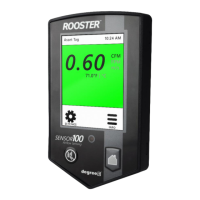

 To Next Page