Rooster™ Sensor100 USER MANUAL
Rooster
TM
Sensor100 USER MANUAL 62320MN000-A04 4
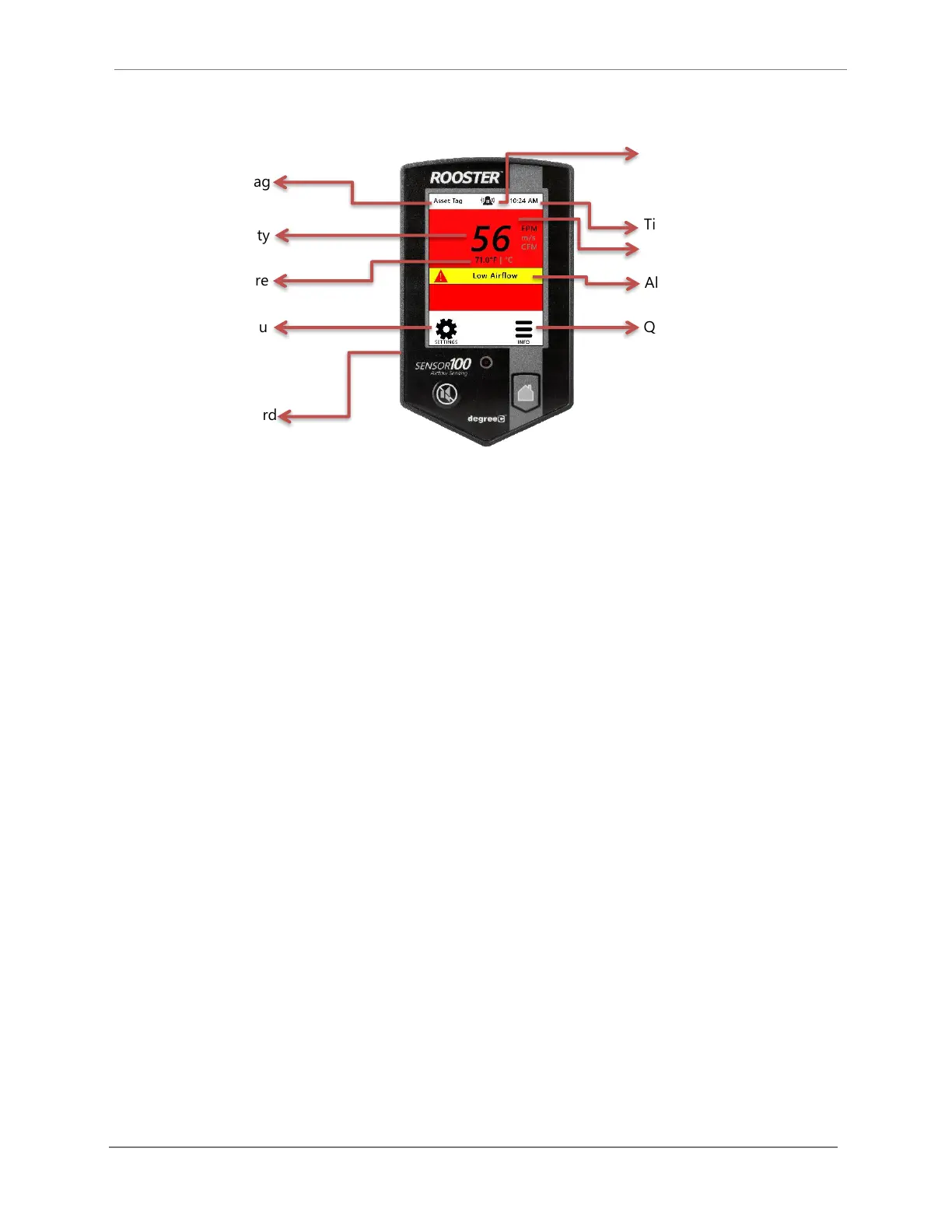
Soft Buttons and Home Screen
Feature Overview
Users logged in as EH&S can change default “Asset Tag” to a custom tag. This is useful for
naming the sensor in larger distributed systems, or to denote a company asset number. The user
may set a 12-digit numeric asset tag with the provided on-screen keypad OR plug in a USB
interface keyboard to enter a 12-character alphanumeric tag.
Home>Settings>System>Advanced>Configure Asset Tag
Users logged in as EH&S or Certifier can set time, date and change clock to display in 12 or 24
hour format.
Home>Settings>System>Time>Date and Time Settings
Users may toggle keypad beep sounds on and off.
Home>Settings>System>Alarms/Sound>Key Beep
Users can toggle through low, medium, or high alarm volumes. If logged in as an EH&S or
Certifier, a global minimum volume threshold can be set. This restricts a standard user from
setting an alarm volume too low for particular facility safety requirements.
Home>Settings>System>Alarms/Sound>Device Volume
Air Velocity
(touch to toggle units)
Air Temperature
(touch to toggle units)
USB input for keyboard
and firmware upgrades
configuration settings including
alarm thresholds, calibration date,
Status Color (Green, Yellow or Red)
Night Setback/Mute Indicator


 To Next Page