Rooster™ Sensor100 USER MANUAL
Rooster
TM
Sensor100 USER MANUAL 62320MN000-A04 14
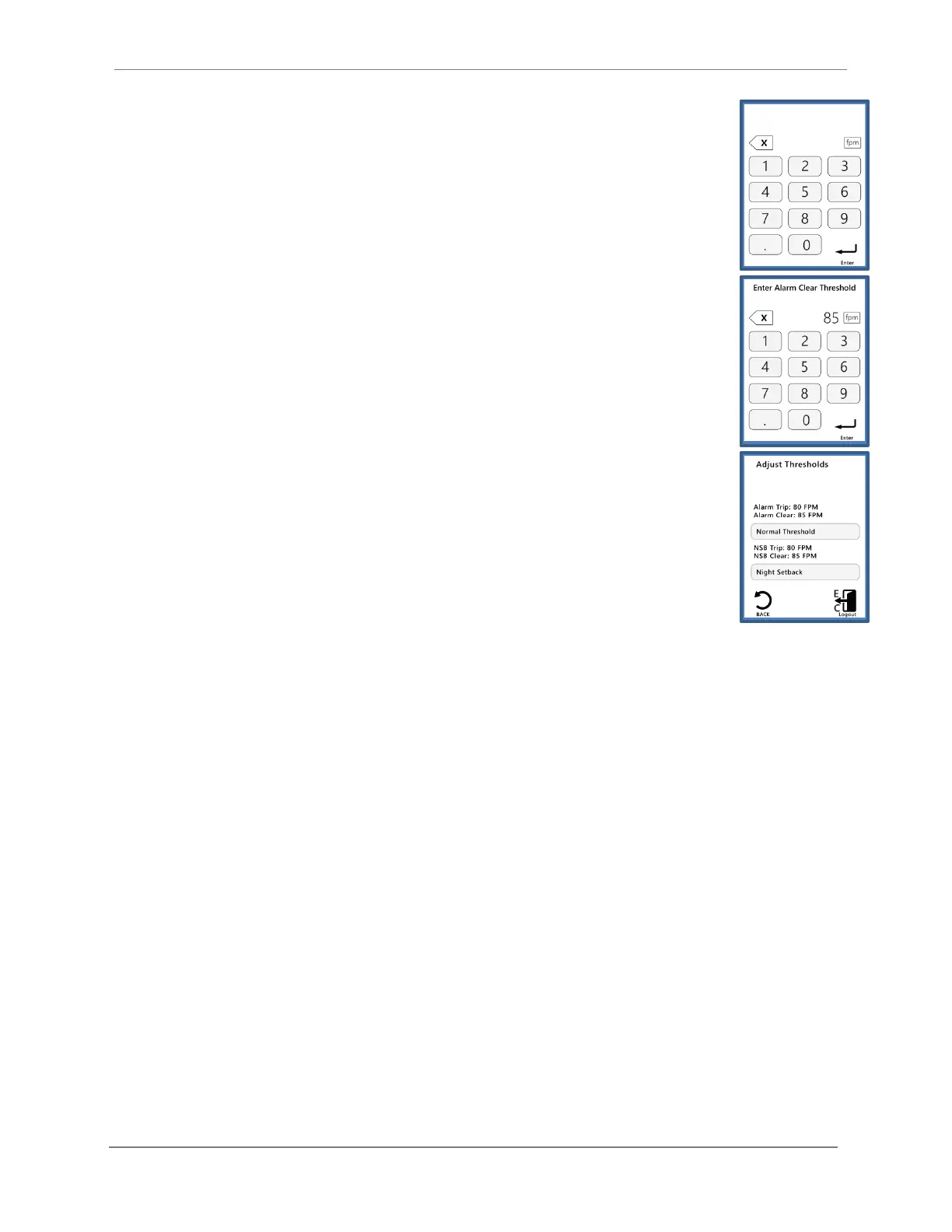
2) To set alarm thresholds, you will first have to define an alarm trip point
and an alarm clear point. The alarm trip point is the air velocity value
that will trigger an alarm. The alarm clear point is the air velocity value
that will clear an alarm state. Once you have defined these values, the
alarm will trip and clear based on your settings. You may return to this
menu at any time to adjust these values as needed.
3) By default, no values are set for the NSB (Night Setback) mode of
operation. Depending on your application or setup, you may not need to
have an active alarm during night setback mode. You may choose,
however, to set a specific alarm trip and clear point for night setback
mode. You will first have to define an alarm trip point and an alarm clear
point. The alarm trip point is the air velocity value that will trigger an
alarm. The alarm clear point is the air velocity value that will clear an
alarm state. Once thresholds are assigned for night setback, you may
choose to set your alarm as “audible” or “muted” in the alarm controls
menu below.:
Home>Settings>System>Alarms/Sound>Alarm Controls>Night Setback
4) To quickly glance at threshold settings, follow this menu path:
Home>Settings>Thresholds>Threshold Info
Alarm Troubleshooting
Is your alarm failing to sound or clear as you intended? You may need to verify that you have
entered valid threshold values. For both normal and NSB modes of operation, the “Alarm Trip”
or “NSB Trip” point must be a lower value than the “Alarm Clear” or “NSB Clear” point to
properly trigger and clear an alarm.
The Rooster
TM
Sensor100 offers an array of customization options for alarm behaviors. In the
following section, we will provide a detailed overview on how to customize your alarm behavior
to meet your particular needs and preferences.
Alarm Controls
To provide our users with full customization of the alarm behaviors that are best suited for their
facilities and unique conditions, the Rooster
TM
Sensor100 allows authorized users (Certifier &
EH&S) to set night setback, ringback, alarm delay, startup delay, latching, alarm tone, and airflow
resolution preferences.


 To Next Page