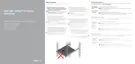
Table 5 Right control panel features
Item Indicator,
button, or
connector
Icon Description
1 Power button Indicates if the appliance is turned on or off.
Press the power button to manually turn on or
off the appliance.
Note: Press the power button to gracefully
shut down an ACPI-compliant operating
system.
2 USB port (2) The USB ports are 4-pin, 2.0-compliant. These
ports enable you to connect USB devices to the
appliance.
3 iDRAC Direct
port
The iDRAC Direct port is micro USB 2.0-
compliant. This port enables you to access the
iDRAC Direct features. For more information,
see the iDRAC User’s Guide at Dell.com/
idracmanuals.
4 iDRAC Direct
LED
N/A The iDRAC Direct LED indicator lights up to
indicate that the iDRAC Direct port is
connected. For more information, see the
iDRAC Direct LED indicator codes section.
5 VGA port Enables you to connect a display device to the
appliance. For more information, see the
Technical specifications section.
Back view of the appliance
You can access the components such as appliance identification button, power supply sockets,
cable management arm connectors, iDRAC storage media, NIC ports, and USB ports from the back
of the appliance. Most of the expansion card ports can be accessed from the back panel. The hot
swappable power supply units are accessible from the back panel.
Figure 5
Back view of appliance with 3 PCIe expansion slots
Item 1 is the PCIe expansion card slot(s), enables you to connect to PCI Express expansion cards.
Item 2 is the hard drive, enables you to install drives that are supported in your appliance. Item 3 is
the power supply unit, supplies power to the components of the appliance. Item 4 is the NIC port,
integrated on the network daughter card (NDC) provides network connectivity. Item 5 is the USB
3.0 port, enables you to connect USB devices to the appliance. Item 6 is the video port, enables
you to connect a display device to the appliance. Item 7 is the serial port, enables you to connect
serial device to the appliance. Item 8 is the iDRAC 9 Enterprise port, enables you to remotely
Overview
10 Dell EMC VxRail Appliances on PowerEdge Servers E Series Owner's Manual










 To Next Page