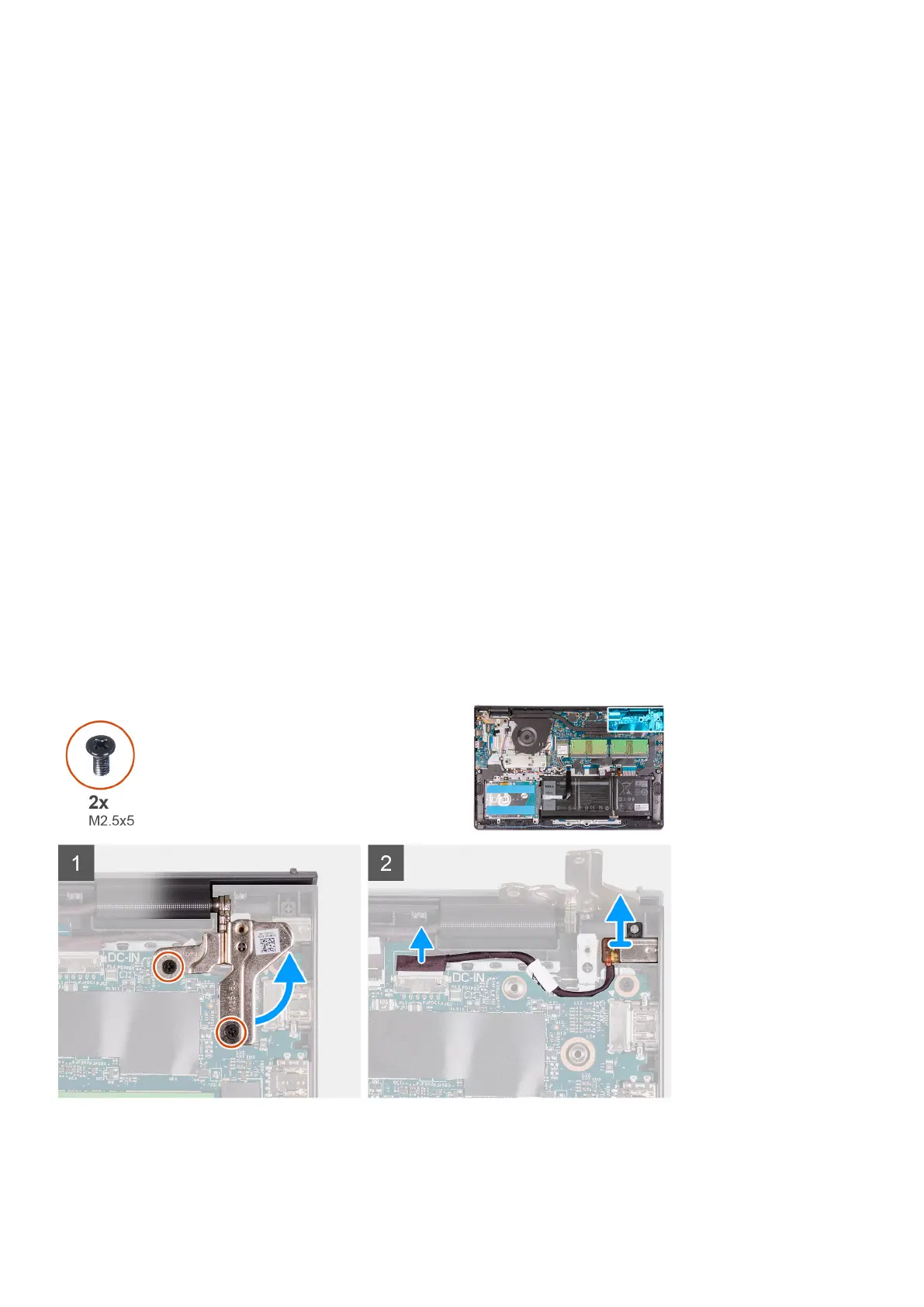
4. Fold back the right hinge and install the two (M2.5x5) screws to secure it to the palm-rest and keyboard assembly.
Next steps
1. Install the display assembly.
2. Install the heatsink.
3. Install the system fan.
4. Install the memory modules.
5. Install the SSD.
6. Install the WLAN card.
7. Install the battery.
8. Install the base cover.
9. Install the SD card.
10. Follow the procedure in after working inside your computer.
Power-adapter port
Removing the power-adapter port
Prerequisites
1. Follow the procedure in before working inside your computer.
2. Remove the SD card.
3. Enter service mode.
4. Remove the base cover.
About this task
The following images indicate the location of the power-adapter port and provides a visual representation of the installation
procedure.
Steps
1. Remove the two (M2.5x5) screws from the right hinge and fold the hinge up.
2. Disconnect the power-adapter port cable from the system board.
80
Removing and installing components






 To Next Page