support.dell.com Rack Installation Guide 1-17
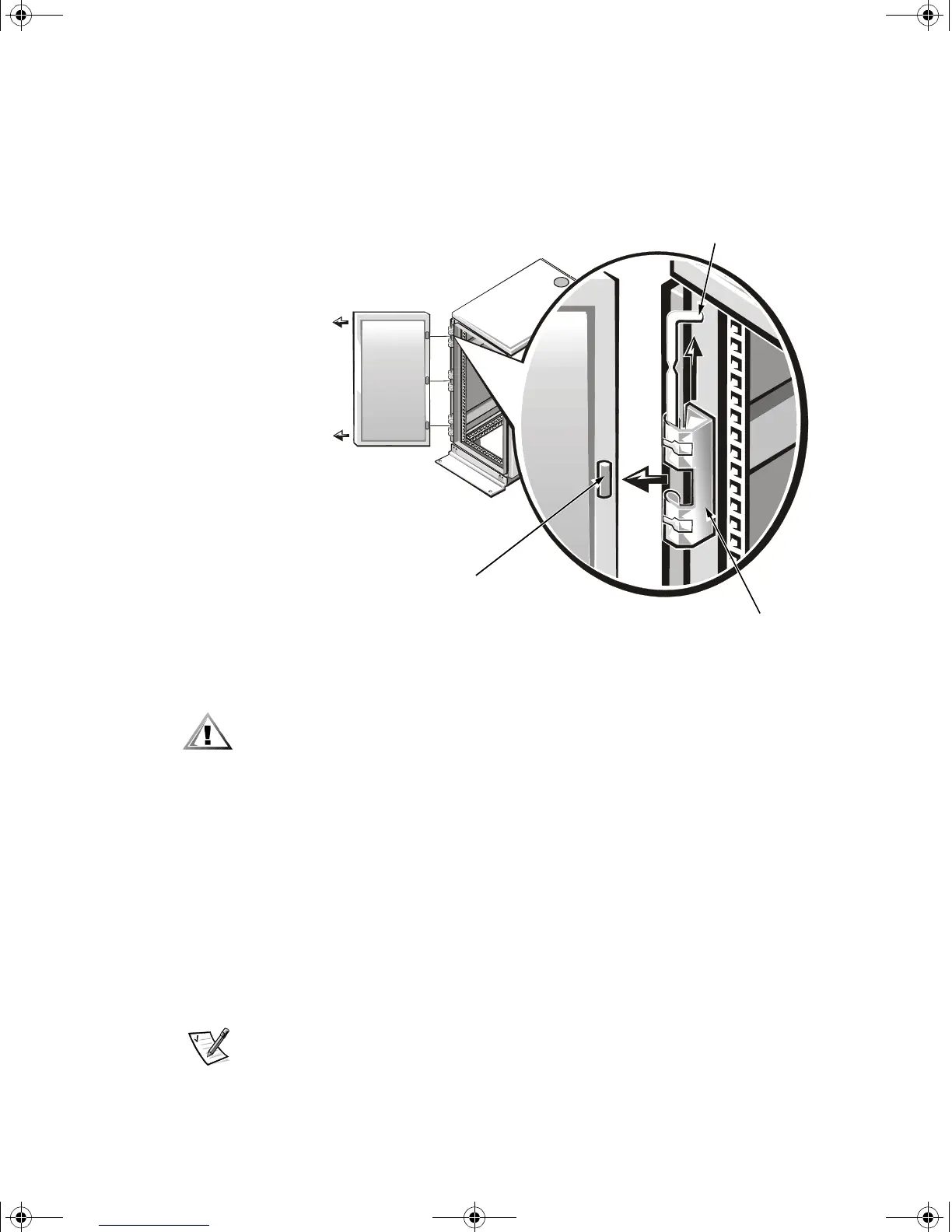
3. Remove the front door from the rack as shown in Figure 1-14.
a. With the door open, lift out and fully retract all hinge pins.
b. Once all the hinge pins have been lifted out and retracted, lift the door out.
Figure 1-14. Removing the 24-U Rack Doors
CAUTION: Store the two doors where they will not injure someone if the
doors accidently fall over.
If you want to reverse the door so that the handle is on the other side, perform the
following steps:
1. With the door open, lift out and fully retract all hinge pins.
2. Remove the hinges and door brackets from the door frame.
3. Replace the hinges and door brackets on the opposite side and switch the posi-
tion of the handle.
4. Replace the rack door (see the section, “Replacing the Rack Doors,” found later
in this guide).
Installing the Slide Assemblies in the Four-Post Rack
NOTE: If the slide assemblies were preinstalled by Dell, you can skip this section.
hinge insert
hinge
hinge pin
2D786bk0.book Page 17 Thursday, January 18, 2001 8:44 PM



 To Next Page