Back to Contents Page
Processor Module
Dell™ 500 Service Manual
Removing the Processor Module
CAUTION: Before you begin the following procedure, follow the safety instructions in the Product
Information Guide.
1. Follow the instructions in
Before You Begin.
2. Remove the processor thermal-cooling assembly (see
Removing the Processor Thermal-Cooling Assembly).
NOTICE: To avoid damage to the processor, hold the screwdriver so that it is perpendicular to the processor when
turning the cam screw.
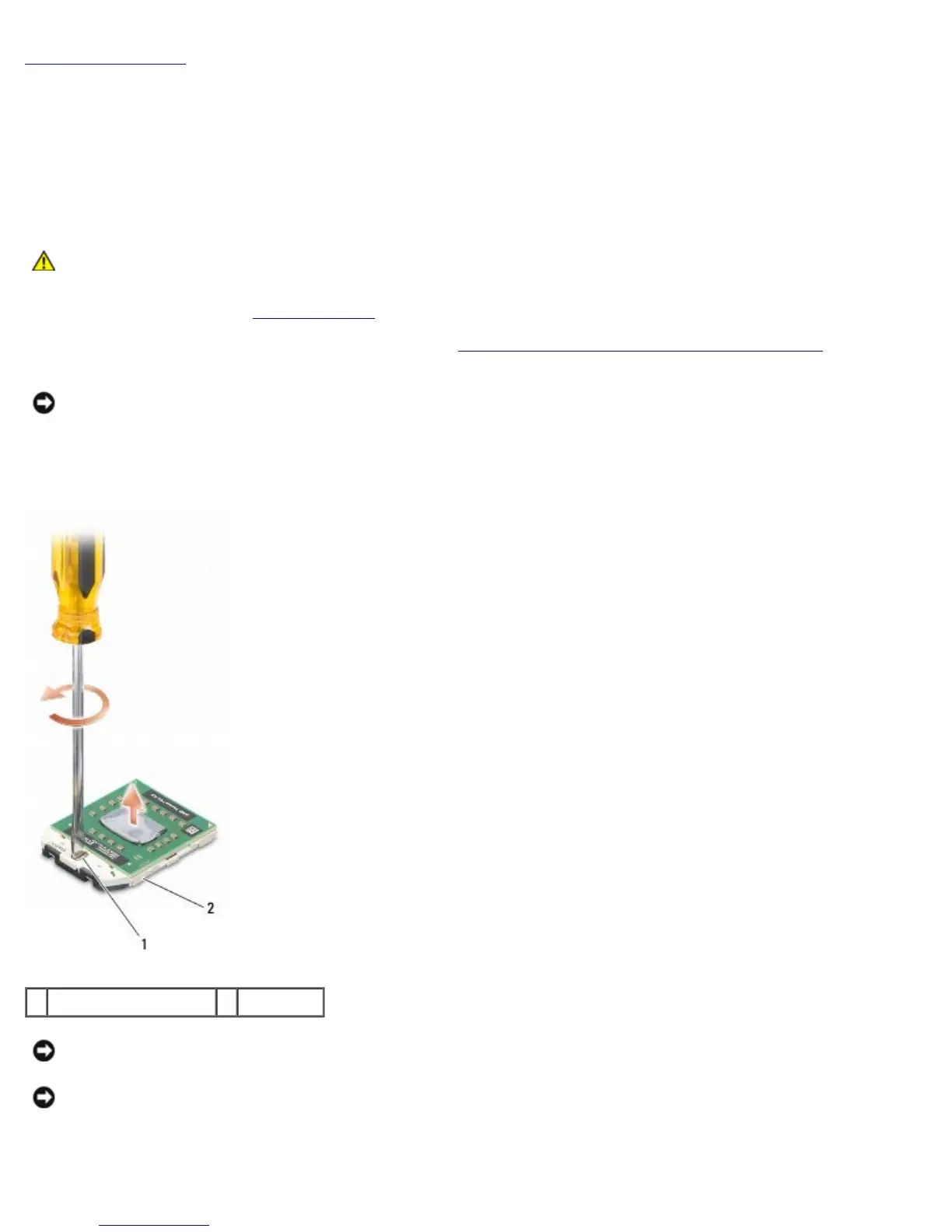
3. To loosen the ZIF socket, use a small, flat-blade screwdriver and rotate the ZIF-socket cam screw counterclockwise
until it comes to the cam stop.
1 ZIF-socket cam screw 2 ZIF socket
NOTICE: To ensure maximum cooling for the processor, do not touch the heat transfer areas on the processor
thermal-cooling assembly. The oils in your skin can reduce the heat transfer capability of the thermal pads.
NOTICE: When removing the processor module, pull the module straight up. Be careful not to bend the pins on the
processor module.
4. Lift the processor module from the ZIF socket.





 To Next Page