44 | Operating the monitor
NOTE:
RS232 remains enabled, whether Ethernet is enabled or dis-
abled.
This monitor comes with networking capability which lets you remotely access and
change settings such as Input Source Selection, Brightness and Volume.
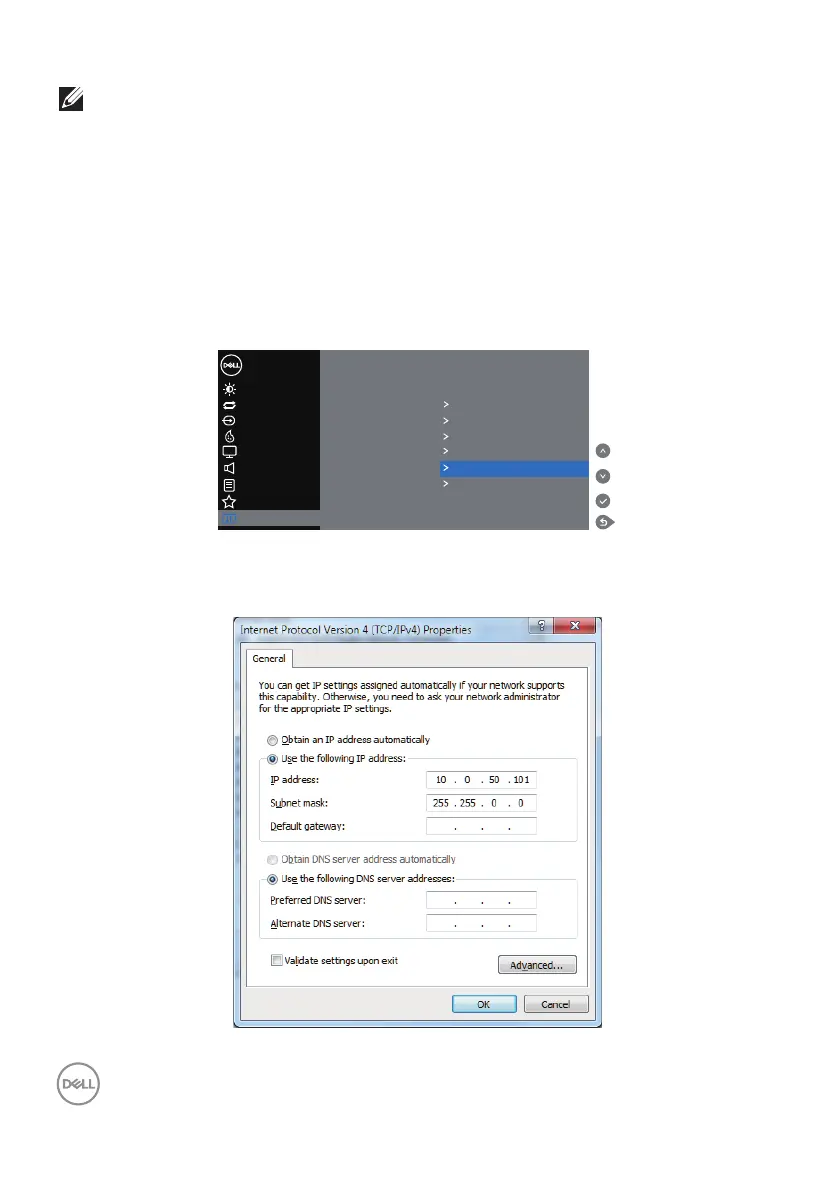
To access the Dell Display Web Management tool you need to set the IP Addresses
for your computer and the monitor.
1. Press the Menu key on the remote control to display the IP Address of the
monitor, or by navigating to OSD Menu > Others. By default, the IP Address is
10.0.50.100
Color
Display
Personalize
Menu
Brightness/Contrast
Dell 55 Monitor
Auto Adjust
Input Source
Display Info
DDC/CI On
HDMI CEC Off
LCD Conditioning Off
Audio
Others
Firmware 12C105
Service Tag ABCDEFG
Reset Others
Factory Reset
IP Address 10.0.50.100
2.
In the computer’s IP Properties tab, specify an IP Address by selecting Use the
following IP Address and enter the following values: For IP Address: 10.0.50.101
and for Subnet Mask: 255.255.0.0 (leave all other entries as blanks).














 To Next Page