Operating your monitor 41
Icon Menu and submenus Description
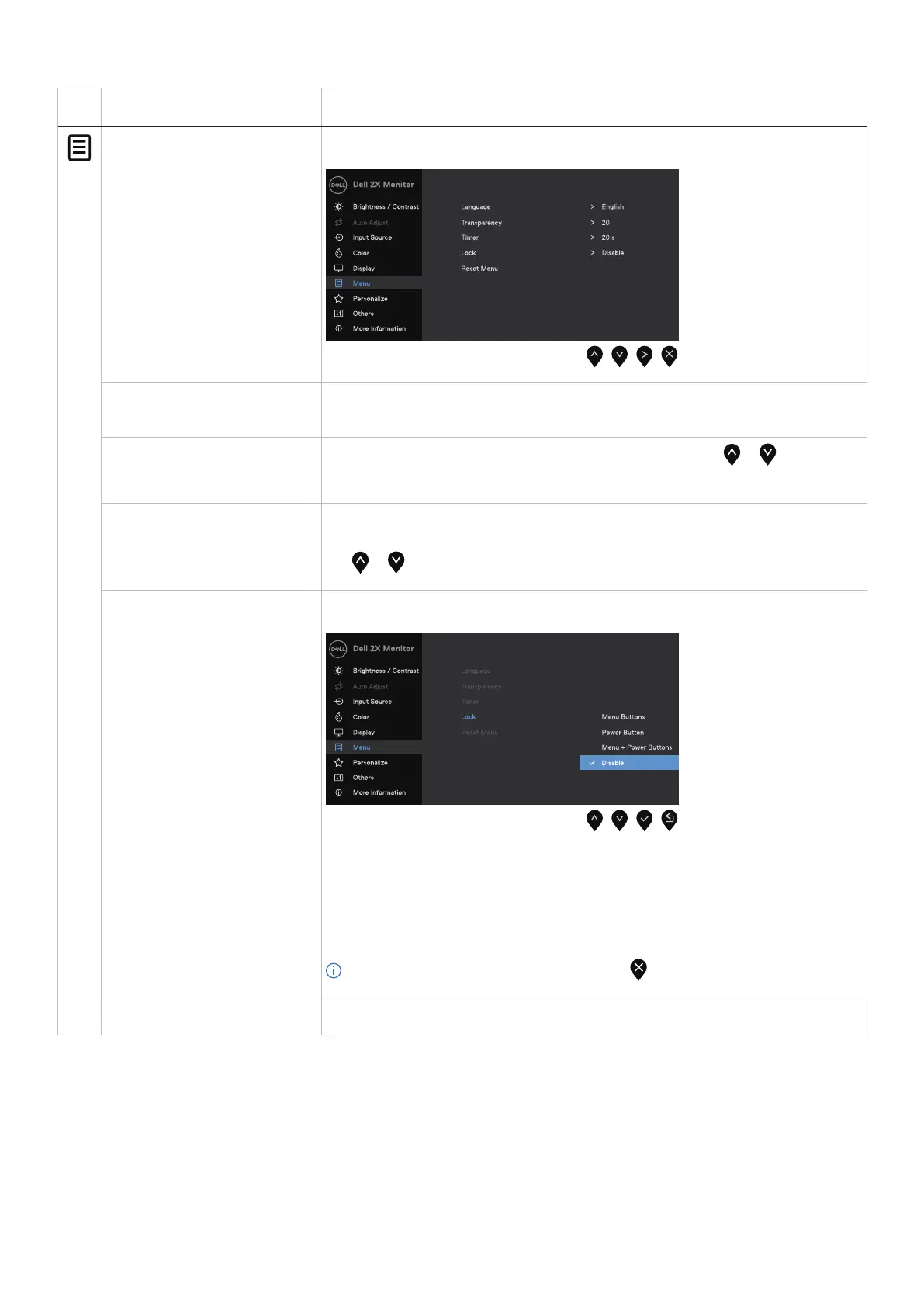
Menu Select this option to adjust the settings of the OSD, such as the languages of the OSD, the
amount of time, the menu remains on screen, and so on.
Language Language option sets the OSD display to one of the eight languages: English, Spanish,
French, German, Brazilian Portuguese, Russian, Simplified Chinese, or Japanese.
Transparency
Select this option to change the menu transparency by pressing the or buttons from
0 to 100.
Timer OSD hold time: sets the length of time, the OSD will remain active after the last time you
pressed a button.
Use or to adjust the slider in 1 second increments, from 5 to 60 seconds.
Lock With the control buttons on the monitor locked, you can prevent people from accessing the
controls. It also prevents accidental activation in multiple monitors side-by-side setup.
• Menu Buttons: All Menu/function buttons (except the power button) are locked and
not accessible by the user.
• Power Button: Only the Power button is locked and cannot be accessed.
• Menu + Power Buttons: Both the Menu/function and power buttons are locked and
cannot be accessed.
The default setting is Disable.
NOTE: To unlock the button(s), press and hold key of the monitor for 4 seconds.
Reset Menu Select this option to restore default menu settings.



 To Next Page