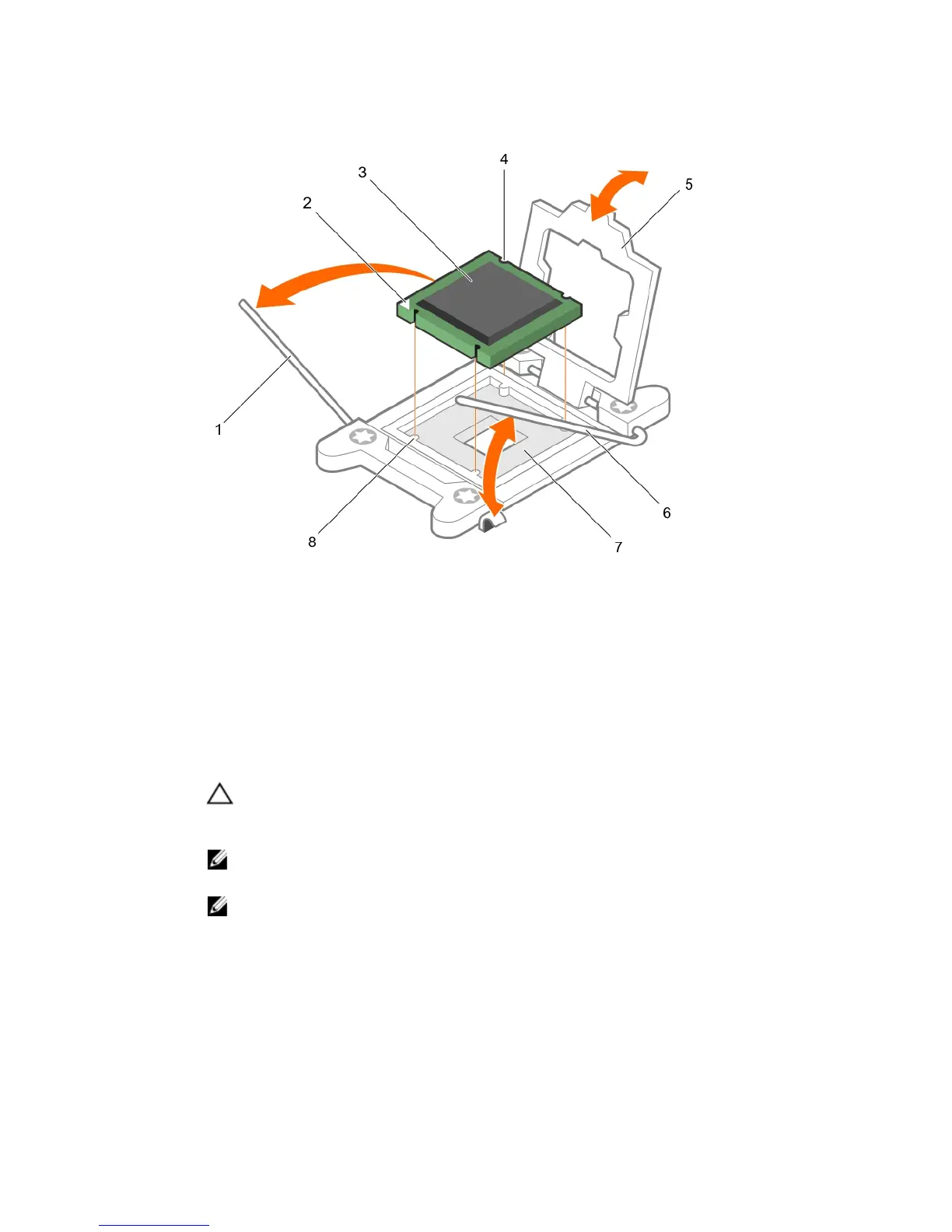
Figure 37. Removing and installing a processor
1. close first socket-release lever 2. pin-1 indicator of processor
3. processor 4. slot (4)
5. processor shield 6. open first socket-release lever
7. socket 8. socket keys (4)
d. Hold the tab on the processor shield and lift the processor shield until the open first socket-
release lever lifts up.
CAUTION: The socket pins are fragile and can be permanently damaged. Be careful not to
bend the pins in the socket when removing the processor out of the socket.
e. Lift the processor out of the socket and leave the open first socket-release lever up.
NOTE: If you are permanently removing the processor, you must install a socket protective
cap in the vacant socket to protect the socket pins and keep the socket free of dust.
NOTE: After removing the processor, place it in an anti-static container for reuse, return, or
temporary storage. Do not touch the bottom of the processor. Touch only the side edges of
the processor.
Next steps
1. Replace the heat sink(s) and processor(s). See the Installing a processor section in this document.
2. Complete the tasks listed in the After working inside your system section in this document.
89







 To Next Page