72 IR Emitter Board
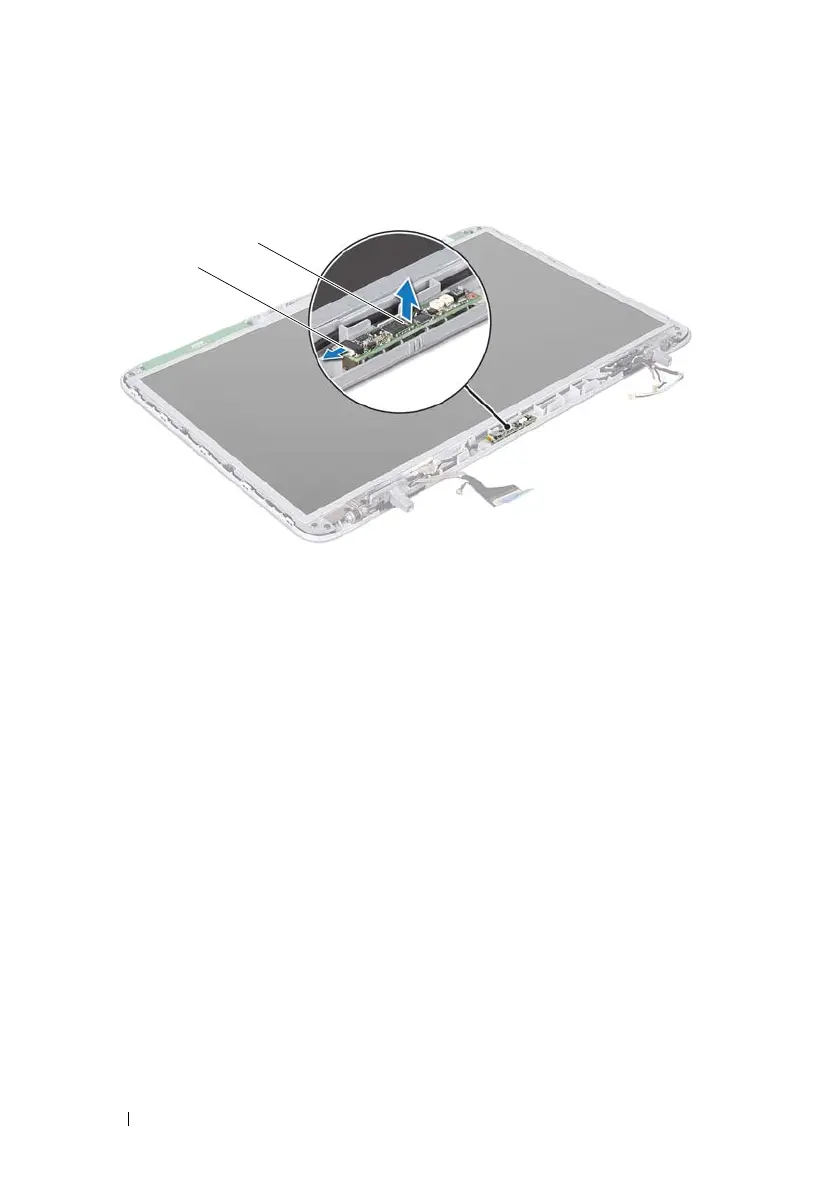
Replacing the IR Emitter Board
1
Follow the instructions in "Before You Begin" on page 9.
2
Connect the IR emitter board cable to the connector on the IR emitter
board.
3
Use the alignment posts to place the IR emitter board on the display back
cover.
4
Replace the display bezel (see "Replacing the Display Bezel" on page 60).
5
Replace the display assembly (see "Replacing the Display Assembly" on
page 58).
6
Replace the keyboard (see "Replacing the Keyboard" on page 45).
7
Replace the palm-rest assembly (see "Replacing the Palm-Rest Assembly"
on page 40).
8
Replace the optical drive (see "Replacing the Optical Drive" on page 34).
9
Replace the module cover (see "Replacing the Module Cover" on page 16).
1 IR emitter board cable 2 IR emitter board
book.book Page 72 Wednesday, April 25, 2012 2:11 PM



 To Next Page