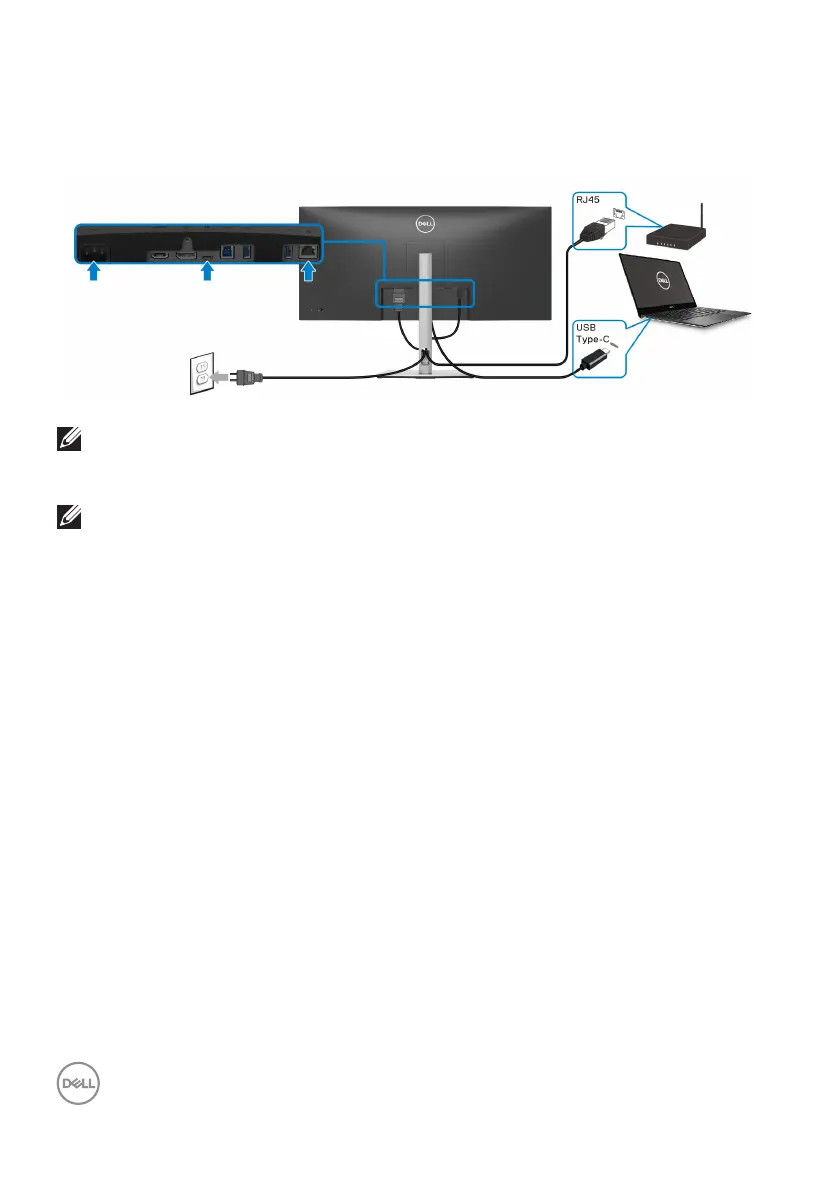
40 │ Setting up the monitor
• If your notebook requires more than 90W to operate and the battery is drained,
it may not be powered up or charged with the USB PD port of this monitor.
Connecting the monitor for RJ45 Cable (Optional)
NOTE: RJ45 cable is non in-box standard accessory.
Connecting the SuperSpeed USB 5 G
bps (USB 3.2 Gen1) cable
NOTE: To prevent data damage or loss, before unplugging the USB
upstream port, make sure that NO USB storage devices are in use by
the computer connected to the monitor’s USB downstream port.
After you have completed conn
ecting the DisplayPort/HDMI/USB Type-C cable,
follow the procedures below to connect the USB cable to the computer and
complete your monitor setup:
1. a. Connect one computer: c
onnect the USB 3.2 (Gen1) upstream port
(cable supplied) to an appropriate USB 3.2 (Gen1) port on your computer.
b. Connect two computers*: connec
t the USB 3.2 (Gen1) upstream port
(cable supplied) and USB Type-C upstream port (cable supplied) to
appropriate USB ports on the two computers. Then use the OSD menu to
select between the USB upstream source and input sources. See USB.
2. Connec
t the USB peripherals to the USB 3.2 (Gen1) downstream ports on the
monitor.



 To Next Page