1-14 Installation Guide
www.dell.com | support.dell.com
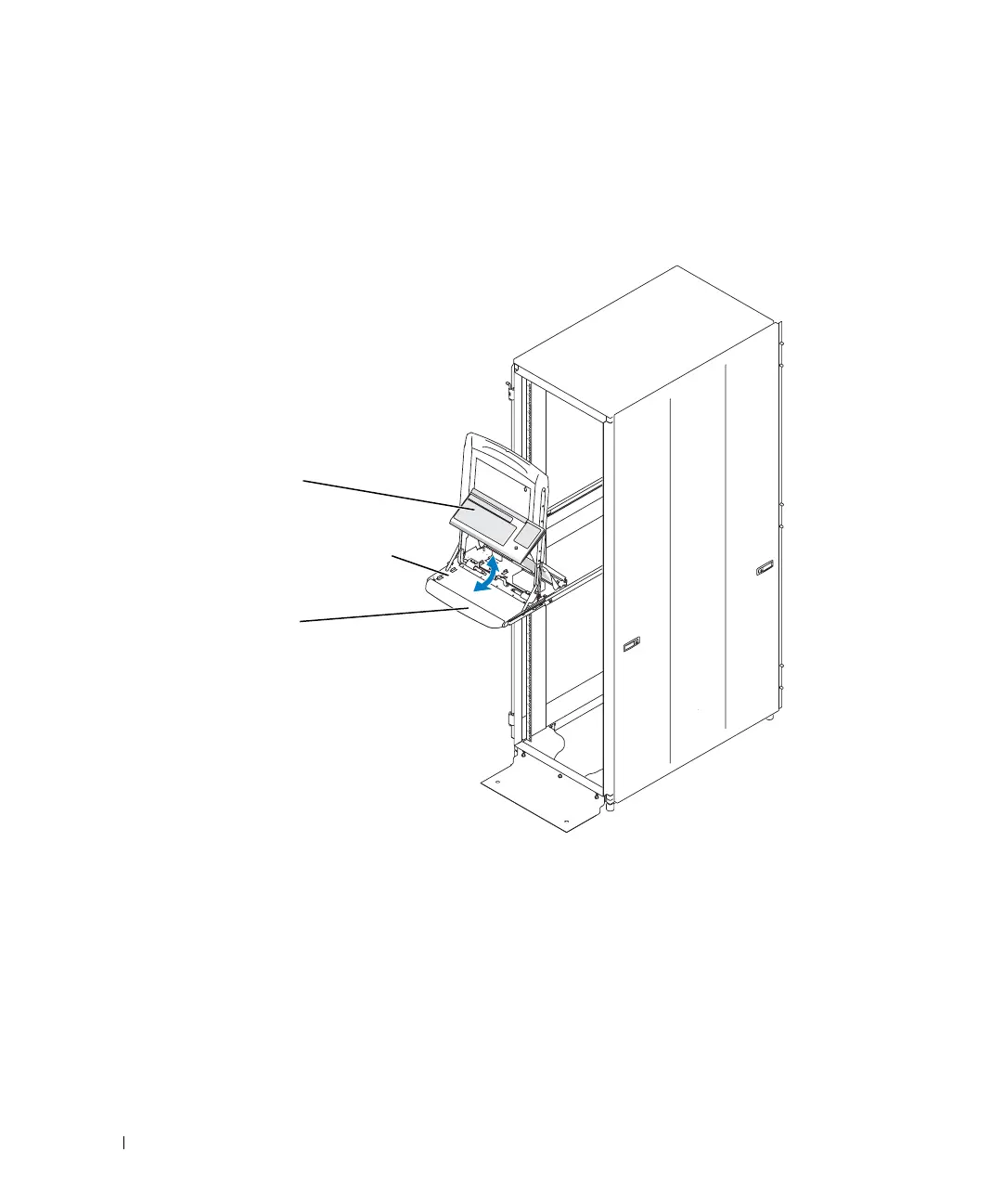
4 Tilt the front of the keyboard down, slide it under the palmrest and between the two
alignment features at the sides of the tray, and then rotate the back of the keyboard
down until it snaps into a locked position. See Figure 1-9.
Figure 1-9. Installing the Keyboard in the Tray
5
Route the keyboard/trackball cable to the left through two of the securing hooks at the
bottom of the cable enclosure, and out through the cutout in the back of the tray. See
Figure 1-10.
6 Route the keyboard/trackball cable along the arm with the other cables, and press it
into the securing clips along the arm.
7 To flatten the cable bundle enough to stay inside the cable-management arm, press
the cable bundle to the arm along the entire length of the arm.
keyboard
palmrest
alignment features (2)
8x738bk0.book Page 14 Monday, April 28, 2003 10:21 AM



 To Next Page