Home
Dell
Server
PowerEdge M620
Page 247
Dell PowerEdge M620 - Page 247
368 pages
Manual
Save Page as PDF
To Next Page
To Next Page
To Previous Page
To Previous Page
Loading...
Installing Blade Components
247
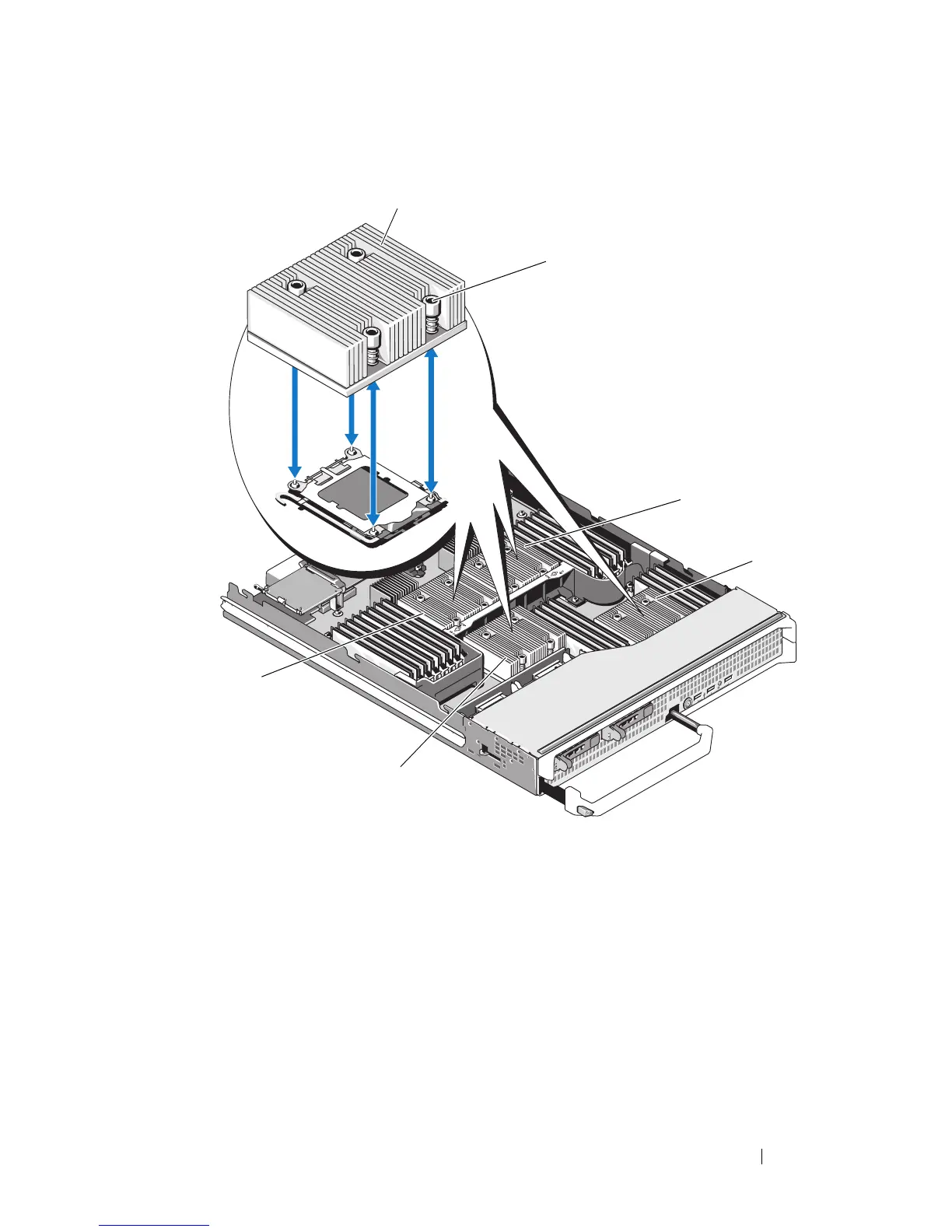
Figure 3-42.
Installing and Removi
ng the Heat Sink (PowerEdge M905)
1
heat sink
NOTE:
Y
ou must install the heat
sink in the orientation shown here.
2
screws (4)
3
socket CPU2
4
socket CPU4
5
socket CPU3
6
socket CPU1
2
1
3
4
6
5
246
248
Table of Contents
Main Page
Default Chapter
3
Table of Contents
3
About Your System
13
Accessing System Features During Start-Up
13
System Overview
14
System Control Panel Features
16
LCD Module
18
LCD Module Features
19
Using the LCD Module Menus
19
Blade Features
22
Using USB Diskette or USB DVD/CD Drives
31
Hard-Drive Features
31
Back-Panel Features
34
Power Supply Indicator
36
Fan Module Indicators
37
Identifying Midplane Version
38
Ikvm Module
41
Tiering the Avocent Ikvm Switch from an Analog KVM Switch
44
Tiering the Avocent Ikvm Switch from a Digital KVM Switch
46
CMC Module
48
I/O Connectivity
52
Guidelines for Installing I/O Modules
52
Port Auto-Disablement in Quad-Port Network Daughter Card (Poweredge M710HD Only)
53
Mezzanine Cards
55
I/O Module Port Mapping
58
Dell Powerconnect-KR 8024-K Switch
69
Dell M8428-K 10 Gb Converged Network Switch
71
Mellanox M3601Q QDR Infiniband Switch I/O Module
73
Mellanox M2401G Infiniband Switch I/O Module
74
Cisco SFS M7000E Infiniband Switch Module
75
Cisco Ethernet Switch
77
Powerconnect M6348 1 Gb Ethernet Switch I/O Module
79
Powerconnect M8024 10 Gb Ethernet Switch I/O Module
81
Powerconnect M6220 Ethernet Switch Module
83
Dell 10 Gbe KR Pass-Through I/O Module
85
Dell 8/4 Gbps Fibre Channel Pass-Through I/O Module
86
Gb Ethernet Pass-Through Module
88
10 Gb Ethernet Pass-Through I/O Module
90
Gbps Fibre Channel Pass-Through Module
92
Brocade M5424 FC8 I/O Module
95
Brocade M4424 SAN I/O Module
98
10/100/1000 Mb Ethernet Pass-Through Module
101
LCD Status Messages
103
Viewing Status Messages
103
Removing LCD Status Messages
103
Cpu Heatsink
106
Clear Sel
109
User Guide
112
System Messages
115
DIMM Configuration
118
System Halted
120
System Board
122
Bios Update
129
Reset the System
132
Warning Messages
134
Diagnostics Messages
135
Alert Messages
135
Using the System Setup Program
137
And UEFI Boot Manager
137
Choosing the System Boot Mode
137
Entering the System Setup Program
138
Responding to Error Messages
138
Using the System Setup Program Navigation Keys
138
System Setup Options
139
Memory Settings Screen
140
Processor Settings Screen
141
SATA Settings Screen (Poweredge M610, M610X)
143
Boot Settings Screen
143
Integrated Devices Screen
144
PCI IRQ Assignments Screen
146
Serial Communication Screen
146
Power Management Screen (Poweredge M915, M910, M710, M710HD, M610 and M610X Only)
147
System Security Screen
148
Exit Screen
149
Entering the UEFI Boot Manager
150
UEFI Boot Manager Screen
150
UEFI Boot Settings Screen
150
System Utilities Screen
151
System and Setup Password Features
151
Using the System Password
151
Using the Setup Password
153
Installing Blade Components
155
Recommended Tools
155
Removing and Installing a Blade
155
Removing a Blade
155
Installing a Blade
158
Removing and Installing a Blade Blank
158
Removing a Blade Blank
158
Installing a Blade Blank
159
Opening and Closing the Blade
159
Opening the Blade
159
Closing the Blade
161
Inside the System
162
System Memory
171
System Memory - Poweredge M915
171
System Memory - Poweredge M910
177
System Memory - Poweredge M905
181
System Memory - Poweredge M805
184
System Memory - Poweredge M710
188
System Memory - Poweredge M710HD
194
System Memory - Poweredge
199
M610/M610X
200
System Memory - Poweredge M605
204
System Memory - Poweredge M600
210
Installing Memory Modules
213
Removing Memory Modules
214
Mezzanine Interface Card (Poweredge M610X Only)
215
Removing the Mezzanine Interface Card
215
Installing the Mezzanine Interface Card
217
I/O Module Mezzanine Cards
217
Mezzanine Card Installation Guidelines
218
Installing a Mezzanine Card
219
Removing a Mezzanine Card
222
SD Card
223
Poweredge M905 and M805
223
Poweredge M915, M910, M710, M710HD, M610, and M610X
224
SD Vflash Card (Poweredge M915, M910, M710, M710HD, M610, and M610X Only)
225
RAID Battery
226
Removing a RAID Battery
226
Installing the RAID Battery
231
Integrated NIC Hardware Key
232
Internal USB Key (Poweredge M915, M910, M710, M710HD, M610, and M610X Only)
232
Network Daughter Card/Lom Riser Card (Poweredge M915 and M710HD Only)
233
Removing the LOM Riser Card
233
Installing the LOM Riser Card
234
Expansion Cards and Expansion-Card Riser (Poweredge M610X Only)
235
Expansion Card Installation Guidelines
235
Installing an Expansion Card
236
Removing an Expansion Card
238
Expansion-Card Riser (Poweredge M610X Only)
239
Removing the Expansion-Card Riser
239
Installing the Expansion-Card Riser
243
Processors
243
Processor Installation Guidelines
243
Removing a Processor
244
Installing a Processor
259
Flexmem Bridge (Poweredge M910 Only)
261
HT Bridge Card (Poweredge M905 Only)
262
Blade System Board NVRAM Backup Battery
265
Hard Drives
267
Hard Drive Installation Guidelines
267
Installing a Hard Drive
267
Removing a Hard Drive
269
Configuring the Boot Drive
269
Removing a Hard Drive from a Hard-Drive Carrier
269
Installing a Hard Drive in a Hard-Drive Carrier
270
Video Controller (Poweredge M905, M805, M605, and M600 Only)
272
Hard-Drive Backplane
274
Blade System Board
276
Removing the System Board
276
Installing the System Board
280
Storage Controller Card
281
Removing the Storage Controller Board
281
Installing the Storage Controller Board
282
Midplane Interface Card (Poweredge M610X)
283
Removing the Midplane Interface Card
283
Installing the Midplane Interface Card
285
Installing Enclosure Components
287
Power Supply Modules
287
System Power Guidelines
287
Power Supply Blanks
288
Removing a Power Supply Module
288
Installing a Power Supply Module
291
Fan Modules
291
Removing a Fan Module
291
Installing a Fan Module
292
CMC Module
293
Removing a CMC Module
293
Installing an SD Card in the CMC Module
294
Installing a CMC Module
295
Ikvm Module
296
Removing an Ikvm Module
296
Installing an Ikvm Module
296
I/O Modules
296
Removing an I/O Module
296
Installing an I/O Module
298
Enclosure Bezel
298
Removing the Enclosure Bezel
298
Installing the Enclosure Bezel
299
Enclosure Midplane
300
Installing the Midplane and Front Module Cage Assembly
302
Enclosure Control Panel Assembly
303
Removing the Enclosure Control Panel
303
Installing the Enclosure Control Panel
305
LCD Module
305
Removing the LCD Module
305
Installing the LCD Module
307
Troubleshooting Your System
309
Safety First-For You and Your System
309
Start-Up Routine
309
Checking the Equipment
310
Troubleshooting External Connections
310
Troubleshooting Video
310
Troubleshooting the Keyboard
311
Troubleshooting the Mouse
311
Troubleshooting USB Devices
312
Responding to a Systems Management Alert Message
312
Troubleshooting a Wet Enclosure
312
Troubleshooting a Damaged Enclosure
313
Troubleshooting Enclosure Components
314
Troubleshooting Power Supply Modules
314
Troubleshooting Fan Modules
315
Troubleshooting the CMC Module
315
Troubleshooting the Ikvm Module
317
Troubleshooting a Network Switch Module
318
Troubleshooting Blade Components
319
Troubleshooting Blade Memory
319
Troubleshooting Hard Drives
320
Troubleshooting Expansion Cards
321
Troubleshooting Processors
322
Troubleshooting the Blade Board
323
Troubleshooting the NVRAM Backup Battery
324
Running System Diagnostics
325
Dell Poweredge Diagnostics
325
System Diagnostics Features
325
When to Use the System Diagnostics
326
Running the System Diagnostics
326
Running the Embedded System Diagnostics
326
From a USB Flash Drive
327
System Diagnostics Testing Options
328
Using the Advanced Testing Options
329
Error Messages
329
System Board Information
331
Blade System Board Jumper Settings
331
Poweredge M915 Jumper Settings
331
Poweredge M905 Jumper Settings
332
Poweredge M910 Jumper Settings
332
Poweredge M805 Jumper Settings
333
Poweredge M710 Jumper Settings
334
Poweredge M710HD Jumper Settings
335
Poweredge M610/M610X Jumper Settings
336
Poweredge M600 Jumper Settings
337
System Board Connectors
338
Poweredge M915 System Board
338
Poweredge M910 System Board
340
Poweredge M905 System Board
342
Poweredge M805 System Board
344
Poweredge M710 System Board
346
Poweredge M710HD System Board
348
Poweredge M610 System Board
349
Poweredge M610X System Board
350
Poweredge M610X Midplane Interface Card
352
Poweredge M610X Expansion-Card Riser
353
Poweredge M610X Mezzanine Interface Card
354
Poweredge M605 System Board
355
Poweredge M600 System Board
357
Disabling a Forgotten Password
358
Getting Help
361
Contacting Dell
361
Index
363
Other manuals for Dell PowerEdge M620
Technical Guide
49 pages
Getting Started Guide
11 pages
Related product manuals
Dell PowerEdge M630
129 pages
Dell PowerEdge M610
51 pages
Dell PowerEdge M630p
134 pages
Dell EMC PowerEdge M640
76 pages
Dell PowerEdge M520
139 pages
Dell PowerEdge M830
169 pages
Dell PowerEdge M1000e
93 pages
Dell PowerEdge MX760c
155 pages
Dell EMC PowerEdge MX740c
102 pages
Dell EMC PowerEdge MX750c
112 pages
Dell PowerEdge R7515 MY077
142 pages
Dell PowerEdge R650XS M4JNT
145 pages












 To Next Page