Operating the monitor | 77
Icon Menu and
Submenus
Description
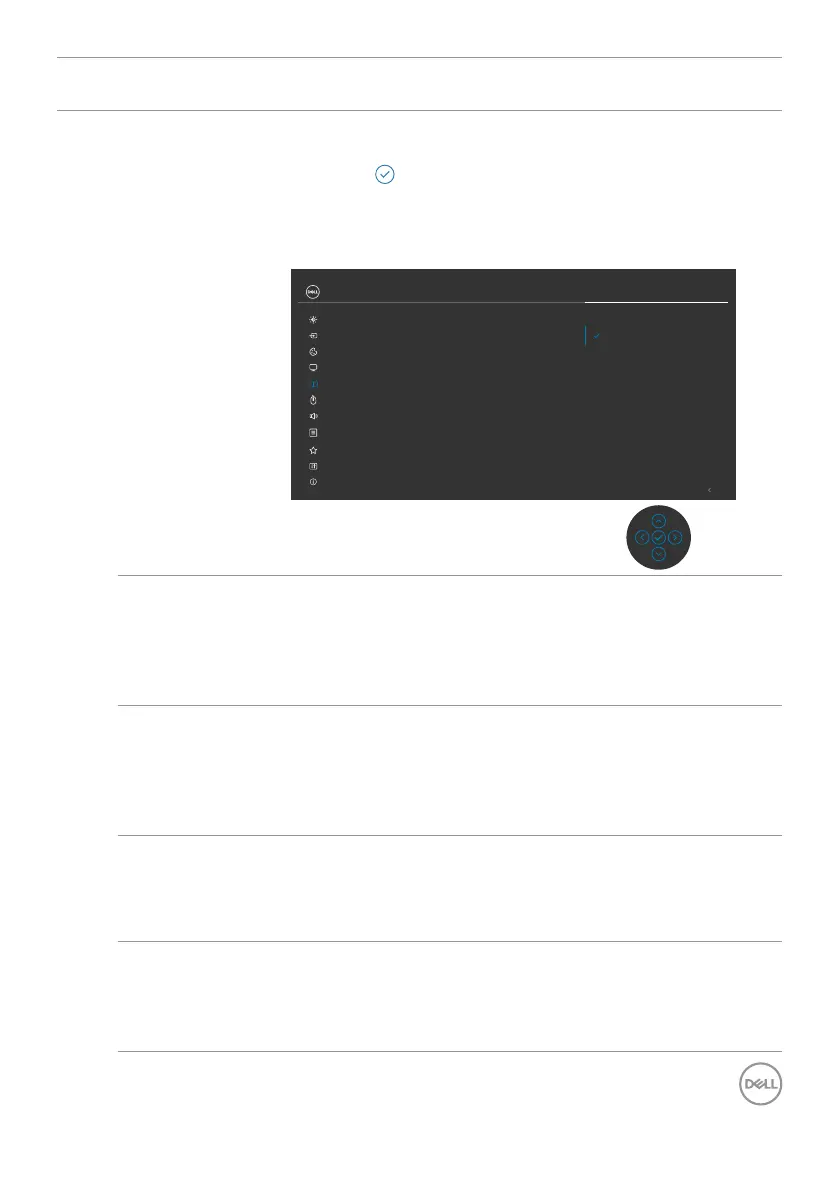
PIP/PBP (Sub) Select between the different video signals that may be
connected to your monitor for the PBP sub-window.
Press the button to select the PBP sub-window source
signal.
NOTE: The feature is available only when the PIP/PBP
mode is enabled.
Exit
Input Source
Color
Brightness/Contrast
Display
PIP/PBP
Personalize
Others
Menu
USB
PIP/PBP Mode
PIP/PBP (Sub)
USB Switch
Video Swap
Audio
Contrast (Sub)
DP
Thunderbolt (140W)
HDMI
UltraSharp 40 Monitor
Screen Partition (DP/TBT)
Screen Partition refresh rate
Audio
More Information
USB Switch Select to switch between the USB upstream sources
in PBP mode. Move the joystick to switch among USB
upstream sources in PBP mode.
NOTE: The feature is available only when the PIP/PBP
mode is enabled.
Video Swap Select to swap videos between the main window and sub-
window in PBP mode. Move the joystick to swap the main
window and sub-window.
NOTE: The feature is available only when the PIP/PBP
mode is enabled.
Audio Allows you to set the audio source from the main window
or the sub-window.
NOTE: The feature is available only when the PIP/PBP
mode is enabled.
Contrast (Sub) Adjust the Contrast level of the picture in PBP Mode.
Move the Joystick to increase or decrease the contrast.
NOTE: The feature is available only when the PIP/PBP
mode is enabled.










 To Next Page