Setting up your wireless mouse │ 11
Setting up your wireless mouse
Charging the battery
NOTE: Your wireless mouse has a rechargeable battery. For best results, ensure that
the battery is fully charged before using it for the first time.
NOTE: To improve battery life, turn off the power switch when the wireless mouse
is not in use.
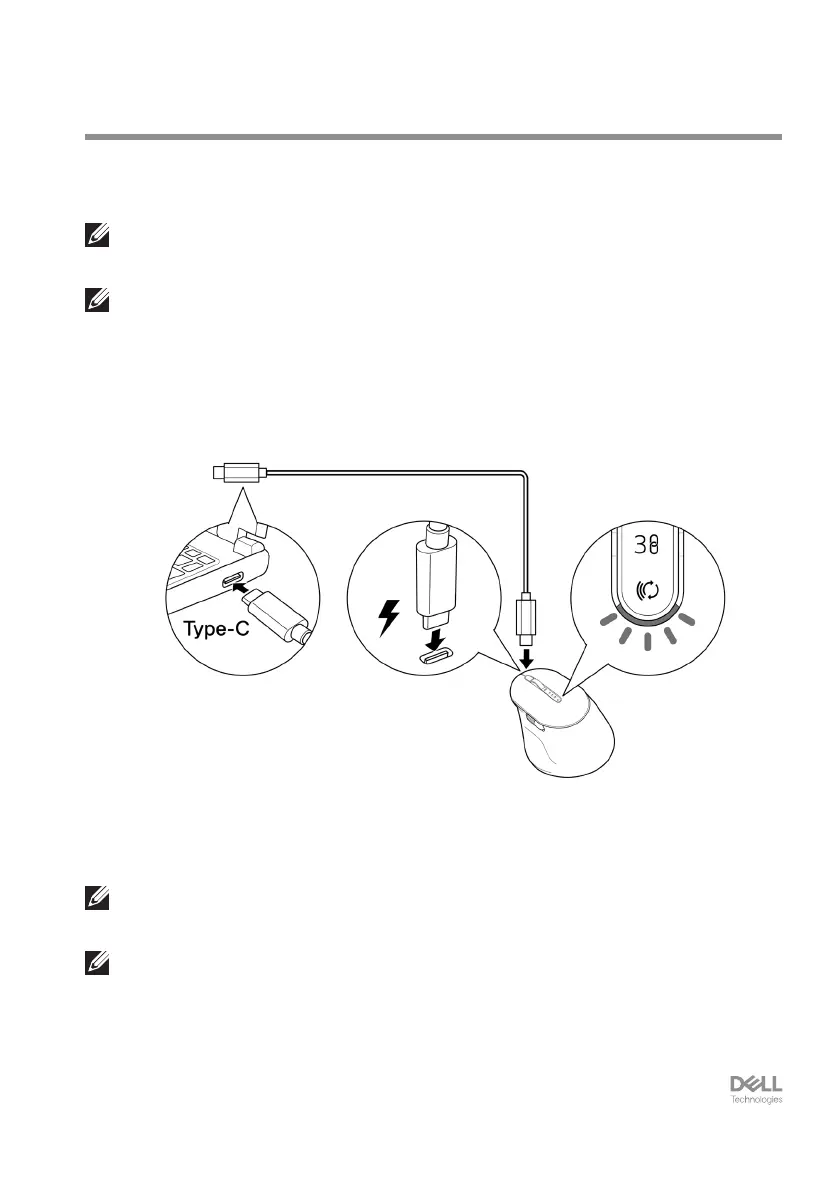
Connect one end of the USB-C charging cable to the USB-C port on the mouse and the
other end to an available USB-C port on your computer, desktop, or compatible mobile
device.
The white low battery LED indicator will breathe until the battery is fully charged or the
USB charging cable is unplugged.
NOTE: During charging, the low battery LED indicator will turn on even if the mouse
is turned off.
NOTE: The USB-C charging cable can be used only for charging the mouse.
It does not support data transfer.


 To Next Page