ENGLISH
I
ORear
r
I ;
I
----------:
[NUMBER]
I i
GJ
GJ GJ
j
(0-9,
+10)
-n
GJGJGJ
i
I
-8GJGJ-
[TUNING
+/-],
,_~'tC~:LG.!
[TV
VOL
+/-],
Ilii
_
~
[SETUP],
[MODE
/MENU],
Ii
-
k-------,
[~
\l
<Jt>],
[BAND
/
-7:1~!iQ
0
Qi
[AUDIO],
PICTURE
ADJUSn,
l~ii0
~
0:
[ENTER],
[MEMORY
/
SUBTITLE]
Jl~:.Q--~-J;~,
[DISPLAY],
[RETURN]
45
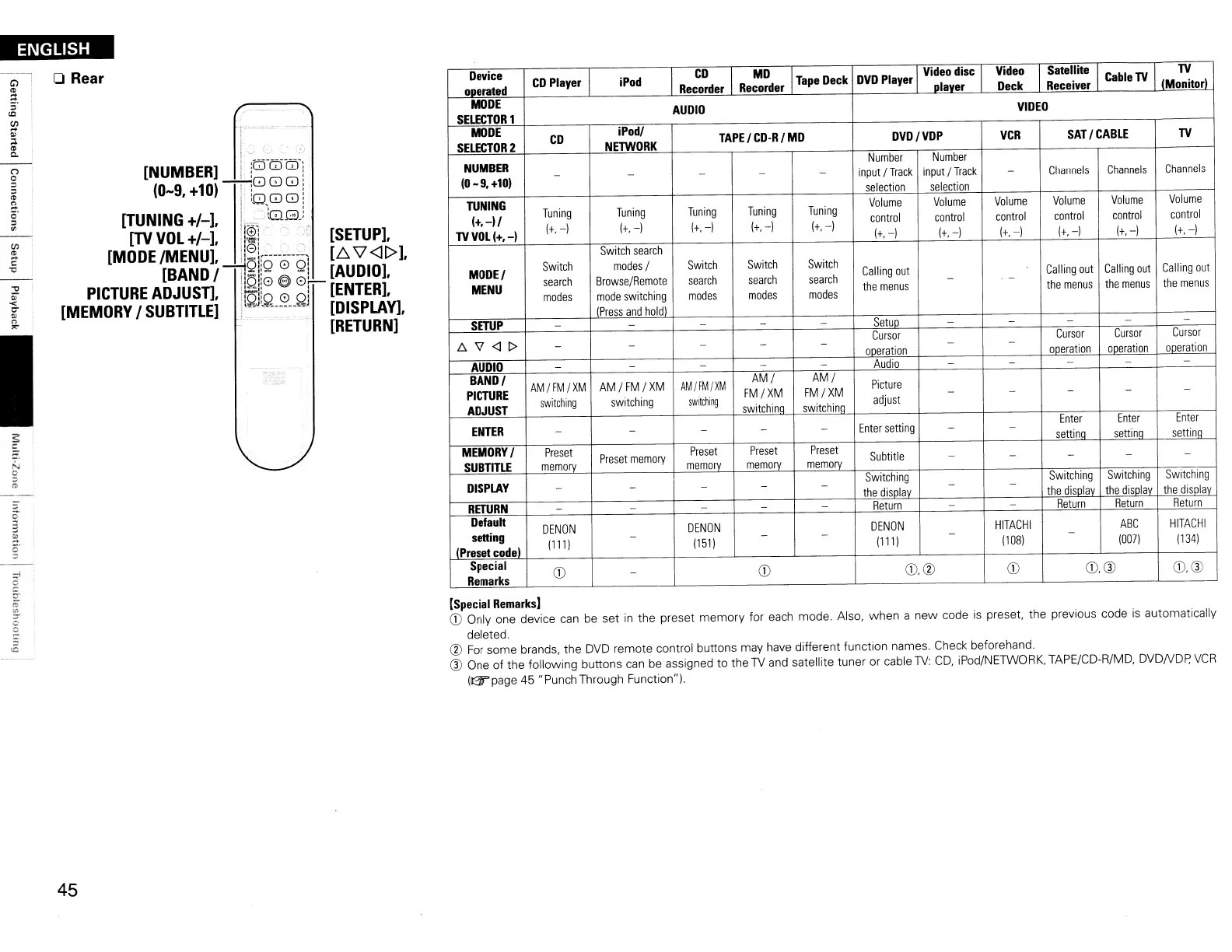
Device
CD
Player
iPod
CD
MD
Tape
Deck
DVD
Player
Video
disc
Video
Satellite
Cable
TV
TV
operated
Recorder
Recorder
plaver
Deck
Receiver
IMonitorl
MODE
AUDIO
VIDEO
SELECTOR
1
MODE
CD
iPodl
TAPE
I
CD-R
I
MD
DVD/VDP
VCR
SAT
I
CABLE
TV
SELECTOR
2
NElWORK
NUMBER
Number
Number
(0
-
9.
+101
- -
- -
-
input
I
Track
input
!Track
-
Channels
Channels
Channels
selection
selection
TUNING
Tuning Tuning
Tuning
Tuning
Tuning
Volume
Volume
Volume
Volume
Volume
Volume
(+.-11
control
control
control
control
control
control
TV
VOL
(+.-1
1+,
-)
1+,-)
1+,-) 1+,-)
1+,-1
1+,-)
(+,
-)
1+,-)
(+,
-I
1+,
-)
(+,
-I
Switch
search
MODEl
Switch
modes
I
Switch
Switch Switch
Calling
out
Calling
out
Calling
out
Calling
out
search
Browse/Remote
search
search
search
- -
MENU
modes
mode
switching
modes
modes
modes
the
menus
the
menus
the
menus
the
menus
(Press
and
hold
I
SETUP
- - - - -
Setuo
-
-
- -
-
.6\7<11>
Cursor
Cursor
Cursor
Cursor
- -
- -
-
ooeration
- -
ooeration
ooeration
ooeration
AUDIO
- - - - -
Audio
-
-
-
-
-
BANDI
AM/FM/XM
AM
IFMI
XM
AM/FM/XM
AMI
AM/
Picture
PICTURE
switching
switching
switching
FM/XM FM/XM
adjust
- - - -
-
ADJUST
switchina switchina
ENTER
Enter
setting
Enter
Enter
Enter
-
- - - - - -
settino
settina
settina
MEMORY
I
Preset
Preset
memory
Preset
Preset Preset
Subtitle
SUBTITLE
memory
memory
memory
memory
-
- - -
-
DISPLAY
- - - - -
Switching
- -
Switching
Switching
Switching
the
disolav
the
disolav
the
disolav
the
disolav
RETURN
- -
- -
-
Return
-
-
Return
Return
Return
Default
DENON
DENON
DENON
HITACHI
ABC
HITACHI
setting
1111
)
-
(151)
-
-
1111
)
-
1108)
-
(0071
1134)
IPreset
codel
Special
CD
-
CD
CD,<V
CD
CD,a>
CD,®
Remarks
[Special
Remarks]
CD
Only one device
can
be
set
in
the preset memory for
each
mode. Also, when a new code
is
preset, the previous code
is
automatically
deleted.
<V
For
some brands, the
DVD
remote control buttons may have different function names. Check beforehand.
® One of the following buttons
can
be
assigned to the
TV
and
satellite tuner or cable
TV:
CD,
iPod/NETWORK, TAPE/CD-R/MD, DVDNDp,
VCR
IGrpage
45 "Punch Through Function").


 To Next Page
 Loading...