.
B
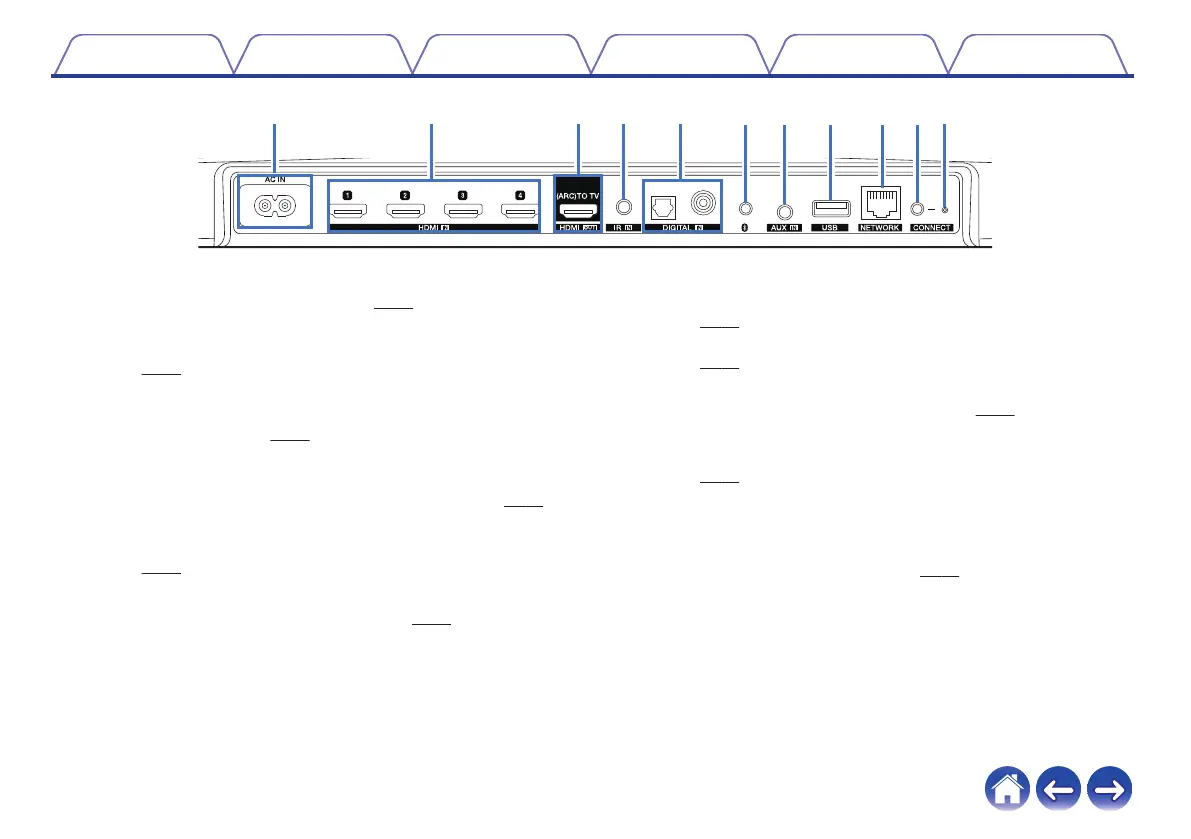
AC inlet (AC IN)
Used to connect the power cord. (v
p. 22)
C
HDMI connectors (HDMI IN)
Used to connect to the HDMI equipment with an HDMI cable.
(v
p. 30)
D
HDMI connector to TV (HDMI OUT)
Used to connect to the TV with an HDMI cable. (Compatible with
the ARC function) (v
p. 26)
E
REMOTE CONTROL jack (IR IN)
Used to connect infrared receivers/transmitters in order to operate
this unit and external devices from a different room. (v
p. 31)
F
Digital audio connectors (DIGITAL IN)
Used to connect devices equipped with digital audio outputs.
(v p. 30)
G
Bluetooth button (V)
Used in the Bluetooth pairing settings. (v p. 52)
H
AUX jack (AUX IN)
Used to connect audio devices with a 1/8 inch (3.5 mm) cable.
(v p. 30)
Used to add the HEOS device to your wireless network.
(v
p. 24)
I
USB port
Used to connect USB storage devices. (v
p. 31)
J
NETWORK connector
Used to connect this unit to a wired Ethernet network.
(v
p. 24)
K
CONNECT button
Used for Wi-Fi setup.
L
Connect in status LED
Indicates the status of this unit. (v p. 68)
Contents
Setup Use Troubleshooting Status LED Appendix
15


 To Next Page