o
Playing HDMI (ARC) - Best choice
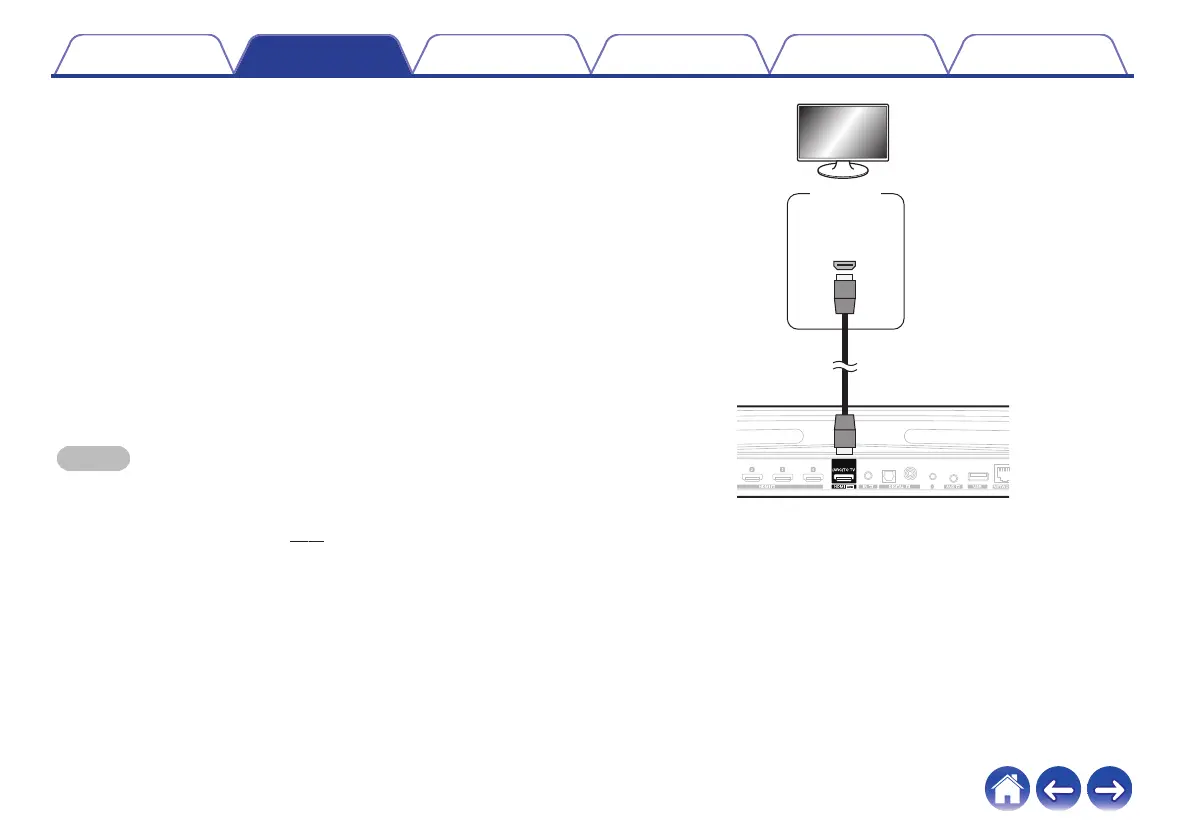
If your TV has an ARC (Audio Return Channel) HDMI connector,
connect it to the HDMI output of the HEOS Bar. This will provide the
best sound and several other benefits.
1
Connect your TV with an ARC (Audio Return Channel)
HDMI connector to the HDMI OUT (ARC) connector on
your HEOS Bar using the included HDMI cable.
2
Select “TV” from the music tab.
3
Select the name of the HEOS Bar to which you
connected the TV in step 1.
4
The sound from your TV can be played directly on the
HEOS Bar.
NOTE
0
The TV also needs to be compatible with the ARC function.
Turn the TV HDMI control function on. See the TV Owner’s Manual for details.
0
To change the input automatically, you can set the default TV input in the setup
menu. “Adjusting the TV input” (v p. 57)
.
Contents
Setup Use Troubleshooting Status LED Appendix
28


 To Next Page