EasyManua.ls Logo

DENT Instruments PowerScout 3 HD - Configuring Communications Using Viewpoint HD

DENT Instruments PowerScout 3 HD
94 pages
Print Icon
To Next Page IconTo Next Page
To Previous Page IconTo Previous Page
Loading...
29
DENT Instruments
PowerScout HD
Meter Configuration
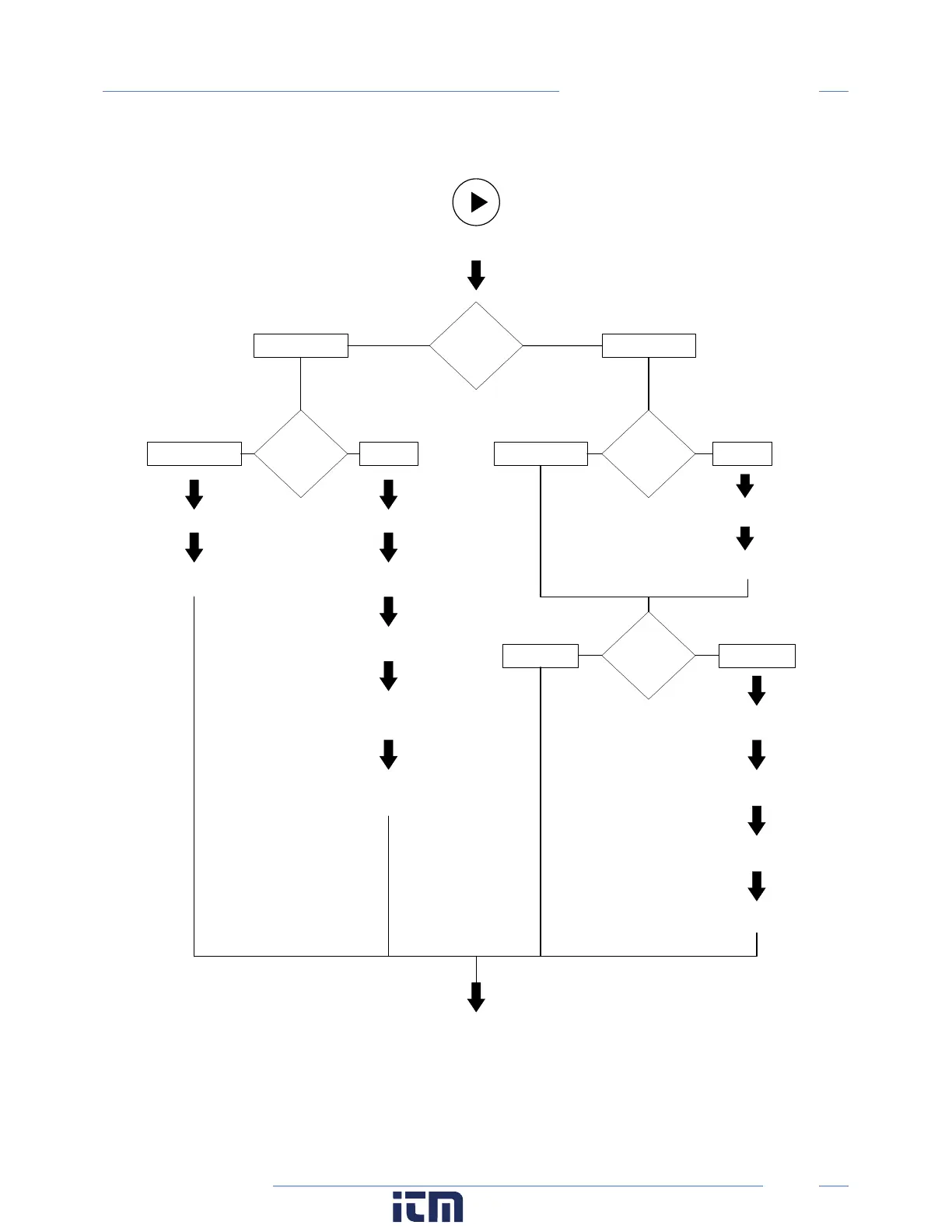
CONFIGURING COMMUNICATIONS USING VIEWPOINT HD
Navigate to Communication Setupunder the Display Menu List Box
RS-485
OR
ETHERNET
RS-485
Ethernet
Modbus
OR
BAC net
Modbus
OR
BAC net
Modbus
BACnet Modbus BACnet
Set Serial Settings
Set Modbus Address
Set Serial Settings
Set Device ID
Set Max Masters
(optional)
Set Max Info Frames
(optional)
DHCP
OR
STATIC
Set Device ID
DHCP
Static IP
Set Static IP Address
Set Subnet Mask
Set Gateway Mask
Press SEND SETUP TO METER
Set MS/TP Address
Set BACnet Port & BBMD
(optional)
Set Default Gateway
w ww. . com
information@itm.com1.800.561.8187

Table of Contents

Other manuals for DENT Instruments PowerScout 3 HD

Related product manuals