74
PowerScout HD
RTU Programming & Scripting
b) ViewPoint HD.
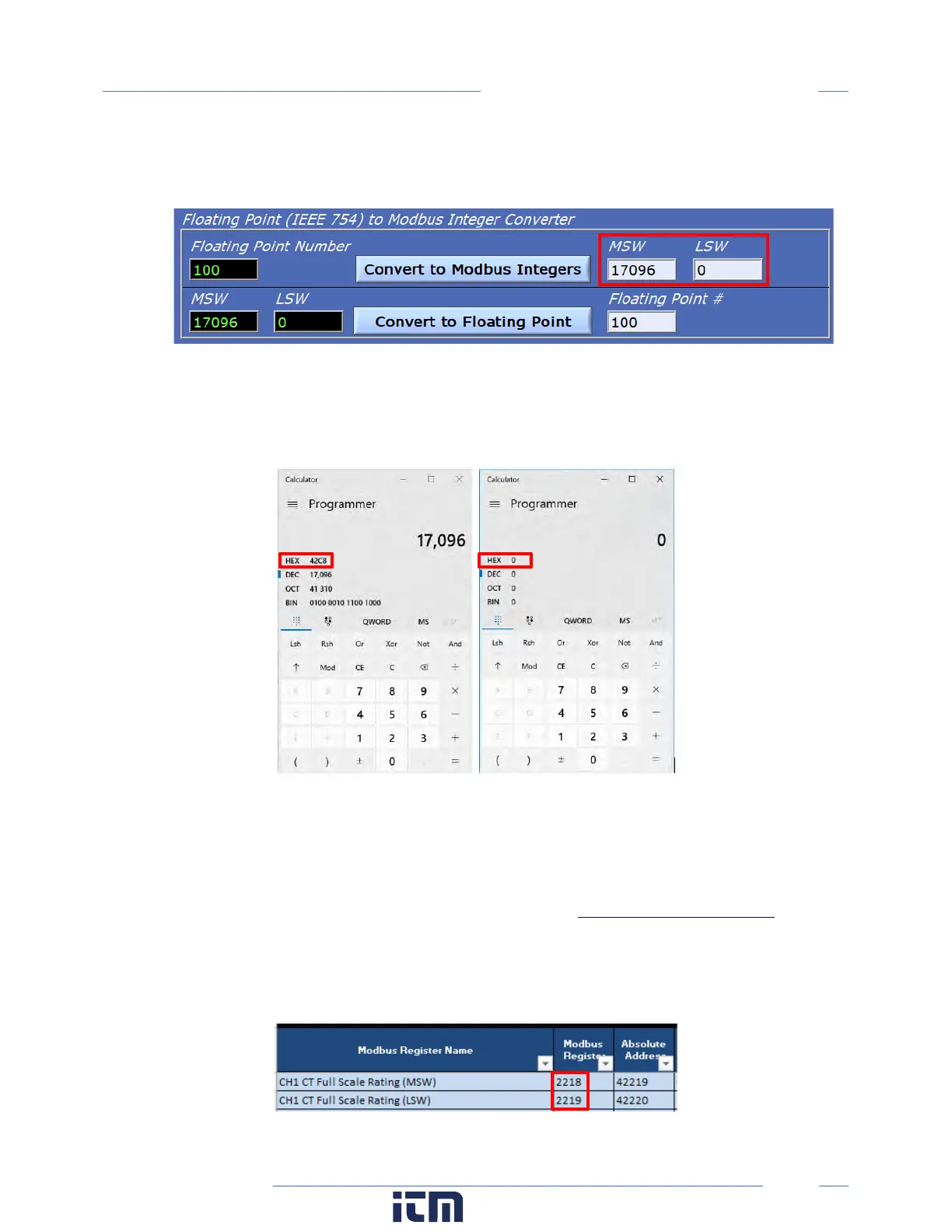
If an internet utility is not available, ViewPoint HD has a built-in conversion utility under the
Advanced Tab. Enter 100.00 and press the “Convert to Modbus Integers” button.
This utility identifies that the MSW and LSW registers need to be set to 17096 & 0 (decimal)
respectively. If hexadecimal notation is required, these decimal values can be converted using a
utility such as the MS Windows Calculator (under Programmer mode) as shown below.
After padding, we also arrive at 0x42C8 0x0000 as the MSW and LSW register values, respectively.
Step 2) Identify which configuration registers control the CH1 CT Full Scale Rating
a. Refer to the MS Excel Register List (USB drive or at
b. Use ViewPoint HD to discover the address of displayed data.
a) Open the MS Excel Register List and locate the CH1 CT Full Scale Rating Registers under USER
CONFIG POINTS group.
w ww. . com
information@itm.com1.800.561.8187



 To Next Page