13
Getting to Know Wizzybug
USER GUIDANCE
Speed Always choose a suitable speed range for your child’s
ability and their environment (see pages 40 to 41). Wizzybug can
be driven at low speeds indoors or in small spaces, so that your
child can steer around obstacles. It can also be driven at higher
speeds in bigger spaces.
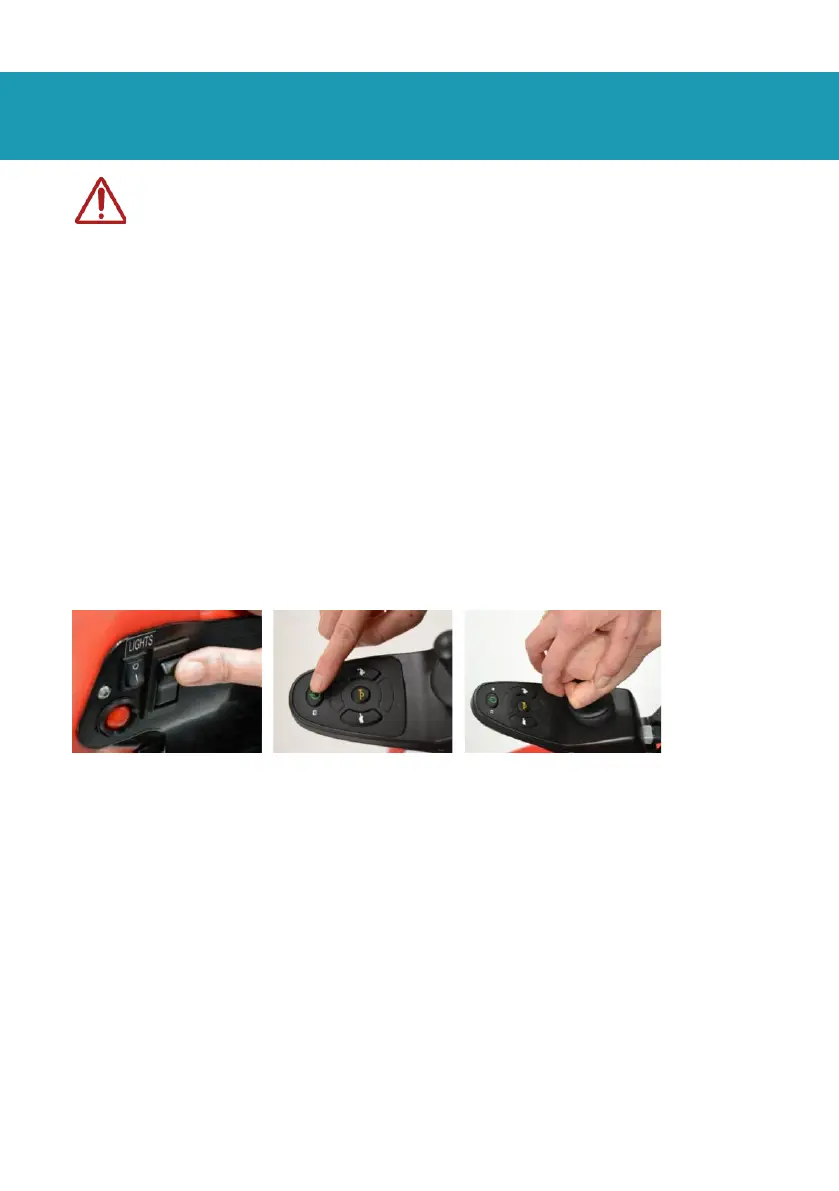
Stopping Your child can stop Wizzybug by letting go of the joystick.
If you need to stop Wizzybug quickly, you can turn off the on/off
switch at the back of Wizzybug (Fig. 5), on the controller (Fig. 6) or
use the carer control to take control of Wizzybug. However, the
quickest way to stop Wizzybug may be to lift your child’s hand
from the joystick (Fig. 7).
Driving on slopes Wizzybug can take much longer to stop on a
slope than on level ground.
Driving on pavements or near steps The carer must take control
of Wizzybug on pavements or near roads, open water, steps or
other obvious hazards.
Always use dropped kerbs to move off pavements or when
crossing the road, so that Wizzybug does not move in a
dangerous or unexpected way. Keep your child away from kerb
edges and roads.


 To Next Page