51
CHARGING AN SLA BATTERY
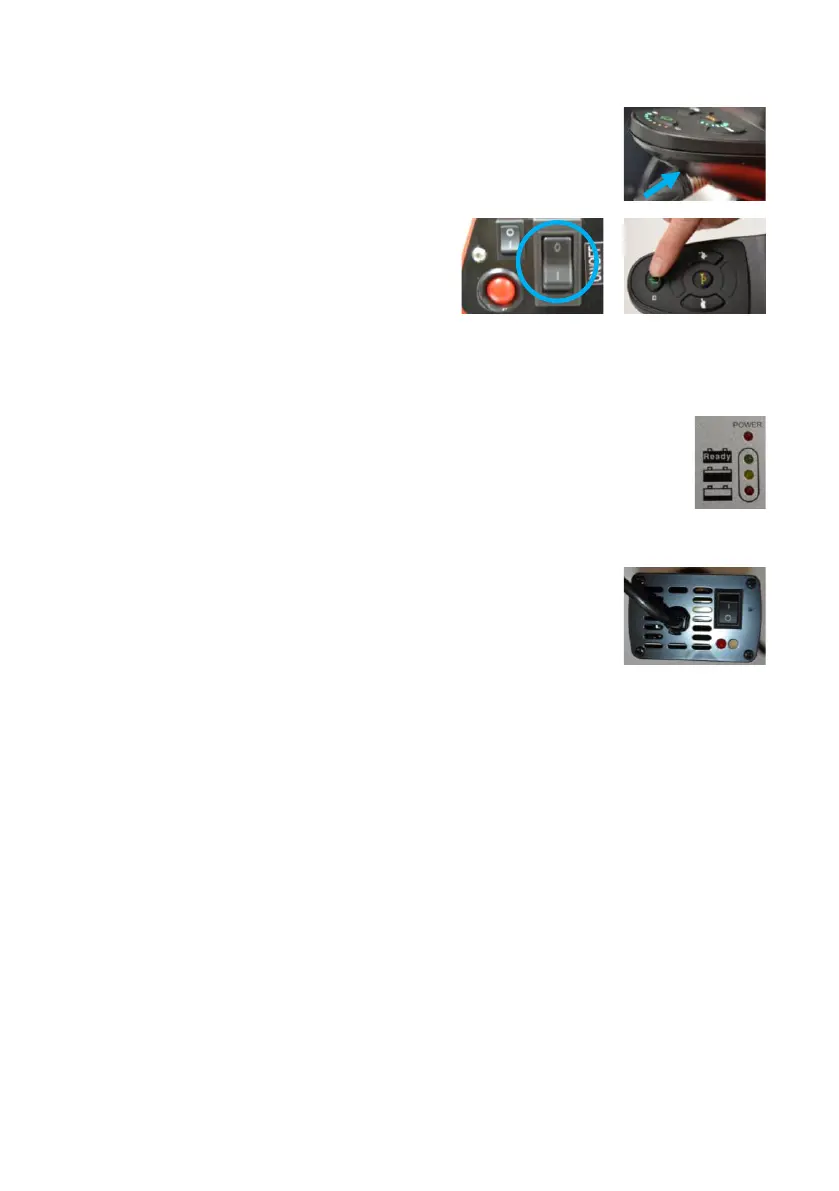
1. Put the silver connector into the charging
socket in the front face of the joystick.
2. Switch on Wizzybug using the
on/off switch at the back, then
switch on the joystick.
3. Plug the charger into a mains socket and switch the socket on.
The red power light on the charger will come on.
For a Prolite E charger, a second LED will come on
after a few seconds: Red indicates that the battery is
charging and yellow shows the battery is about 80%
charged. When the battery is fully charged a
green light will show.
For a Numax charger, the orange LED shows
the battery is charging. When the battery is
fully charged a green light will show.
(When Wizzybug is being charged the lights on
the battery indicator on the joystick control
will scroll and flash. The joystick cannot be
used and Wizzybug cannot be driven.)
4. You can keep the charger connected until you need to use
Wizzybug. You cannot overcharge the lead acid battery.
5. When you are ready to disconnect the charger, turn off the
mains supply first, then switch off the joystick’s on/off button.
Unplug the charger from the mains supply, then unplug the
silver connector from the front of the joystick.
If you use Wizzybug every day, we recommend that you charge it
every day.
Fig. 77 Charging an SLA Battery


 To Next Page