Network configuration 32
devolo Magic 2 WiFi
2-1
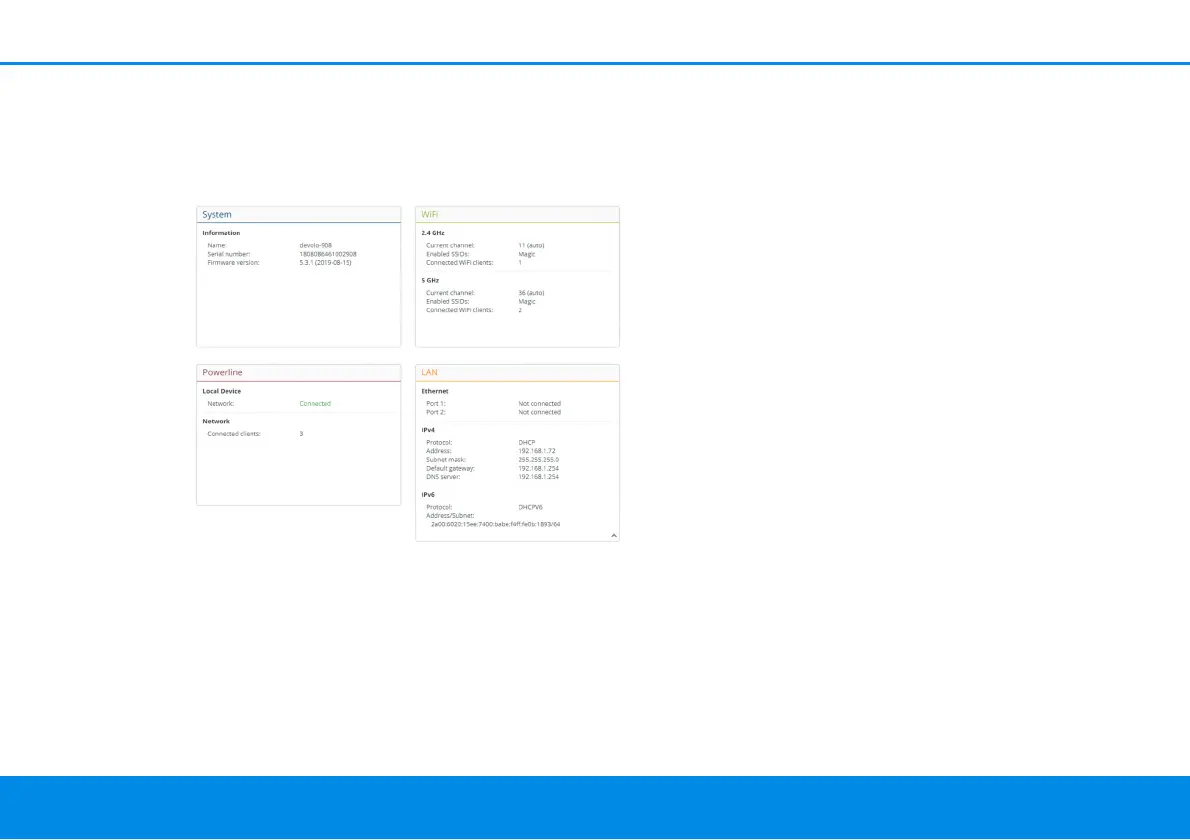
4.3 Overview
The Overview area shows the status of the
devolo Magic 2 WiFi
2-1
and the connected LAN,
PLC and WiFi devices.
4.3.1System
Name: Device name
Serial number: Device serial number
Firmware version: Firmware version of the device
4.3.2WiFi
2.4 GHz
Current channel: used frequency channel in the
2.4-GHz frequency range
Enabled SSID: name of the enabled WiFi network
Connected WiFi clients: number of devices
connected to the network.
5 GHz
Current channel: used frequency channel in the 5-
GHz frequency range
Enabled SSIDs: Name of the enabled WiFi
networks
Connected WiFi clients: number of devices
connected to the network.
4.3.3Powerline
Local device
Network: status information “connected“ or “not
connected“
Network
Connected clients: number of devices connected
to the Powerline network












 To Next Page