1918
NOMAD
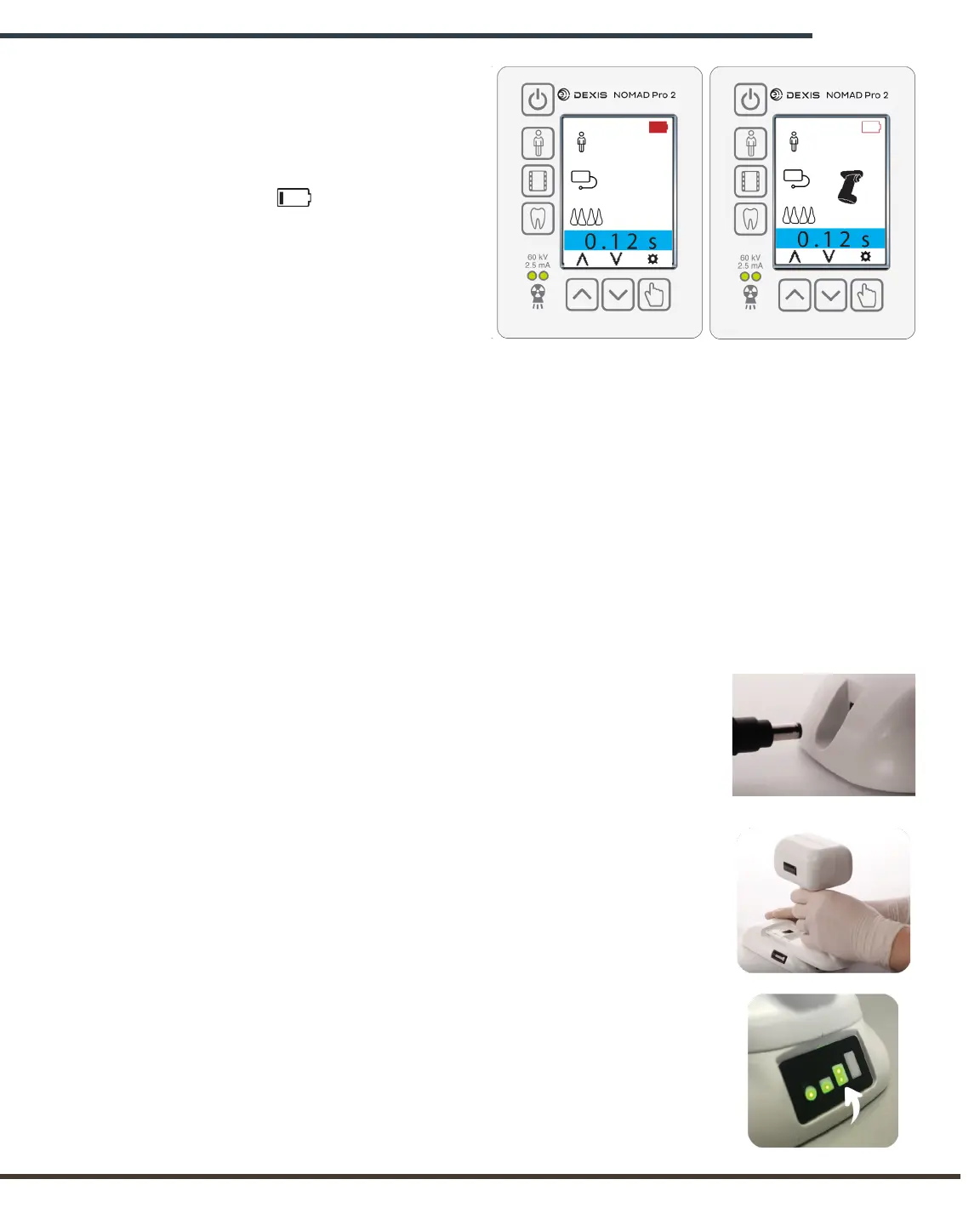
The Recharge Handset Alarm consists of the
user interface alternately flashing the two
screen shown above.
If the battery charge is too low,
the NOMAD Pro 2 will not emit an
X-ray and the Recharge Handset
alarm will display.
When a battery is depleted to the
single bar level , it is recommended
the handset be recharged. Remove the
handset from the charging cradle once
it is fully charged.
Replace a low charge handset
with the secondary handset (which
should be charged in advance). It
is recommended that you keep one
handset fully charged at all times to
ensure continuous operation.
3.4 Checking for Handset in Sleep Mode
Occasionally, a Handset may enter sleep mode and disable itself. This feature is designed
to extend the useful life of the battery. Sleep mode occurs when the Handset is not used
for an extended period of time or when stored while attached to the device.
To check if your handset is in sleep mode, remove handset from the Charger or device and
wait 5 seconds. Looking at the top of the Handset, pull and hold the trigger and watch
for a small red light flashing one or more times. If no light is seen, the Handset is in sleep
mode. To enable the Handset, follow the three steps below.
Unplug the cord from the Charging Cradle.
Put the Handset on the Charging Cradle.
Plug in the cord and watch for the
charging indicator to begin flashing.


 To Next Page