2322
NOMAD
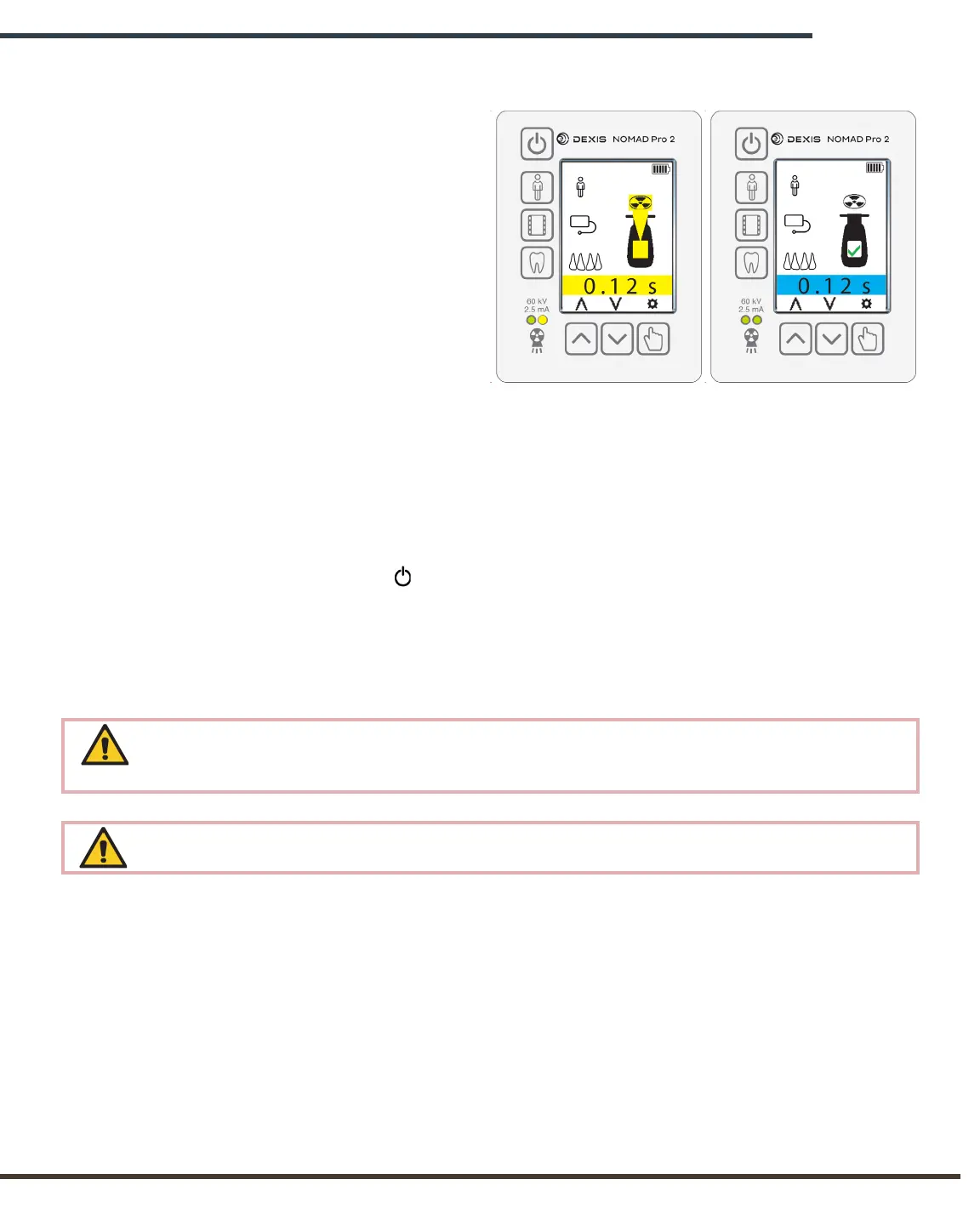
X-rays On Alert
X-ray Complete Alert
4.5 Initiating and Completing an X-ray Exposure
To begin the exposure, press and
hold the trigger. The Ready alert
is replaced with the X-rays On
alert, the green LED is replaced
with a yellow LED, and there is an
alert tone for the duration of the
exposure.
To ensure complete exposure,
keep the trigger depressed until the
audible tone is complete, the yellow
LED is off, and the X-ray Complete
alert briefly displays. The device
then returns to the at-rest state.
NOTE: An exposure can be terminated
for any reason by prematurely releasing
the depressed trigger.
4.6 Powering Off
Press and release the Power button to turn the NOMAD Pro 2 off.
The NOMAD Pro 2 also automatically shuts off after approximately three minutes of
inactivity.
The NOMAD Pro 2 display darkens, accompanied by a tone to indicate shut-down.
In the event of a malfunction or a noticeable change in image quality, it is recommended
to immediately cease the use of the device on the patient and call Technical Support at
1-888-88-DEXIS.
Any serious incident that has occurred in relation to the use of the NOMAD Pro2 should
be reported to Technical Support at 1-888-88-DEXIS.


 To Next Page