34
2
Hardware Installation
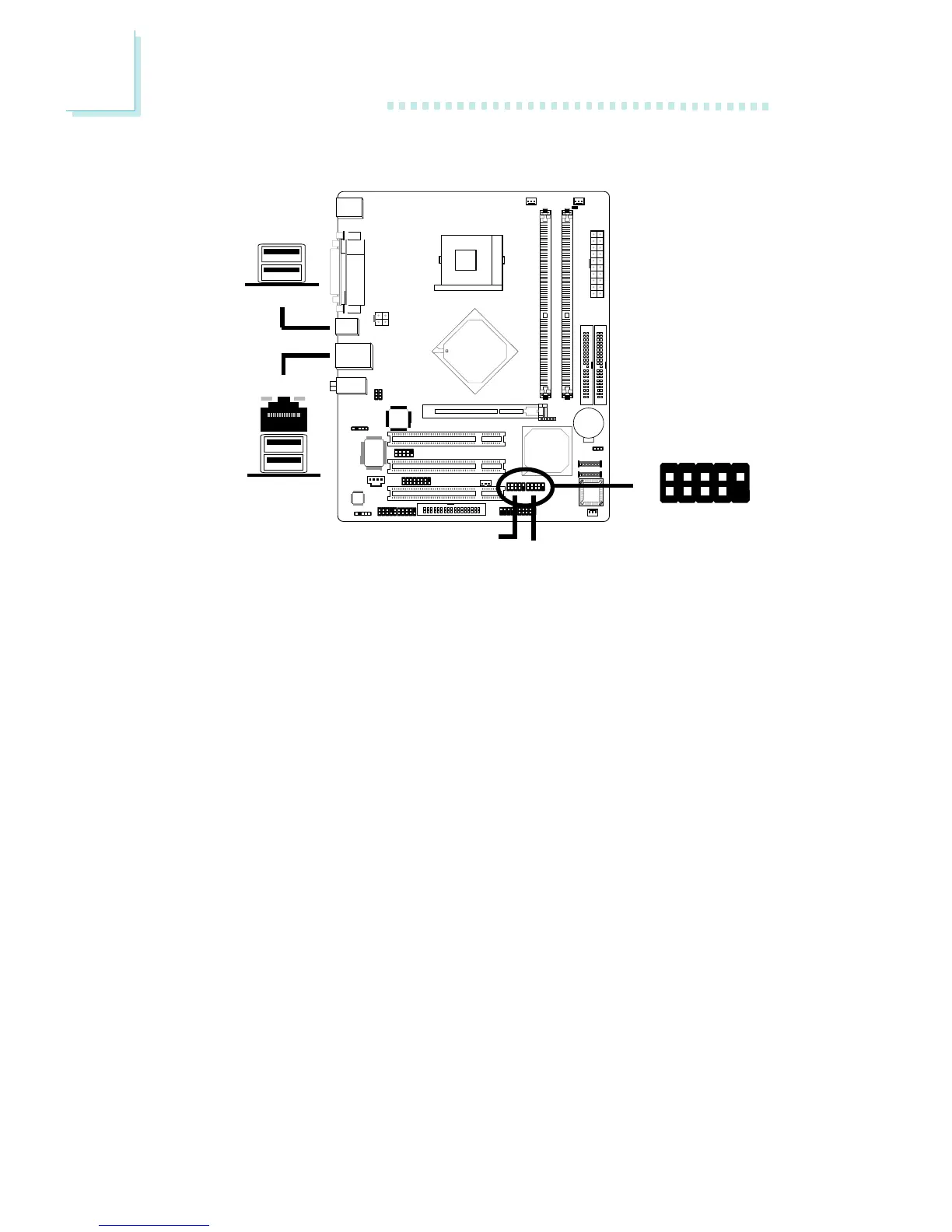
2.5.5 Universal Serial Bus Ports
USB 4
USB 3
Four onboard USB 2.0/1.1 ports (Black) are at locations CN5 and
CN6 of the system board.
J11 (USB 5/6) and J12 (USB 7/8) connectors allow you to connect
4 additional USB 2.0/1.1 ports. The additional USB ports, which are
mounted on card-edge brackets, will be provided as options. If you
want to use the optional USB ports, install the card-edge bracket to
the system chassis then insert the connector that is attached to the
USB port cables to J11 and/or J12.
BIOS Setting
Enable or disable the onboard USB in the Integrated Peripherals
submenu (“Onboard Device” field) of the BIOS. Refer to chapter 3
for more information.
Driver Installation
You may need to install the proper drivers in your operating system
to use the USB device. Refer to your operating system’s manual or
documentation for more information.
USB 7/8
1
VCC
-Data
+Data
Ground
Key
VCC
-Data
+Data
Ground
Key
2
10
9
USB 5/6
USB 5/6/7/8
USB 2
USB 1
"
"
"



 To Next Page