C|24 Guide38
EQ and Dynamics Bypass Switch
The EQ and Dynamics Bypass switch changes
the function of the EQ and Dynamics switches
on all channels, putting them in Bypass mode:
EQ Switch When the EQ and Dyn Bypass switch
is lit, the EQ switch toggles the Bypass state of all
EQ plug-ins on the channel. In Bypass mode,
when the EQ plug-ins on a track are bypassed,
the track’s EQ switch is lit.
Dynamics Switch When the EQ and Dyn Bypass
switch is lit, the Dyn switch toggles the Bypass
state of all Dynamics plug-ins on the channel. In
Bypass mode, when the Dynamics plug-ins on a
track are bypassed, the track’s Dyn switch is lit.
See “Bypassing EQ and Dynamics Plug-ins” on
page 77.
Channel Automation Mode Switch and
Indicators
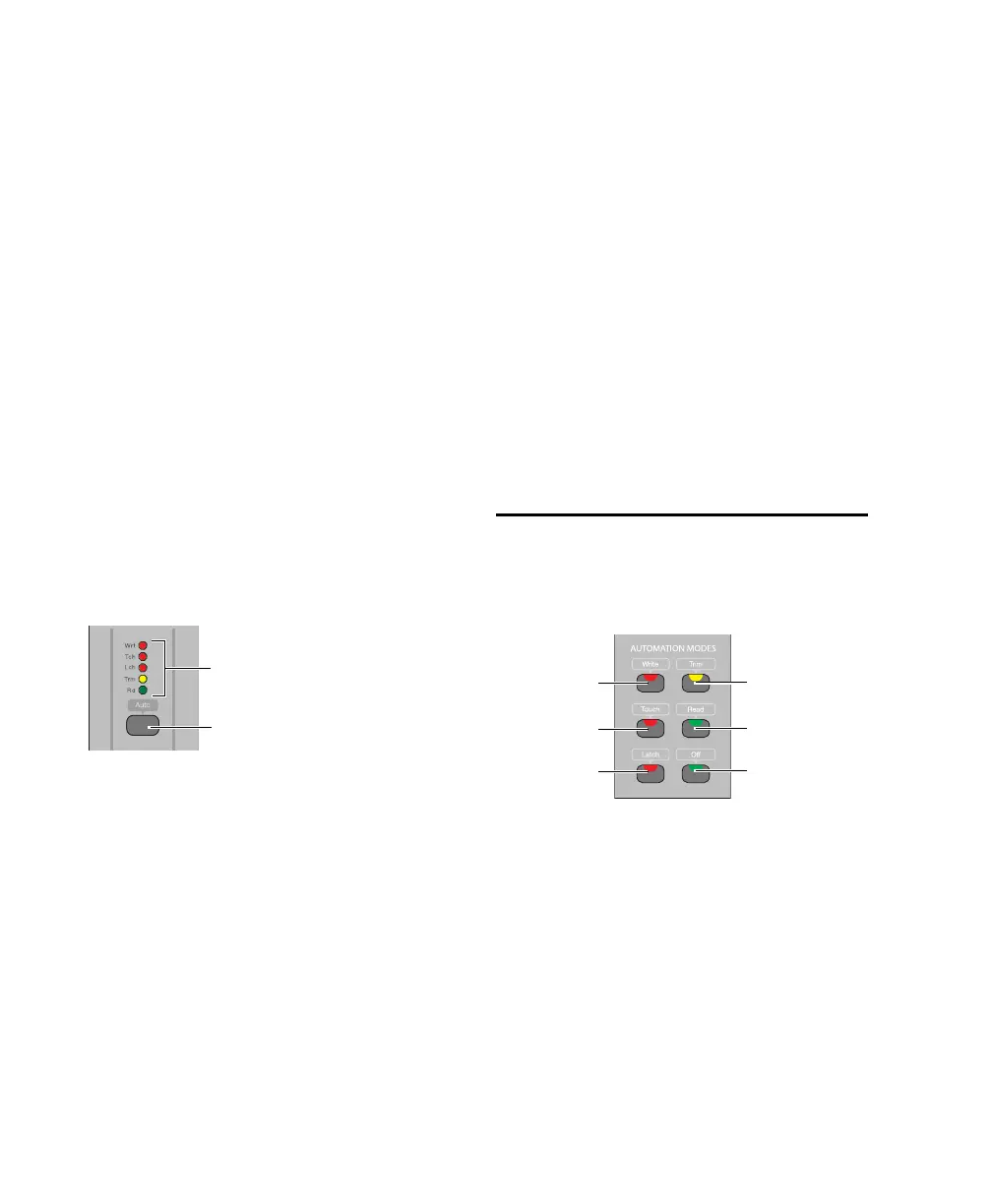
Each channel has an Automation Mode switch
and series of Automation Mode indicators
(Write, Touch, Latch, Trim and Read).
The Automation Mode switch cycles the chan-
nel through the following Pro Tools automation
modes:
•Write
•Touch
•Latch
•Touch/Latch (ProToolsHD only)
•Read
•Off
See “Working with Automation” on page 98.
The Automation Mode switch lets you cycle the
channel through Touch, Latch, Read and Off
modes during playback, but it prevents you
from entering Write mode during playback. To
directly enter Write mode during playback, use
the Global Automation Mode switch (See “Auto-
mation Mode Switches” on page 38.)
When in Write mode, the corresponding indica-
tor flashes at all times. When in Touch or Latch
modes, the corresponding indicator lights until
automation writing begins. When automation
writing begins on the channel, the indicator
flashes. If automation is turned off for the chan-
nel (Off), none of the indicators is lit.
Global Automation Switches
Automation Mode Switches
The Automation Mode switches are used to dis-
play and set automation modes. These switches
light to indicate that at least one channel is in
that automation mode. If multiple channels are
selected and set to different automation modes,
all applicable mode switches are lit.
These Automation Mode switches mirror the
function of the on-screen Automation Mode se-
lector for each track, and let you change auto-
mation modes of channels during playback.
Automation Mode switch and indicators
Automation Mode switch
Automation Mode indicators
Automation Mode switches
Automation
Trim Mode
switch
Automation
Latch Mode
switch
Automation
Touch Mode
switch
Automation
Write Mode
switch
Automation
Read Mode
switch
Automation
Off
switch



 To Next Page