PYKO-out: Professional IP audio endpoint
6. CONFIGURATION
6.1. Connecting to PYKO-out WEB pages
PYKO-out embeds a web server that enables you to control the PYKO through your favorite Internet
browser.
● Put your headphones on. At start-up, PYKO will announce its IP address over the headphones
output – write this address down!
Note:
PYKO-out factory setting is IP address configured at 192.168.0.100
● Open your web browser.
● Type the PYKO-out IP address into the address bar and hit the ‘Enter’ key.
● You can now visualize the Web pages that enable you to configure the device and get its status.
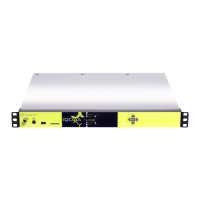
The WEB page hereafter is displayed, and gives the firmware version (Application loaded), the
IP address and Mac address.
6.2. Network parameters
Go to « Settings » menu and select « Network » to configure the network parameters.
These parameters are:
● Logical name: logical name of this PYKO on the network.
● IP address of PYKO-out
In case PYKO is to be used in DHCP mode, enter 0.0.0.0.
● Netmask: subnet mask
● IP gateway: IP@ of the gateway if it is used
● Primary DNS: IP@of the Domain Name System server. Useful if the domain names are used
instead of IP@. Domain name is often used when configuring Icecast/Shoutcast streams.
10


 To Next Page