PYKO-out: Professional IP audio endpoint
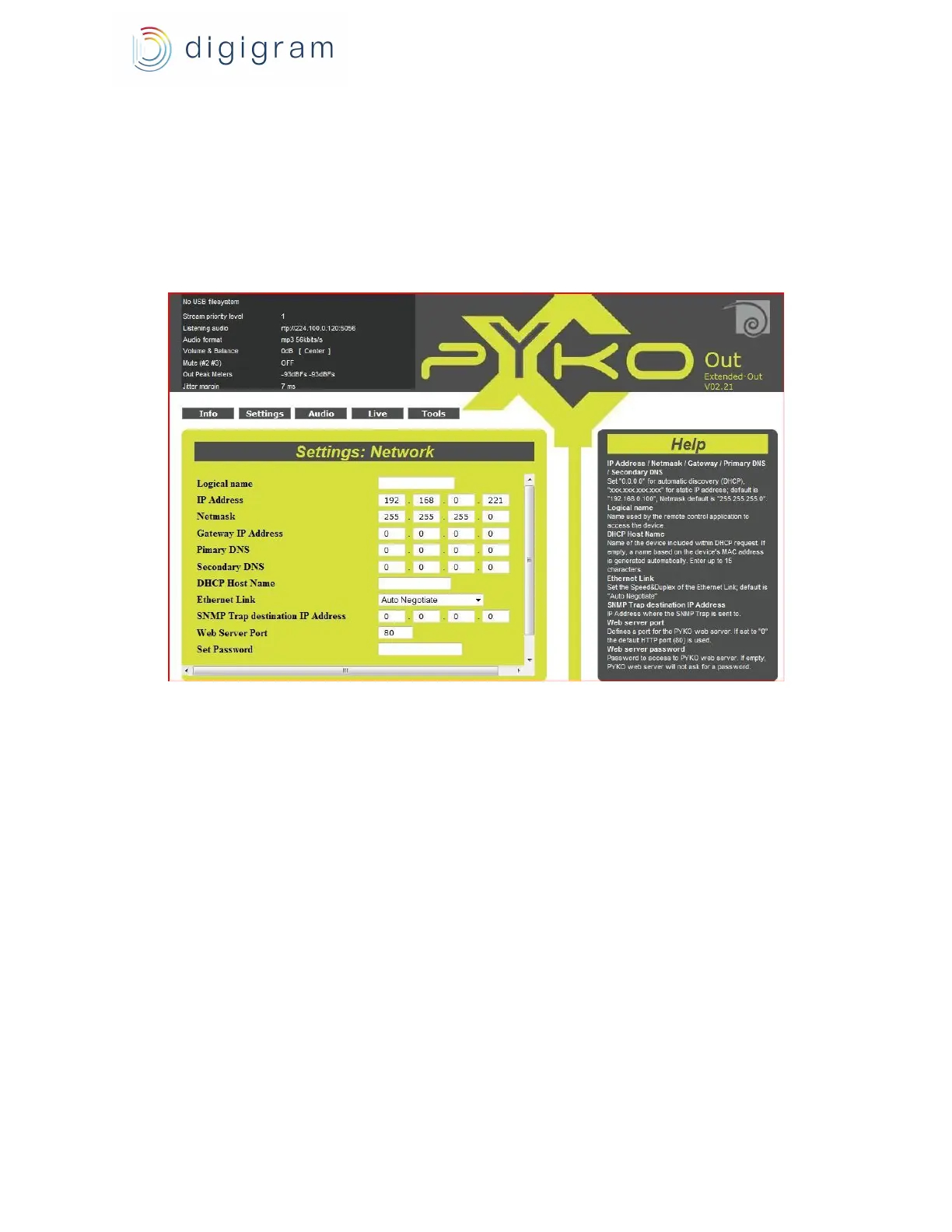
● DHCP hostname: name of the
● Ethernet link: allows to set the speed and mode of the network interface ( auto-negotiation,
half/full duplex, 10/100 Mbits/s),
● IP address of an SNMP supervisor receiving the SNMP traps
● Web server port: http port (80 by default)
● password to connect to PYKO WEB pages (no password by default).Once the password is
activated, this password must be entered to be able to connect to the WEB pages (no username
is required). Several simultaneous connexions are possible.
6.3. Global parameters
Go to menu « Settings », « Global Mode »
The parameters are the following :
- IP address announcement : enable/disable announcement of the IP address on the headphones
output when PYKO starts.
- Syslog Mode: enable/disable syslog messages.
- Syslog Address: address of the Syslog client that received the Syslog messages (note that the
UDP port used for Syslog is 514).
11


 To Next Page