PYKO-out: Professional IP audio endpoint
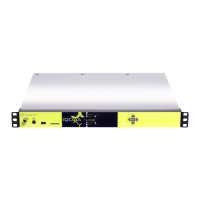
PYKO can be controlled through ASCII TCP commands. The TCP port used for receiving the
TCP commands must be configured in « Device Control», « Port for TCP control
connection ». This port is the destination port used by a control application to send the TCP
commands to PYKO.
The ASCII commands are described at the end of this document.
Local control of PYKO through commands sent via the serial port
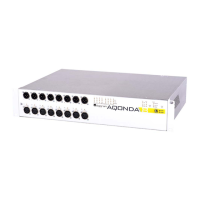
PYKO can be controlled through ASCII commands sent through its RS232 port. To enable this
mode, go to section « Serial Link » and select « Control » for parameter « Serial link mode ».
The ASCII commands are described in a separate document.
6.8. Tunneling of auxiliary data
RS232 tunneling mode configuration
RS232 tunneling consists in transmitting serial data from of a PYKO towards one or several
distant PYKOs (maximum 4). The transmission can be done in TCP mode (one PYKO to another
one), or in UDP mode (one to maximum four).
Note: the UDP mode does not guarantee that the distant PYKO receives the data.
To enable the TCP mode, select « Gateway TCP server » or « Gateway TCP client » for
parameter «Serial link mode ».
- Gateway TCP server: in this mode, PYKO-out receives the serial data sent from another PYKO
on the port defined in « Connection port ».
14


 To Next Page