PYKO-out: Professional IP audio endpoint
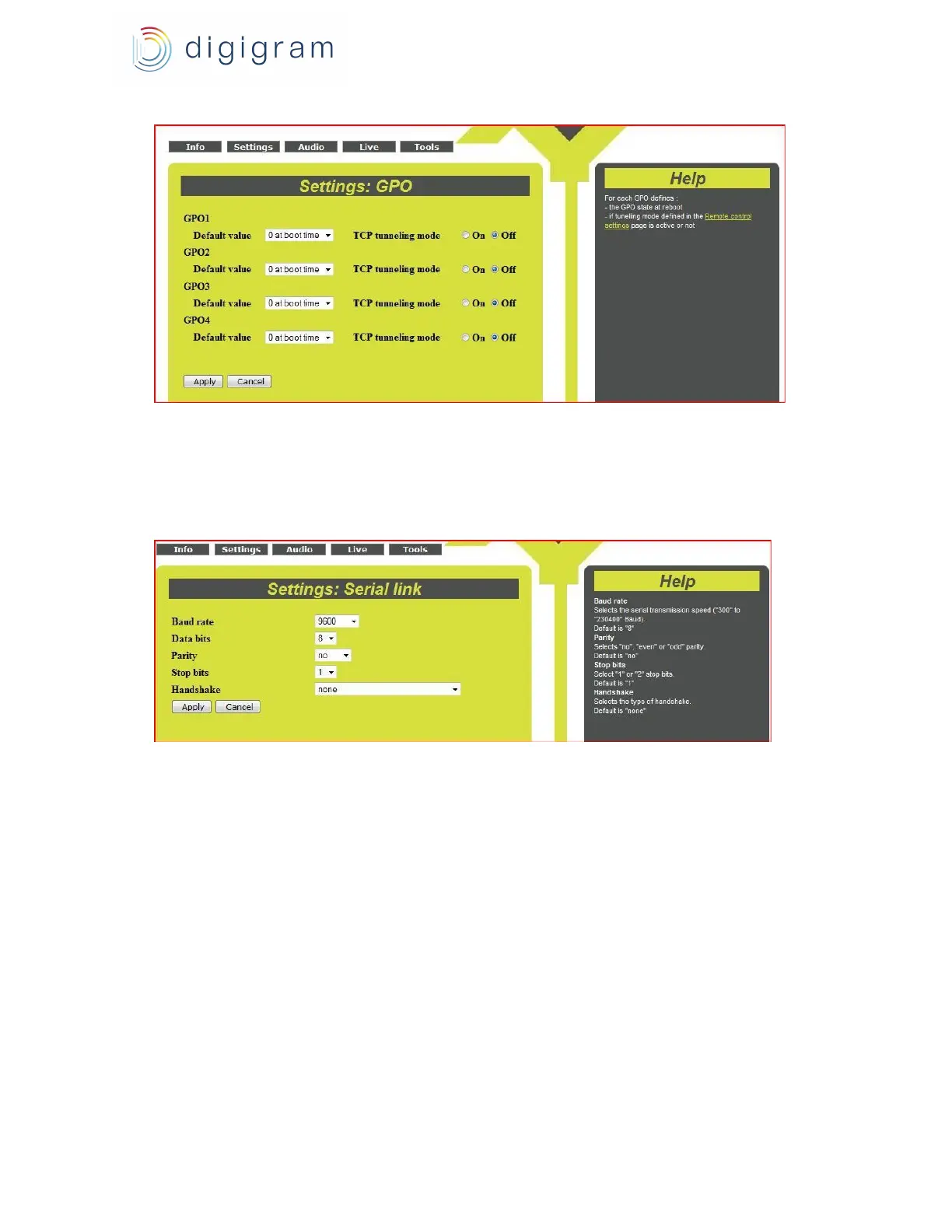
Click on “Apply” to take the settings into account, or “Cancel” to discard them.
6.6. Serial port configuration
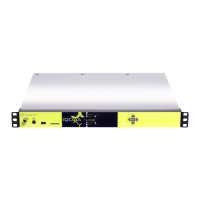
Parameters of the serial port can be configured from the « Settings » menu, « Serial».
PYKO serial port can be used either to transmit RS232 data to the serial port of distant PYKOs, or
to locally send real time commands to a PYKO.
If the serial port is used, it is necessary to configure its parameters :
- Baud rate : bit rate (from 300 to 230 400 bits/s)
- Data bits : number of bits for data (8 or 7 bits)
- Parity : parity bit (no bit, ‘even’ parity bit, or ‘odd’ parity bit).
- Stop bits : number of stop bits (1 or 2)
- Handshake : serial transmission mode (no protocol, XON/XOFF protocol , RTS/CTS).
RS232 tunneling mode can be configured via the remote control parameters defined here-after.
6.7. Configuration of remote control and local control
To setup these parameters, go to menu «Settings», «Remote Control».
Remote control of PYKO through TCP commands
13


 To Next Page