PYKO-out: Professional IP audio endpoint
3. PYKO-out physical interfaces
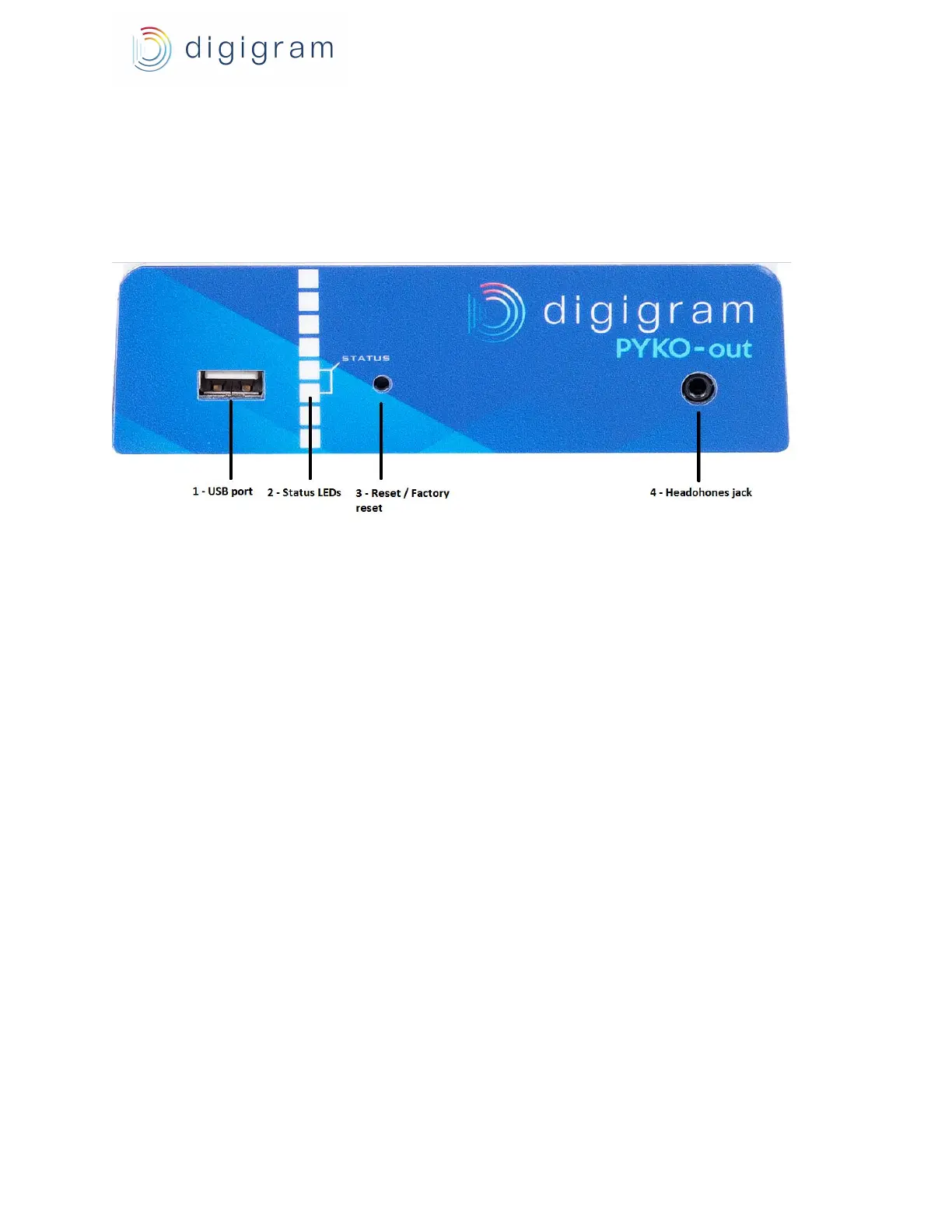
3.1. PYKO-out front panel
1. USB port
USB 1.1 interface allowing to store mp3 audio files to play them on the outputs.
2. LEDs
Two LEDs indicate the network activity and the presence of an audio stream.
3. Reset button
Press this button briefly to reset your PYKO.
If you press it until the LED blinks (approximately 10 seconds), PYKO-out is reset to factory
configuration, i.e. to ‘Stream Server’ mode with IP address 192.168.0.100., DHCP=OFF, and the
UDP/TCP ports to the default UDP and TCP port values (respectively 40002 and 40004).
4. Headphones out (mini jack)
● At start-up, PYKO-out announces its IP address on this output.
● During operation, it plays the audio in parallel of the stereo line output.
6


 To Next Page