PYKO-out: Professional IP audio endpoint
6.11. Display of PYKO-out status
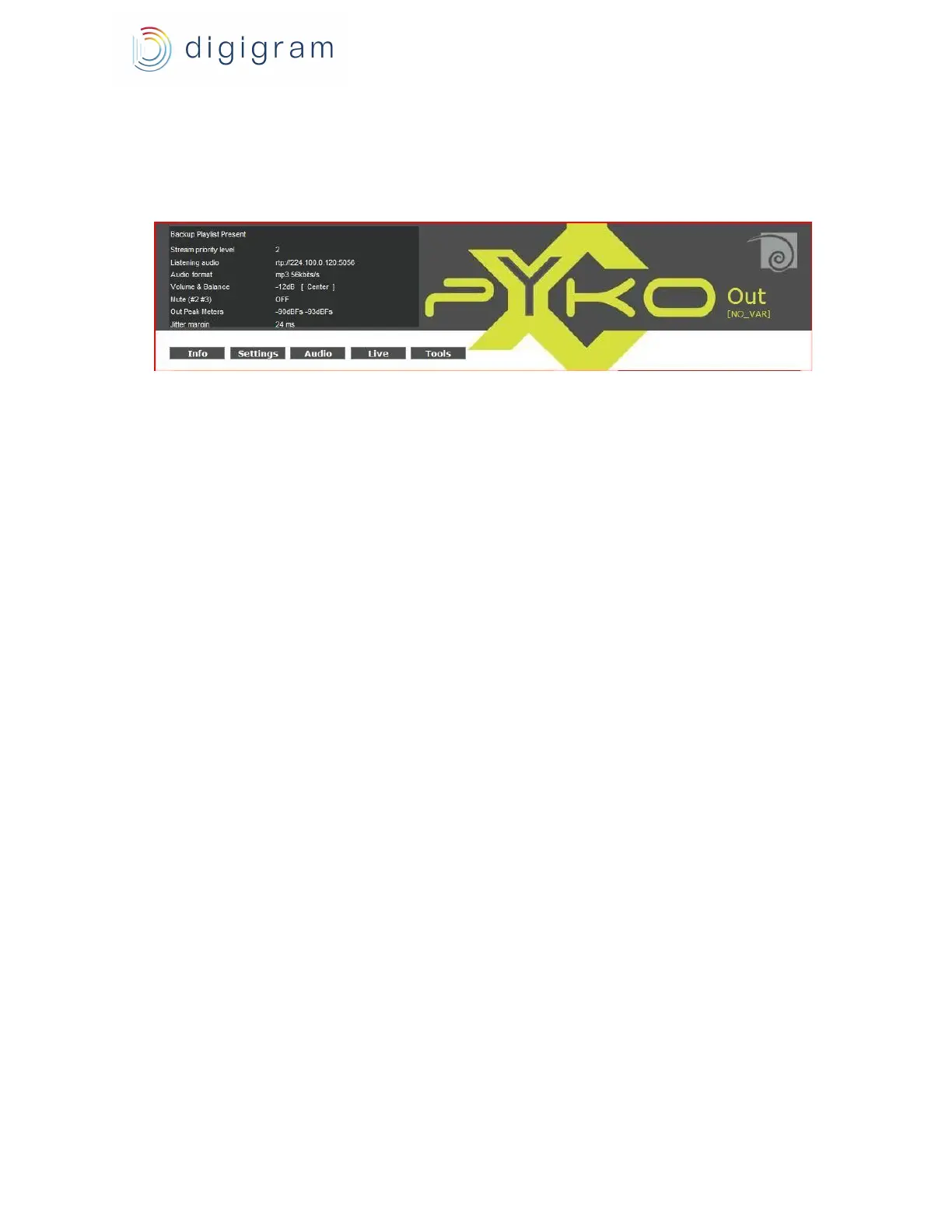
The status of PYKO-out is displayed on the top left of the WEB pages.
Displayed information are :
Backup Playlist Present : allows to know whether the defined playlist is detected or not on the
USB memory stick.
Stream priority level: allows to know the priority level that is being decoded.
Listening audio: allows to know the source that is being decoded: URL, or playlist name.
Audio format: audio format that is being decoded.
Volume & Balance: current attenuation on the audio outputs.
Mute: mute status on the outputs (ON / OFF).
Out Peak Meters: instantaneous peak-meter value of the decoded audio signal, given in dBFs (0
dBfs being the maximum value).
Jitter margin : indicates the jitter variation that can be supported on the current stream. If the
displayed value goes to 0, it is necessary to increase the parameter « Latency » from the “Stream
priority” page associated to this stream.
6.12. M3u playlists and mp3 sound files on the USB
memory stick
PYKO-out supports USB memory sticks FAT16 formatted.
M3u backup playlists and associated mp3 sound files must be located in folder \bk.
M3u playlists and associated mp3 sound files that can be triggered through ASCII commands
must be located in folder \an
6.13. Firmware update
PYKO-out is delivered with a “Playout” firmware ready to run. This firmware does not support the
USB memory stick, and is to be used with Digigram AudioManager middleware.
For all applications that require the USB memory stick, it is necessary to apply the
“Playout-extended” firmware.
PYKO firmware are available from Digigram WEB site, PYKO-out support page. Download the
firmware file. Then, from the PYKO-out WEB page, go to the <Tools>, <Update>, and click
‘Browse’ to indicate the location of the downloaded firmware file; click on the ‘Upload’ button.
When the message ‘compound.bin successfully loaded’ is displayed, click onto the link ‘Click on
20


 To Next Page