PYKO-out: Professional IP audio endpoint
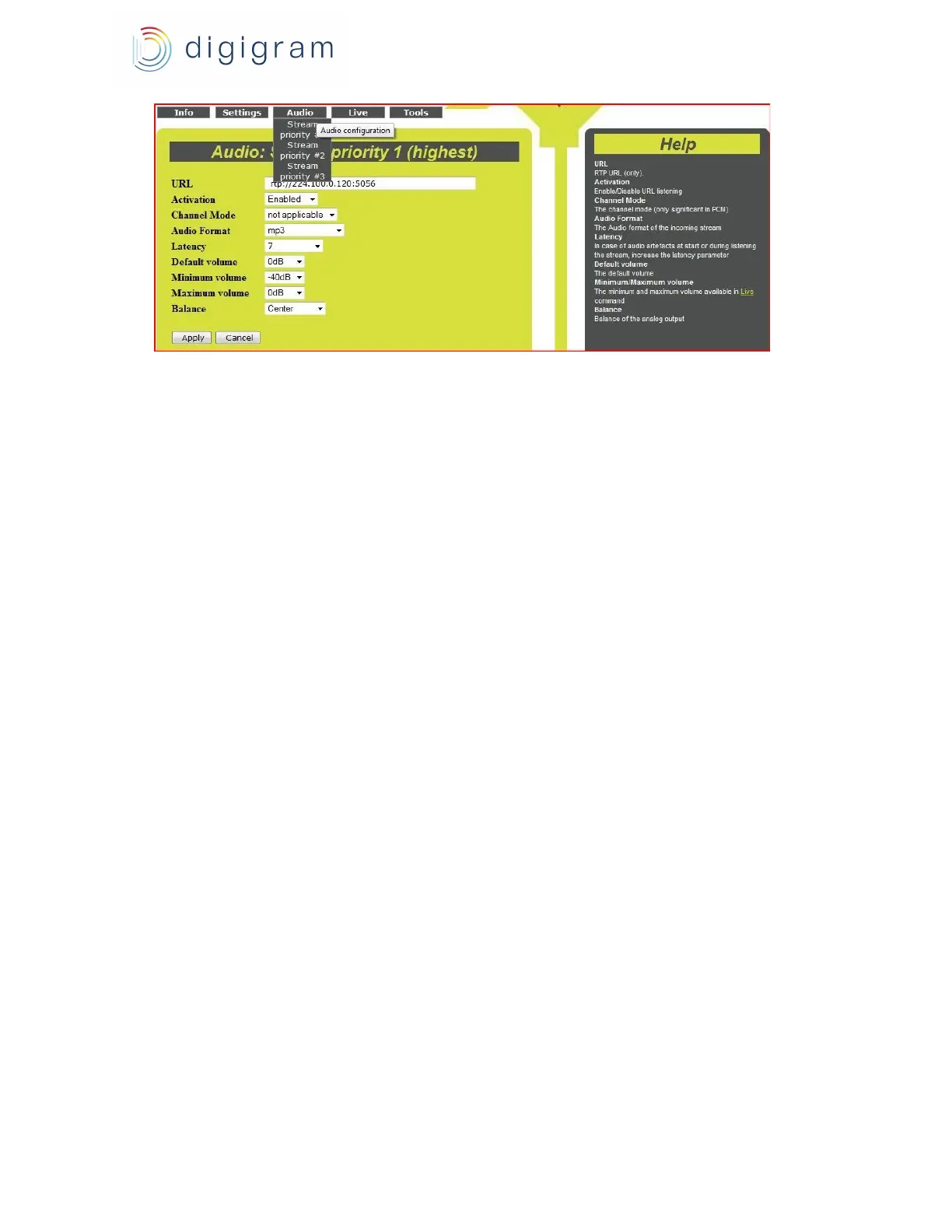
This is the highest priority. This priority can only decode an RTP stream. The stream parameters
are the following :
● URL : URL of the RTP stream to be decoded. Syntax : rtp://addressIP:Port
For a unicast stream, enter 0.0.0.0 in the IP address, and give the UDP port.
Ex : rtp://0.0.0.0 :5040
For a multicast stream, give the multicast IP address and the port.
Ex : rtp://224.0.0.100 :50040
● Activation : Select Enabled to enable this priority level. Select Disabled if you do not want to
use this priority, in which case PYKO-out never decodes this priority.
● Channel Mode : Significant only in PCM format. Select Mono or Stereo.
● Audio Format : Select the format of the audio data of the IP stream to be decoded (mp3, PCM
from 8 kHz to 48 kHz, G711 A-law or µlaw).
In case the configured format does not match the received audio format, PYKO-out interprets
this as an error and does not decode the stream. As a consequence, PYKO-out switches to
the immediately lower priority (Stream priority level “n+1”).
● Latency : this corresponds to the input buffering which is necessary to compensate the
network jitter. The higher the jitter, the higher the buffering value.
Latency values are about:
In mp3, latency value must be at least
equal to 6.
In PCM, latency values lower than 3 can
be used on high performance networks
(LAN).
● Default Volume : default attenuation applied to the output, from 0 dB to -40 dB.
● Minimum volume: maximum attenuation that can be adjusted from the « Live » WEB page.
● Maximum volume: minimum attenuation that can be adjusted from the « Live » WEB page.
● Balance : Left / Right balance. Centred by default.
Click on Apply to confirm the configuration.
17


 To Next Page