Installation Wizard
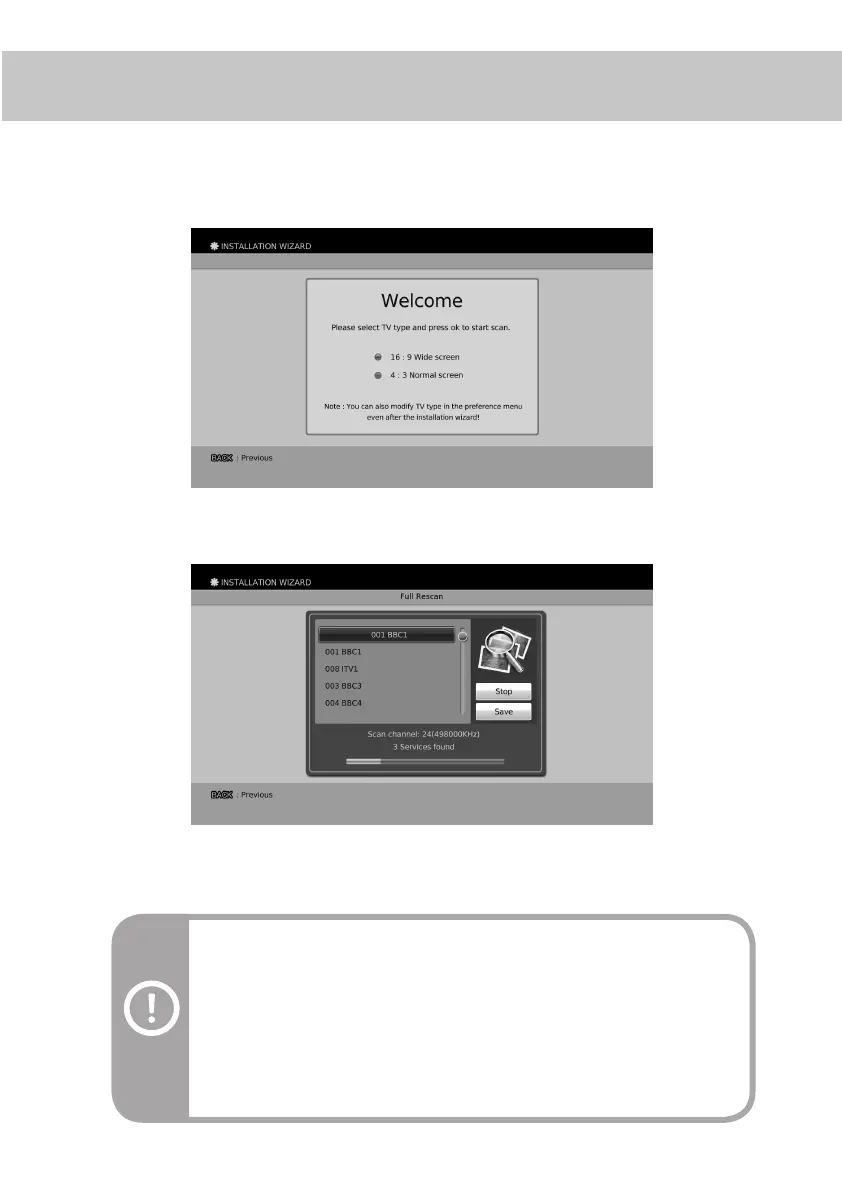
Installation Wizard will guide you through the initial installation process to automatically search digital
services. When using the product for the rst time, the Installation Wizard will be started automatically.
Step 1. Select your TV screen type and press the OK button.
Note:
- Installation Wizard will also run after the product has been returned to the default
settings.
- This process can take few mintues.
Warning:
If you exit the Installation Wizard without fully completing the service searching
procedure, you may not have all of the services available. In this case, you can use
the Menu > Installation > Scan Services > Full Rescan Menu to search for all of
the services.
Step 2. Move your cursor to the Start and press the OK button. After all of the services are searched,
move your cursor to the Save and press the OK button.
After the installation wizard, you can now explore and enjoy the services available on your Digital TV service.
Please read the User’s Guide to nd out more about the features offered by your Digital TV Recorder.
17


 To Next Page