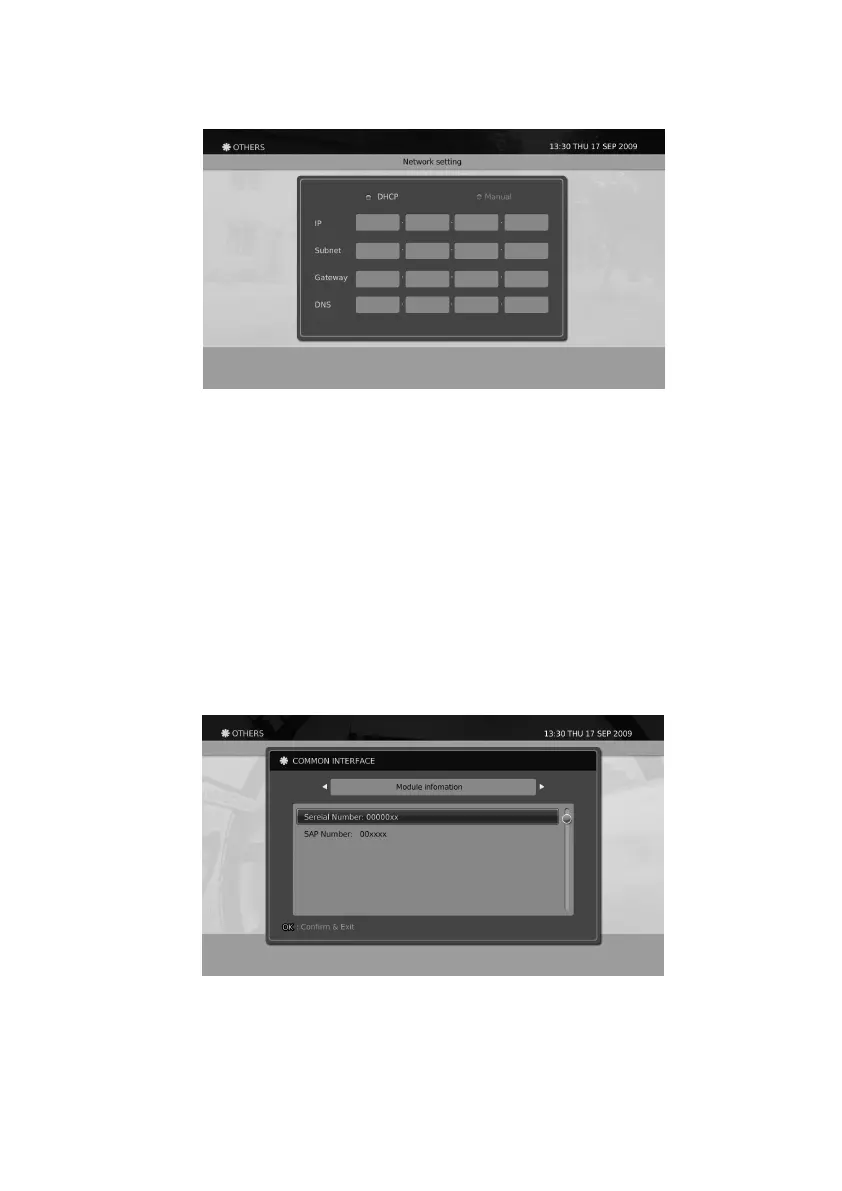
1. Move your cursor to Manual and press the
▼
button.
2. Type in the IP address for your set and press the
▼
button.
3. Type in the Subnet mask value for your set and press the
▼
button.
4. Type in the Router address for your set and press the
▼
button.
5. Type in the DNS address for your set and press the
▼
button.
6. Then move your cursor to APPLY and press the OK button.
Common Interface
You can view your CI module information using this menu.
The information on the Common Interface of the product can be viewed following the below methods.
1. Press the Menu button.
2. Select Others using
◀/▶/▲/▼
button and press the OK button.
3. Select Common Interface using the
▲/▼
button and press the OK button.
4. You can move to other pa ges by pressing the
◀/▶
button.
Network
Using DHCP for your network conguration
Using manual settings for your network conguration
The network settings for your product supports DHCP connection to the network or can be set by manually.
1. Move your cursor to DHCP.
2. Then move your cursor to APPLY and press the OK button.
53


 To Next Page