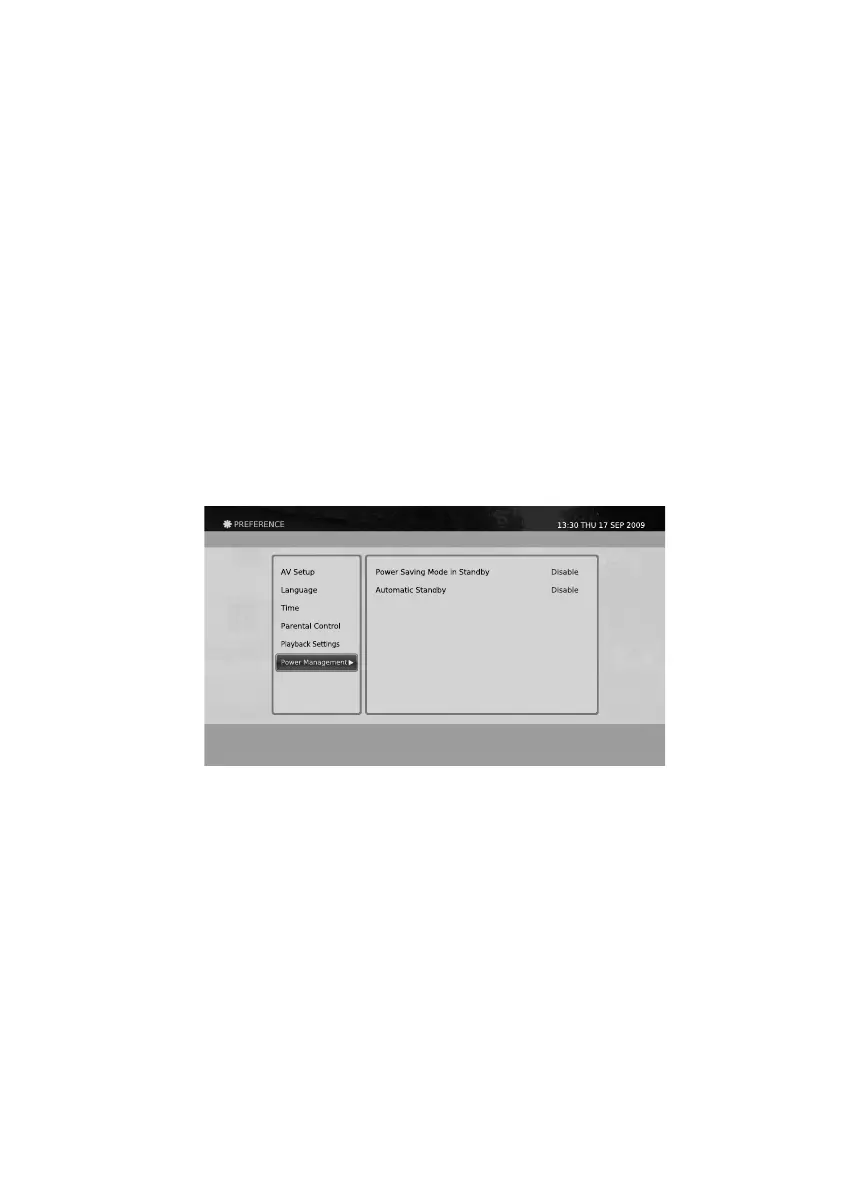
1. Press the Menu button.
2. Select Preferences using
◀/▶/▲/▼
button and press the OK button.
3. Select Power Management using the
▲/▼
button and press the OK button.
Selection: Enable, Disable
The product has two standby modes. For more information, please refer to “Touch Panel and VFD Display”.
Selection: Enable, Disable
You can select whether the product switches to standby mode automatically when there is no interactions with
the user for 4 hours.
Power Saving Mode in Standby
Automatic Standby
Power Management
You can change the settings for the Power Management functions for the product. You can adjust the settings
whether the product switches to the power saving mode on standby. And also adjust the settings for the
automatic standby for the idle mode can be changed.
Selection: 30 Min, 1 Hour, 2 Hour
Selection: Enable, Disable
You can set whether the Time Shifted operation starts automatically or manually. When the Time Shift Auto-Start
is set to Enable, it will start automatically whenever you switch to another service. If it is set to Disable, you have
to press the Pause button whenever you want to start the Time Shifted Recording.
Time Shift Duration
Time Shift Auto-Start
43


 To Next Page