Personal Video Recorder
You can enjoy various play functions similar to a VCR using the playback control buttons while playing back a
programme. Time Shifted Recording is also available when watching a live programme.
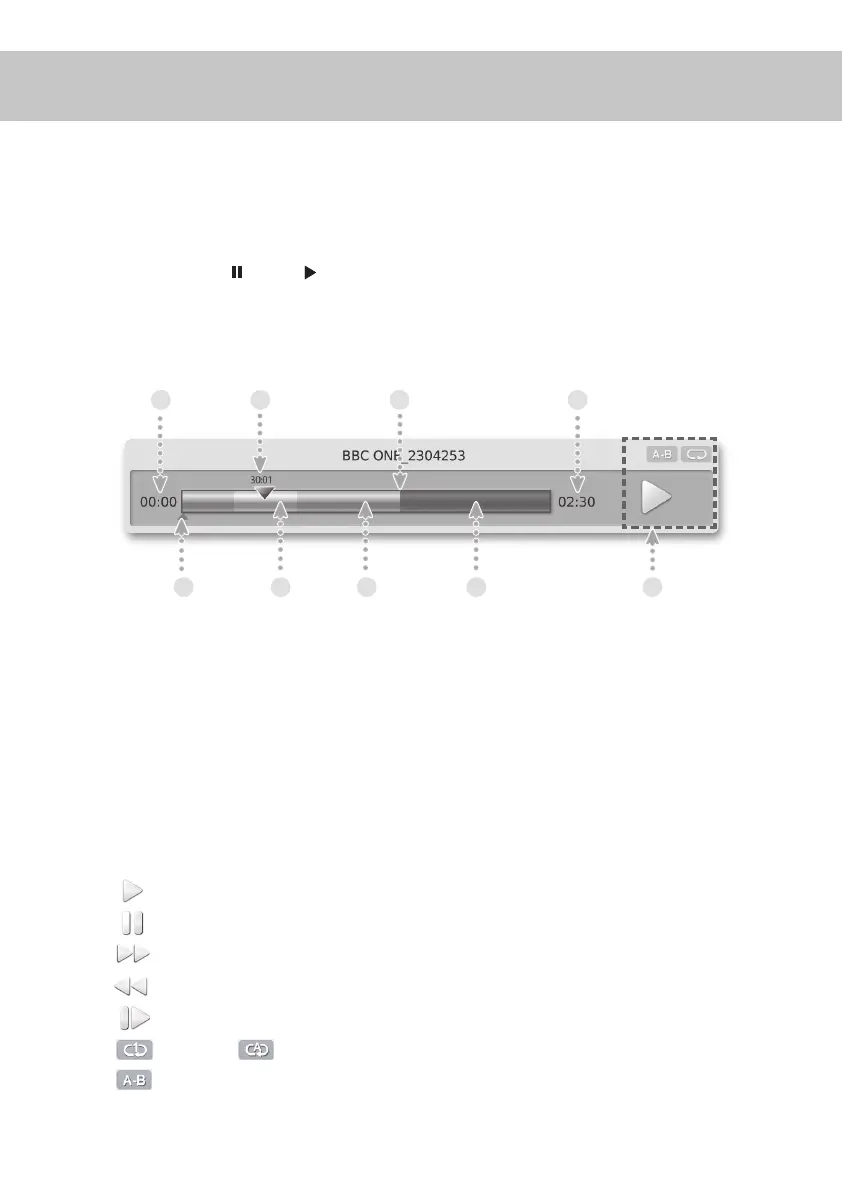
If you press the pause or play button while watching a programme, the Progress Bar will be displayed.
Progress Bar displays the time information of the current programme, how much time-shifted/recorded, the time
gap between the live broadcasting point and watching point, various play modes status and bookmarks.
1 23 4
5
6
7 8 9
1. Start Time: Programme start time.
2. End Time: Programme end time.
3. Watching Time and Point: Current watching time and point.
4. Live Point
5. Bookmark
6. Yellow Bar: Repeat A-B period when a recorded programme is playing.
7. Green Bar: Time Shifted or Recorded portion of a programme.
8. Gray Bar: Broadcasted portion of a programme.
9. Play Mode/Play Settings
- Play
- Pause
- FF: x2, x4, x16, x64
- FR: x2, x4, x16, x64
- Slow: x1/2, x1/4, x1/8
- : Repeat : Repeat All
- : A-B Repeat
General Information
PVR
23


 To Next Page