Schedule
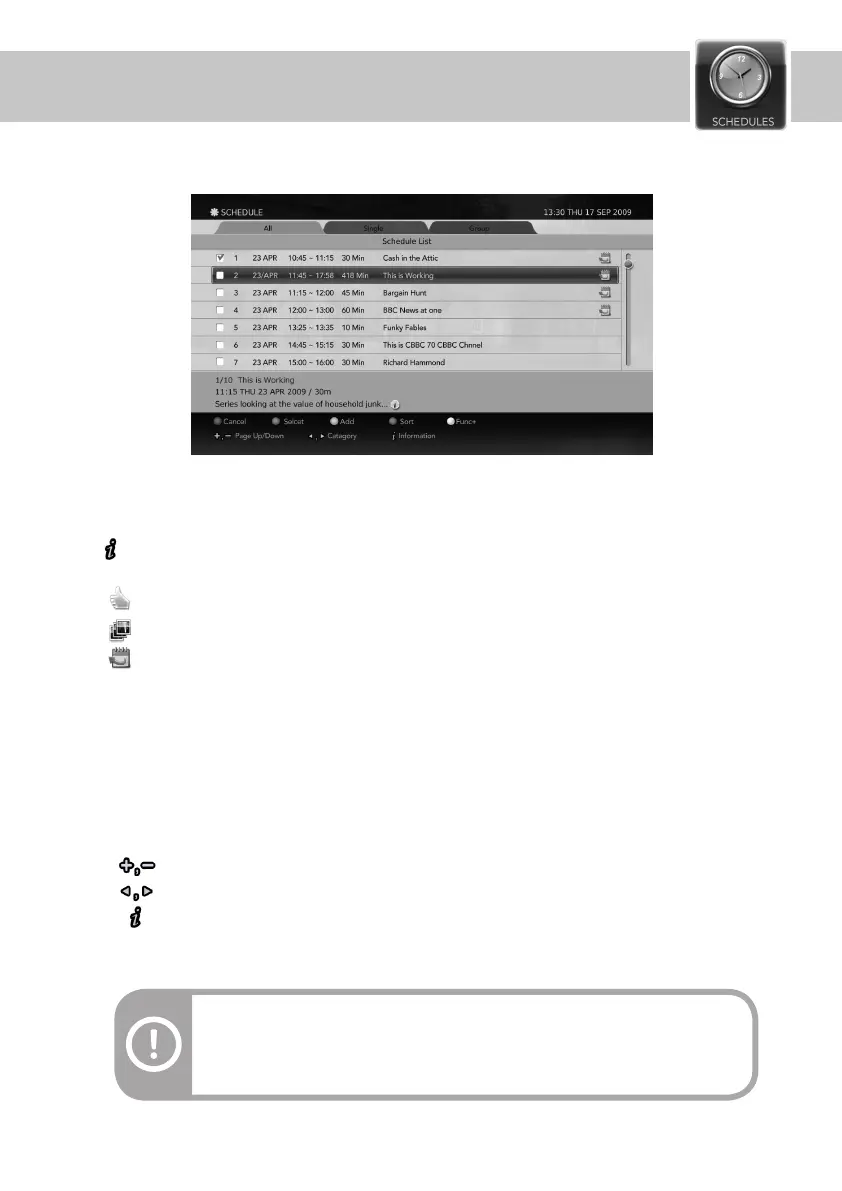
Press the SCHEDULE button to display the list of reserved recordings and instant recordings.
1. Services and Programme information
2. indicates that detailed information is available.
3. Icons
- RED: Cancel. Press the RED button to cancel a schedule.
- GREEN: Select/Unselect. Press the Green button to manually add/delete a schedule.
- YELLOW: Add. Press the YELLOW button to manually edit an existing reservation.
- BLUE: Sort. Press the BLUE button to sort the list by the title’s alphabetical order.
- WHITE: FUNC+. Press the FUNC+ button to use all of the colour button functions just by navigating the
pop-up dialogue window.
- Page Up/Down : Press to move from pages Up/Down.
- Category. Press to move from tabs.
- Press to view the information of the selected service.
- Displayed on recommended programme.
- Displayed on series programme.
- Displayed on event based programme.
General Information
4. Buttons
37
TIP
All: List of All scheduled items including Single, Split and Series programmes.
Single: List of Single items including Split programmes.
Group: List of representive items of Series programmes.


 To Next Page