21
5.
Timer
Record
Menu
In this menu you can setup the schedule for automatic record or switching to the defined
channels at a particular date/time. The
Timer
Record
menu
allows
you
to
create,
edit
and
delete
record
schedules
and
view all
schedule
status
and
history.
Press
the
OK
button
on
the
remote
control
to
enter
the menu when using EPG function.
5.1
Create
a
New
Schedule
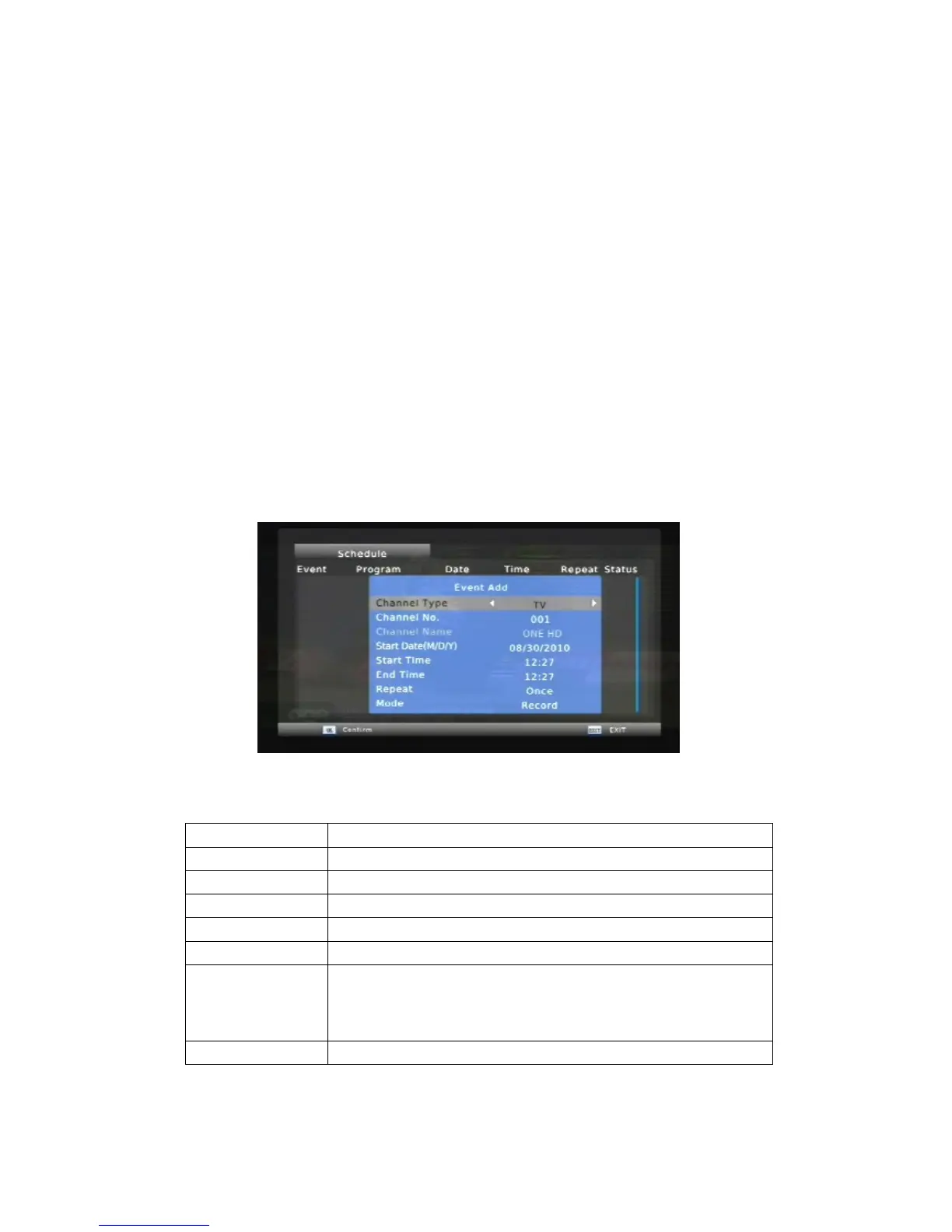
Press RED button to add a new booking. In the appearing dialog select the desired
channel type and number, the start date and time, end time, repeat (once, daily or weekly)
and mode (view or record). Once you set all parameters, press
OK
to store your booking.
Channel Type
Select
the
video
source
Channel No.
Display the channel number
Channel Name
Display the channel name
Start Date
Enter
the date
of
the
record.
Start Time
Enter
the
time
of
the
begin
record.
End Time
Enter
the
time
of
the
end
record.
Repeat
Select
how
often
you
want
the
schedule
to
record. Choose
from
Once,
Everyday,
Mon-Fri,
Mon-Sat
or
for
an
individual
day
of
the
week.
Mode
Select
the schedule mode: RECORD,VIEW



 To Next Page