Communication solutions for power utilities
UNIVERSAL TELEPROTECTION TPU-1
INSTALLATION AND COMMISSIONING MANUAL Web version TPU-1R - Rev. 5.9 (May 2018)
5.5.1 Characteristics of the management computer
Hardware
Pentium III 550 MHz processor or higher.
512 Mbytes of RAM memory.
A LAN module with 10/100Base-TX or 100Base-FX interface.
1 Mbyte SVGA graphic adapter.
A mouse.
Software
Microsoft Windows XP Service Pack 2 version or Microsoft Windows 7 or Microsoft
Windows 10 operating system.
TCP/IP protocol.
Microsoft Internet Explorer v 6.0 web browser or higher.
JAVA virtual machine (Sun Microsystems) version 1.7 or higher.
5.5.2 Connections
10/100Base-TX LAN interface
The TPU-1 terminal can have a 10/100Base-TX LAN interface, which allows it to be
integrated into any network (LAN) that uses this interface. The connector is on the front of
the MWTU module and is a female 8-pin RJ-45.
The cable used to carry out the connection between the terminal and the computer must be
an unshielded twisted pair category five cable (UTP-5) with 8-pin RJ-45 connectors.
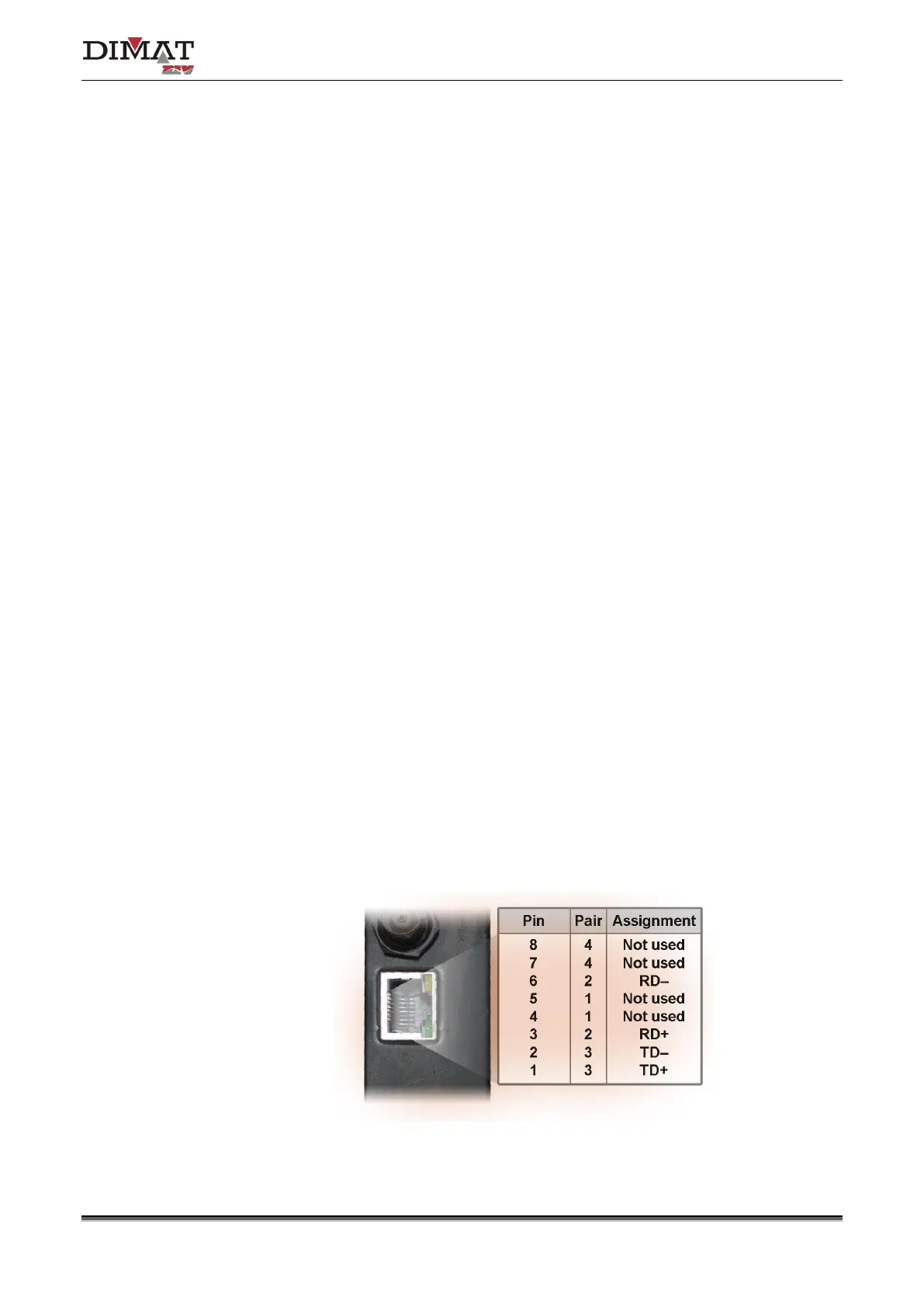
Table 2 shows the use of each one of the pins of the RJ-45 connector, as well as the pair it
belongs to according to ANSI/TIA/EIA-568-A standard, in the 10/100Base-TX LAN interface.
Table 2 Signals of the RJ-45 connector in the 10/100Base-TX LAN interface


 To Next Page