Page 10
LED Diagnostics & Troubleshooting
Rev.: 20141117
Platform: DBALL/DBALL2
Firmware: CHRYSLER7 Range Extender Ready (RXT) Installation
© 2014 Directed. All rights reserved.
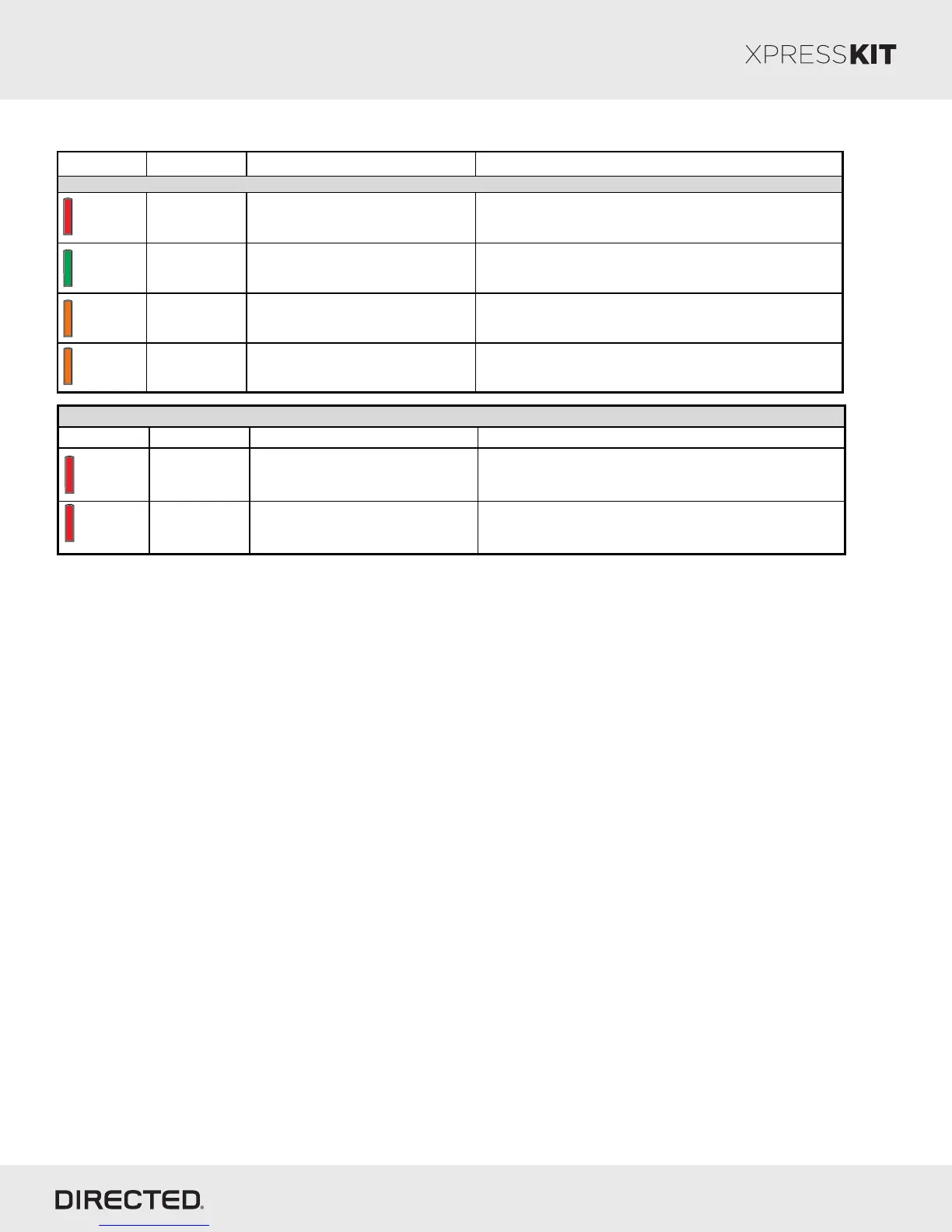
LED Status Description Troubleshooting
Solid red Waiting for module programming. Press 5 times on programming button. See module programming section.
Flashes green
fast
Normal. CAN programmed and w aiting for
bypass programming.
Normal operation
Flashes orange
quickly
Module in RXT mode w aiting for Ignition.
Check for CAN-High and CAN-Low connections as the Ignition is not seen
CAN.
Solid orange f or 3
seconds
Module successefully programmed in RXT. Normal operation
Module programming - Firmware specific
Solid
Flashes
Flashes
Module programming - Error codes
LED Description Troubleshooting Comment
Flashes
red x2
CAN not
detected.
Check the Tan - Tan/Black w ire
connections. Wake up the data bus by
turning the ignition on and try again.
Flashes
red x3
Bypass data not
detected.
Module not in RXT. Press 5 times on
programming button before turning ignition
ON. See module programming.
Make sure the battery w as removed w hen turning the ignition ON.
Solid
N/C: Violet/Brown
N/C: Violet/White
N/C: Blue/Red
N/C: Orange/Black
N/C: Yellow/Red








 To Next Page