6
TV Mode
TV
To use the features described in this section, make sure
you are in TV mode by pressing the TV Mode button.
Remote programming is required. Note: Some features
may not be available depending on your receiver model.
Note: Remote operation is different on DISH Network TVs.
See your DISH Network TV User’s Guide for proper operation.
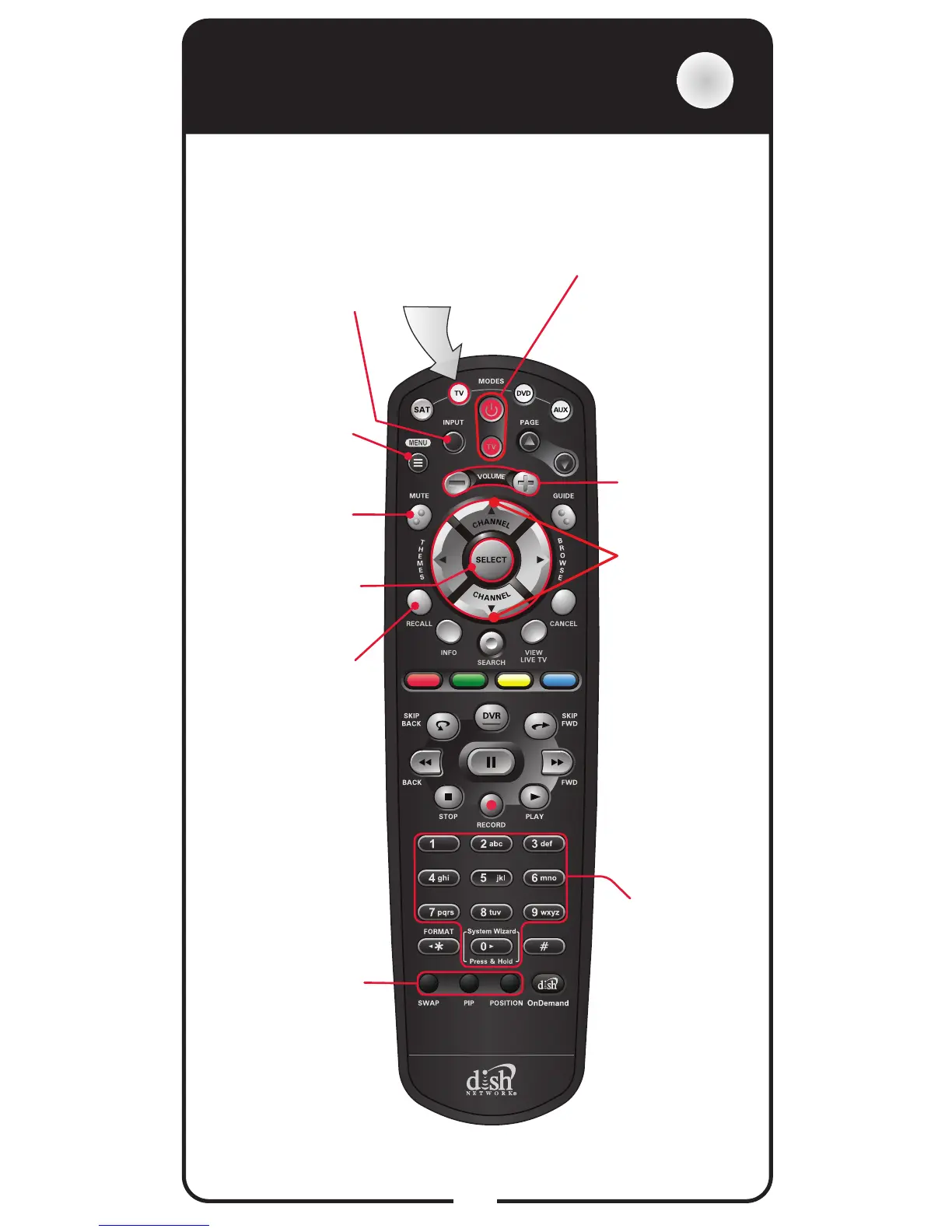
Power & TV Power
Top button turns
the TV on/off
Bottom button
turns the TV on/off
Press this button
for TV Mode
Mute
Turn TV volume
on or off
Recall
Return to last TV
channel viewed
Picture-In-Picture
(PIP) Buttons
Watch two separate
programs at same
time (in Single
Mode)
Number
Buttons
Enter a channel
number or
navigate
through menus
TV Menu
Access menu
features available
on some TVs
Pair/Input
Switch between
TV inputs
(available only for
certain makes and
models of TVs)
Up/Down
Arrow Button
Channel up/
down on the TV
Volume
Control TV
volume
Select Button
Select a program
or menu













 To Next Page