10
Using Remote Button
Shortcuts
In addition to their normal functions, some buttons
on your remote control have special shortcut
functions when you are navigating the on-screen
Electronic Program Guide (EPG), or inside a drop-
down menu of options or scrollable list of events
displayed by your receiver.
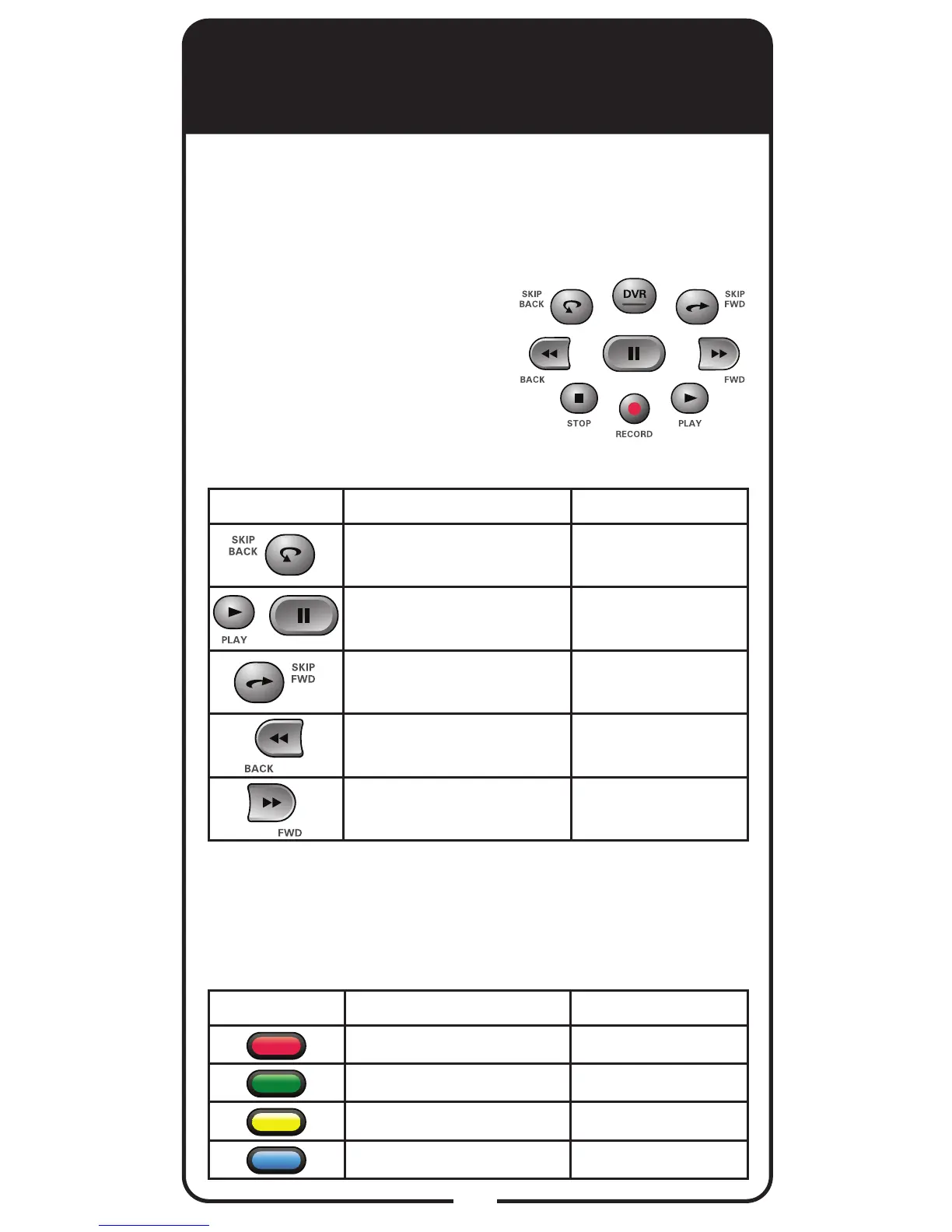
DVR Buttons
The following table lists some
of these shortcuts for the gray
set of buttons that normally
control your DVR functions.
Note: Scheduled updates to your receiver software
may add to or modify these shortcuts.
Buttons In Guide Display Scroll in Lists
Move 3 hours back
By 1 screen
upward
Watch highlighted show No
Move 3 hours ahead
By 1 screen
downward
24 hours back To beginning of list
24 hours ahead To end of list
Buttons From Live TV Scroll in Lists
Jumps to menu bar Jumps to menu bar
Access Quick Clicks list No
Access Setting screen No
Access Broadband Setup No
Colored Buttons
The following table lists some of the shortcuts for
the colored set of buttons on your remote control.
Note: Scheduled updates to your receiver software
may add to or modify these shortcuts.
+













 To Next Page