101
Resetting to Factory Defaults
RESETTING TO FACTORY DEFAULTS
You can reset the receiver to discard any changes you have made to receiver settings,
except for remote control addresses and locks. Resetting the receiver to factory default
settings also discards all Favorite Lists except for the All Chan, All Sub, and All HD lists.
You cannot reset the receiver to default settings to discard or reset a password you have
forgotten. No one but a DISH Network Customer Service Representative can reset the
receiver to bypass a password-protected parental control setting or lock.
1 Press the MENU button, select System Setup, and then Factory Defaults. The receiver
displays a Warning message to confirm that you want to reset the receiver’s preferences.
2 Select Yes.
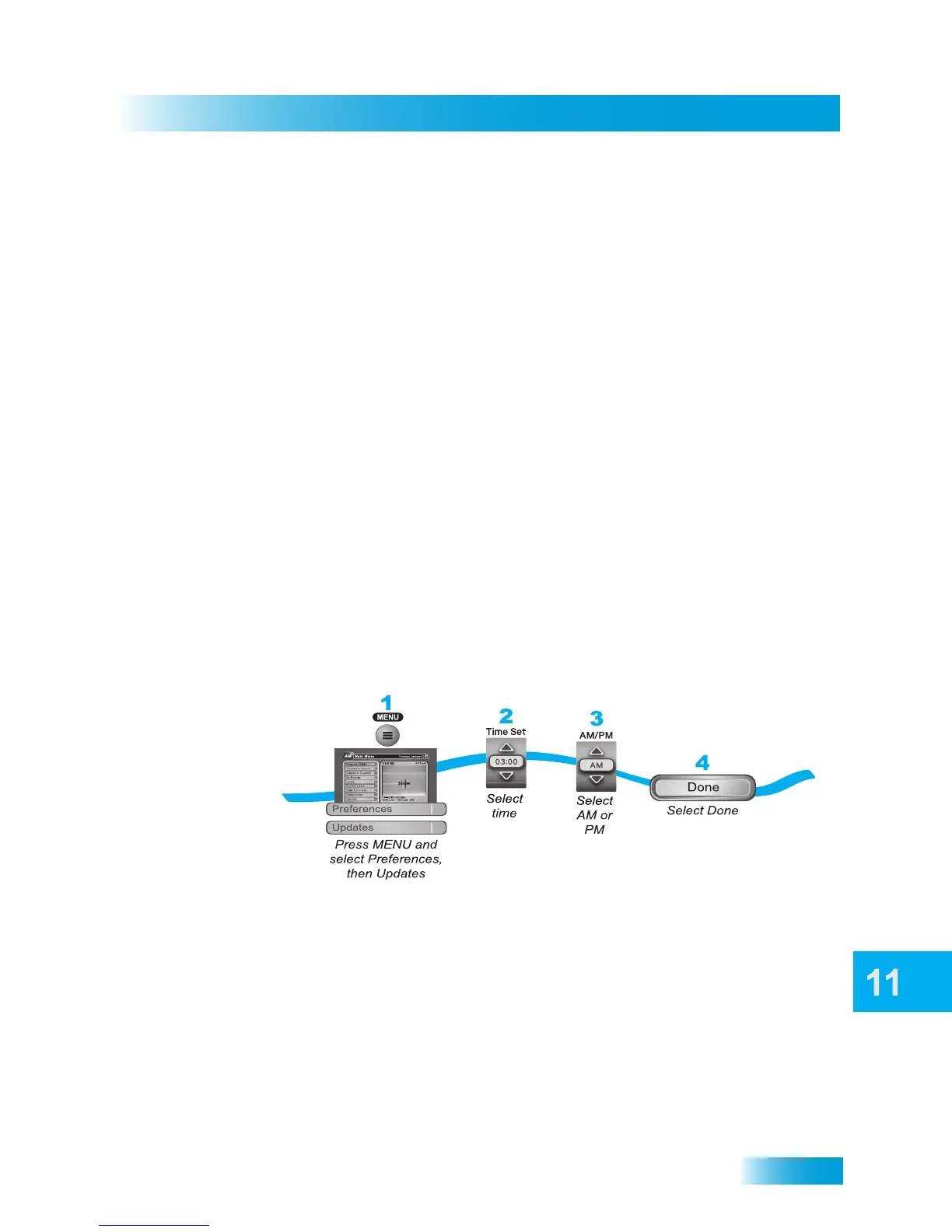
SCHEDULING RECEIVER UPDATES
The receiver comes scheduled to update the Electronic Program Guide (EPG) information
at 3:00 AM every day. This section describes how to change the Updates settings. This
feature is enabled so that your DVR event data and DishPASS timers remain current.
Note: This feature does not interfere with scheduled event timers.



 To Next Page